
Best AI Presentation Makers Compared for Students and Professionals
Introduction
Presentations create ಮಾಡೋದು students, teachers, marketers ಹಾಗೂ business professionalsಗೆ everyday task ಆಗಿದೆ. ಆದರೆ attractive slides design ಮಾಡುವುದು, content organize ಮಾಡುವುದು ಹಾಗೂ professional layout choose ಮಾಡುವುದು ಸಾಕಷ್ಟು time ತೆಗೆದುಕೊಳ್ಳುತ್ತದೆ.
ಅಲ್ಲಿಯೇ AI Presentation Maker tools game changer ಆಗಿವೆ.
ಇಂದು AI tools ಕೆಲವೇ minutesಗಳಲ್ಲಿ topic ಕೊಟ್ಟರೆ complete presentation, images, layouts, animations ಹಾಗೂ speaker notes ಕೂಡ generate ಮಾಡುತ್ತವೆ.
ಈ articleನಲ್ಲಿ AI Presentation Maker tools ಹೇಗೆ ಕೆಲಸ ಮಾಡುತ್ತವೆ, best options ಯಾವುವು, ಯಾವ tool ಯಾರಿಗೆ suitable ಹಾಗೂ purchase ಮಾಡುವ ಮೊದಲು ಯಾವ features ನೋಡಬೇಕು ಎಂಬುದನ್ನು Hybrid Kannada + Englishನಲ್ಲಿ ತಿಳಿದುಕೊಳ್ಳೋಣ.
What is an AI Presentation Maker?
AI Presentation Maker ಅಂದರೆ Artificial Intelligence ಬಳಸಿ presentation slides automatically create ಮಾಡುವ software.
ನೀವು topic ಅಥವಾ prompt ಕೊಟ್ಟರೆ AI:
- Generates slide content
- Designs layouts
- Suggests images
- Creates charts
- Improves formatting
- Organizes presentation flow
ಇದರಿಂದ manual slide creationಗಿಂತ ಸಾಕಷ್ಟು ಸಮಯ ಉಳಿಯುತ್ತದೆ.
Prompt Engineering Best Practices: 25 Techniques That Actually Improve AI Results
Why Use an AI Presentation Maker?
Traditional presentation creationಗೆ hours ಬೇಕಾಗಬಹುದು.
ಆದರೆ AI tools ಮೂಲಕ:
- Faster presentation creation
- Professional designs
- Better storytelling
- Consistent layouts
- Attractive visuals
- Improved productivity
ಸಿಗುತ್ತದೆ.
Students ಹಾಗೂ professionals ಇಬ್ಬರಿಗೂ ಇದು time-saving solution.
How Does an AI Presentation Maker Work?
Typical workflow:
Enter Topic
↓
AI Understands Prompt
↓
Researches Structure
↓
Creates Slide Outline
↓
Generates Content
↓
Applies Design Template
↓
Suggests Images & Icons
↓
Presentation Ready
ನಂತರ user manually edit ಮಾಡಿ final presentation customize ಮಾಡಬಹುದು.
Key Features to Look For
ಒಳ್ಳೆಯ AI Presentation Makerನಲ್ಲಿ ಈ features ಇರಬೇಕು.
AI Content Generation
Topicನಿಂದ complete slide content generate ಮಾಡಬೇಕು.
Professional Templates
Business, education ಹಾಗೂ marketing presentationsಗೆ ready-made templates ಇರಬೇಕು.
AI Image Suggestions
Relevant visuals automatically recommend ಮಾಡಿದರೆ presentation attractive ಆಗುತ್ತದೆ.
Charts & Graphs
Data visualization support ಇದ್ದರೆ reports ಹಾಗೂ business presentations easy ಆಗುತ್ತವೆ.
Collaboration
Team members ಒಂದೇ presentationನಲ್ಲಿ collaborate ಮಾಡಲು ಅವಕಾಶ ಇರಬೇಕು.
Export Options
Presentation export formats:
- PowerPoint (.PPTX)
- Google Slides
- Shareable Link
Best AI Presentation Maker Tools
1. Gamma
Best For
Students, startups, educators, business presentations.
Pros
✅ Beautiful AI layouts
✅ Fast presentation generation
✅ Easy sharing
✅ Modern interface
Cons
❌ Limited free usage
Explore Gamma to create AI-powered presentations, documents, and websites in minutes.
2. Beautiful.ai
Best For
Business presentations
Pros
✅ Smart slide design
✅ Professional templates
✅ Team collaboration
Cons
❌ Premium features require paid plan
Visit Beautiful.ai to build professional presentations using smart AI-powered slide design.
3. Canva Magic Design
Best For
Beginners ಹಾಗೂ content creators.
Pros
✅ Easy drag-and-drop editing
✅ Huge template library
✅ AI design suggestions
Cons
❌ Advanced AI features are limited in free version
Discover Canva Magic Design to generate presentation designs, graphics, and visual content with AI.
4. Microsoft PowerPoint Copilot
Best For
Microsoft 365 users.
Pros
✅ AI-powered slide creation
✅ Word to presentation conversion
✅ Enterprise integration
Cons
❌ Requires Microsoft 365 Copilot access
Learn how Microsoft Copilot helps create professional PowerPoint presentations using AI within Microsoft 365.
5. SlidesAI
Best For
Google Slides users.
Pros
✅ Converts text into slides
✅ Simple interface
✅ Saves time
Cons
❌ Template customization is comparatively limited
6. Tome
Best For
Storytelling presentations.
Pros
✅ AI-generated narratives
✅ Interactive layouts
✅ Quick presentation creation
Cons
❌ Advanced collaboration features are limited
Best AI Video Generators Compared for YouTube Creators and Marketers
Comparison Table
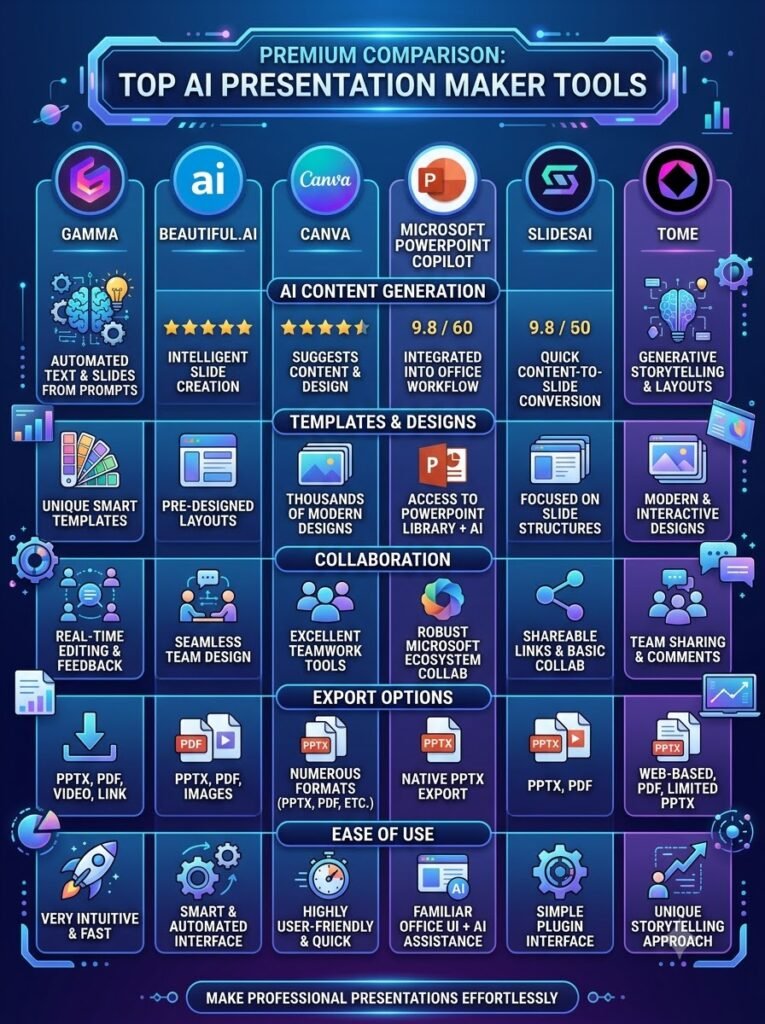
| Tool | Best For | Free Plan | AI Content | Collaboration |
|---|---|---|---|---|
| Gamma | Business & Education | ✅ | ⭐⭐⭐⭐⭐ | ⭐⭐⭐⭐ |
| Beautiful.ai | Business | Limited | ⭐⭐⭐⭐⭐ | ⭐⭐⭐⭐⭐ |
| Canva | Beginners | ✅ | ⭐⭐⭐⭐ | ⭐⭐⭐⭐ |
| PowerPoint Copilot | Microsoft Users | ❌ | ⭐⭐⭐⭐⭐ | ⭐⭐⭐⭐⭐ |
| SlidesAI | Google Slides | ✅ | ⭐⭐⭐⭐ | ⭐⭐⭐ |
| Tome | Storytelling | Limited | ⭐⭐⭐⭐⭐ | ⭐⭐⭐⭐ |
Who Should Use an AI Presentation Maker?
ಈ tools ಹಲವಾರು usersಗೆ useful.
Students
- College presentations
- Project work
- Seminars
Teachers
- Classroom lessons
- Lecture slides
- Course material
Professionals
- Client meetings
- Reports
- Business proposals
Marketers
- Sales decks
- Campaign reports
- Product presentations
Entrepreneurs
- Investor pitch decks
- Startup presentations
- Business planning
How to Create Your Own Personal AI Assistant Without Coding
Benefits of AI Presentation Makers
For Students
- Saves preparation time
- Better-looking slides
- Improves presentation quality
For Professionals
- Faster reports
- Professional designs
- Improved productivity
For Businesses
- Consistent branding
- Team collaboration
- Faster presentation delivery
Best AI Meeting Assistants Compared: Notes, Summaries and Action Items
Pricing Comparison
AI Presentation Maker tools different pricing models offer ಮಾಡುತ್ತವೆ. ನಿಮ್ಮ budget ಹಾಗೂ requirementsಗೆ ಅನುಗುಣವಾಗಿ ಆಯ್ಕೆ ಮಾಡುವುದು ಮುಖ್ಯ.
| Tool | Free Plan | Paid Plan | Best For |
|---|---|---|---|
| Gamma | ✅ Yes | Starts with Premium | Students & Teams |
| Beautiful.ai | Limited Trial | Monthly Subscription | Business Users |
| Canva Magic Design | ✅ Yes | Canva Pro | Beginners & Creators |
| Microsoft PowerPoint Copilot | ❌ No | Microsoft 365 Copilot | Enterprise & Professionals |
| SlidesAI | ✅ Yes | Affordable Monthly Plan | Google Slides Users |
| Tome | Limited Free | Premium Plans | Storytelling Presentations |
Free version try ಮಾಡಿ ನಂತರ paid planಗೆ upgrade ಮಾಡುವುದು best approach.
Which AI Presentation Maker is Best for You?
ಪ್ರತಿಯೊಬ್ಬ userಗೆ ಒಂದೇ tool best ಆಗುವುದಿಲ್ಲ.
Students
Recommended:
- Gamma
- Canva Magic Design
- SlidesAI
Reason:
- Easy to use
- Free plans available
- Quick assignment presentations
Teachers
Recommended:
- Canva
- Gamma
- Microsoft PowerPoint Copilot
Useful for:
- Lecture slides
- Training material
- Course presentations
Business Professionals
Recommended:
- Beautiful.ai
- Microsoft PowerPoint Copilot
- Gamma
Useful for:
- Client meetings
- Reports
- Business proposals
- Executive presentations
Startups
Recommended:
- Tome
- Gamma
- Canva
Best for:
- Pitch decks
- Investor presentations
- Product demos
AI Presentation Maker for Students
Studentsಗೆ presentation creation ತುಂಬಾ time-consuming ಆಗಿರಬಹುದು.
AI tools help with:
- Research organization
- Slide outlines
- Attractive templates
- Speaker notes
- Charts
- Visual elements
ಇದರಿಂದ assignment quality improve ಆಗುತ್ತದೆ.
AI Presentation Maker for Professionals
Working professionalsಗೆ time save ಮಾಡುವುದು ಮುಖ್ಯ.
AI helps create:
- Business reports
- Sales presentations
- Project updates
- Client proposals
- Company profiles
- Team presentations
Professional-looking slides ಕಡಿಮೆ ಸಮಯದಲ್ಲಿ ready ಆಗುತ್ತವೆ.
AI Presentation Maker for Businesses
Businesses presentations regularly prepare ಮಾಡಬೇಕಾಗುತ್ತದೆ.
Examples:
- Sales decks
- Marketing reports
- Investor updates
- Product launches
- Company presentations
- Internal training
AI repetitive design work reduce ಮಾಡುತ್ತದೆ.
Key Buying Factors
AI Presentation Maker choose ಮಾಡುವ ಮೊದಲು ಈ factors consider ಮಾಡಿ.
Ease of Use
Interface beginner-friendly ಇರಬೇಕು.
AI Quality
Content generation accurate ಹಾಗೂ logical ಆಗಿರಬೇಕು.
Template Collection
Professional templates ಹೆಚ್ಚು ಇದ್ದರೆ presentation quality improve ಆಗುತ್ತದೆ.
Collaboration
Team members ಒಂದೇ projectನಲ್ಲಿ work ಮಾಡಬಹುದೇ ಎಂದು check ಮಾಡಿ.
Export Support
Tool PPT, PDF, Google Slides formats support ಮಾಡಬೇಕು.
Pricing
ನಿಮ್ಮ budgetಗೆ suitable plan ಇದೆಯೇ ಎಂದು compare ಮಾಡಿ.
Pros of AI Presentation Makers
Advantages:
✅ Saves hours of manual work
✅ Creates professional designs
✅ Generates slide content quickly
✅ Improves presentation quality
✅ Beginner friendly
✅ Supports collaboration
✅ Better storytelling
✅ Faster editing
Cons of AI Presentation Makers
Limitations:
❌ AI-generated content always perfect ಆಗುವುದಿಲ್ಲ.
❌ Manual editing still required.
❌ Premium templates may require paid plans.
❌ Internet connection is usually needed.
❌ Brand customization may be limited in free versions.
Common Mistakes to Avoid
ಹೊಸ users ಸಾಮಾನ್ಯವಾಗಿ ಈ mistakes ಮಾಡುತ್ತಾರೆ.
❌ Copy AI content without reviewing
❌ Too much text on slides
❌ Poor color combinations
❌ Ignoring branding
❌ Low-quality images
❌ Overusing animations
❌ Not checking facts
Presentation finalize ಮಾಡುವ ಮೊದಲು always review ಮಾಡಿ.
Tips for Better AI Presentations
Professional-looking slidesಗಾಗಿ:
✅ Write a clear prompt.
✅ Mention audience type.
✅ Select the right template.
✅ Keep slides simple.
✅ Use high-quality visuals.
✅ Add charts where needed.
✅ Keep fonts consistent.
✅ Edit AI-generated content before presenting.
Real-World Example
Imagine you need a presentation on:
“Future of Artificial Intelligence”
Workflow:
Enter Topic
↓
AI creates outline
↓
Slides generated
↓
Images suggested
↓
Charts added
↓
Speaker notes created
↓
User reviews content
↓
Presentation ready in minutes
ಈ process manual presentation creationಗಿಂತ ತುಂಬಾ fast ಆಗಿರುತ್ತದೆ.
Can AI Replace PowerPoint Designers?
Short answer:
No.
AI repetitive work automate ಮಾಡುತ್ತದೆ, ಆದರೆ creative storytelling, branding, custom graphics ಹಾಗೂ presentation strategyಗೆ human creativity ಇನ್ನೂ important.
Best results ಪಡೆಯಲು:
AI + Human Editing = Professional Presentation
AI Presentation Maker vs Traditional Presentation Software
| Traditional Software | AI Presentation Maker |
|---|---|
| Manual slide creation | Automatic slide generation |
| User designs layouts | AI suggests layouts |
| Manual content writing | AI generates content |
| Time-consuming | Much faster |
| Requires design skills | Beginner-friendly |
| Limited automation | Smart automation |
Productivity Benefits
Regular presentations create ಮಾಡುವವರು AI tools ಬಳಸಿ:
- Save significant time
- Improve consistency
- Reduce repetitive work
- Create polished presentations faster
- Focus more on ideas than formatting
ಇದು students ಹಾಗೂ professionals ಇಬ್ಬರ productivity ಹೆಚ್ಚಿಸಲು ಸಹಾಯ ಮಾಡುತ್ತದೆ.
Advanced AI Presentation Features
Modern AI Presentation Maker tools ಕೇವಲ slides create ಮಾಡುವುದಲ್ಲ, advanced productivity features ಕೂಡ offer ಮಾಡುತ್ತವೆ.
Popular AI features include:
- AI content generation
- Auto slide design
- Smart layouts
- AI image suggestions
- Speaker notes
- Presentation summaries
- Team collaboration
- Brand customization
ಈ features presentation creation process ಅನ್ನು faster ಹಾಗೂ easier ಮಾಡುತ್ತವೆ.
How to Get the Best Results
AI tool ಬಳಸಿದರೆ ಮಾತ್ರ perfect presentation ಸಿಗುವುದಿಲ್ಲ.
ಈ best practices follow ಮಾಡಿದರೆ output quality improve ಆಗುತ್ತದೆ.
Write a Clear Prompt
Example:
Create a 10-slide presentation about Artificial Intelligence for MBA students with charts and a professional theme.
Specific prompt ಕೊಟ್ಟಷ್ಟು AI better slides generate ಮಾಡುತ್ತದೆ.
Review AI Content
AI-generated content ಅನ್ನು blindly copy ಮಾಡಬೇಡಿ.
Always check:
- Facts
- Statistics
- Grammar
- Slide sequence
- Formatting
Final review ಮಾಡಿದರೆ presentation ಹೆಚ್ಚು professional ಆಗಿರುತ್ತದೆ.
Keep Slides Simple
Presentationನಲ್ಲಿ ಕಡಿಮೆ text ಮತ್ತು ಹೆಚ್ಚು visuals ಬಳಸುವುದು ಉತ್ತಮ.
Good slide includes:
- Short headings
- Bullet points
- Icons
- Charts
- Images
- Graphs
Audienceಗೆ information easily understand ಆಗುತ್ತದೆ.
AI Presentation Maker vs Manual Design
| Manual Presentation | AI Presentation Maker |
|---|---|
| Takes hours | Takes minutes |
| Manual formatting | Automatic formatting |
| User creates layouts | AI suggests layouts |
| Needs design skills | Beginner-friendly |
| Limited productivity | Faster workflow |
| Manual revisions | AI-assisted editing |
AI speed ಹೆಚ್ಚಿಸುತ್ತದೆ, ಆದರೆ final polishingಗೆ human touch ಇನ್ನೂ ಮುಖ್ಯ.
Future of AI Presentation Makers
ಮುಂದಿನ ವರ್ಷಗಳಲ್ಲಿ presentation tools ಇನ್ನಷ್ಟು intelligent ಆಗಲಿವೆ.
Expected trends:
- Voice-to-presentation creation
- Real-time collaboration with AI
- AI presenter coaching
- Automatic translations
- Personalized presentation styles
- Interactive presentations
- Better animations
- Real-time audience insights
Futureನಲ್ಲಿ presentation create ಮಾಡುವುದು ಇನ್ನಷ್ಟು effortless ಆಗುವ ಸಾಧ್ಯತೆ ಇದೆ.
Common Challenges
AI tools ಬಳಸುವಾಗ ಕೆಲವು limitations ಇರಬಹುದು.
Generic Content
AI sometimes general information generate ಮಾಡಬಹುದು.
ನಿಮ್ಮ own examples add ಮಾಡಿದರೆ presentation unique ಆಗುತ್ತದೆ.
Design Limitations
Free plansನಲ್ಲಿ limited templates ಇರಬಹುದು.
Premium plans ಹೆಚ್ಚು customization provide ಮಾಡುತ್ತವೆ.
Accuracy
AI-generated facts ಯಾವಾಗಲೂ verify ಮಾಡಬೇಕು.
Business reports, academic presentations ಹಾಗೂ research topicsನಲ್ಲಿ especially careful ಆಗಿರಿ.
Internet Dependency
ಹೆಚ್ಚಿನ AI presentation tools cloud-based ಆಗಿರುವುದರಿಂದ internet connection ಅಗತ್ಯವಾಗಿರಬಹುದು.
Which AI Presentation Maker Should You Choose?
ನಿಮ್ಮ use caseಗೆ ಅನುಗುಣವಾಗಿ tool ಆಯ್ಕೆ ಮಾಡುವುದು ಉತ್ತಮ.
Choose Gamma if:
- Modern presentations ಬೇಕು
- Students ಅಥವಾ startups ಆಗಿದ್ದರೆ
- Fast presentation creation ಬೇಕು
Choose Beautiful.ai if:
- Business presentations create ಮಾಡುತ್ತೀರಾ
- Professional design priority ಆಗಿದೆಯಾ
- Team collaboration ಬೇಕಾ
Choose Canva Magic Design if:
- Beginner ಆಗಿದ್ದೀರಾ
- Social media ಹಾಗೂ presentations ಎರಡೂ create ಮಾಡುತ್ತೀರಾ
- Easy editing ಬೇಕು
Choose Microsoft PowerPoint Copilot if:
- Microsoft 365 ecosystem use ಮಾಡುತ್ತೀರಾ
- Office presentations regularly create ಮಾಡುತ್ತೀರಾ
- Enterprise features ಬೇಕು
Choose SlidesAI if:
- Google Slides regularly use ಮಾಡುತ್ತೀರಾ
- Text ಅನ್ನು slidesಗೆ quickly convert ಮಾಡಬೇಕಾ
Choose Tome if:
- Storytelling presentations create ಮಾಡುತ್ತೀರಾ
- Creative pitch decks ಬೇಕಾ
Frequently Asked Questions (FAQs)
1. What is an AI Presentation Maker?
AI Presentation Maker ಅಂದರೆ Artificial Intelligence ಬಳಸಿ presentation slides, layouts, visuals ಹಾಗೂ content automatically generate ಮಾಡುವ software.
2. Are AI Presentation Makers free?
ಬಹಳಷ್ಟು tools free plan provide ಮಾಡುತ್ತವೆ.
ಆದರೆ premium templates, advanced AI features ಹಾಗೂ collaboration toolsಗಾಗಿ paid subscription ಬೇಕಾಗಬಹುದು.
3. Which AI Presentation Maker is best for students?
Gamma, Canva Magic Design ಹಾಗೂ SlidesAI beginners ಹಾಗೂ studentsಗೆ ಉತ್ತಮ options.
4. Can AI create an entire presentation?
ಹೌದು.
Topic ಅಥವಾ prompt ನೀಡಿದರೆ AI outline, slide content, design suggestions ಹಾಗೂ images recommend ಮಾಡಬಹುದು.
Final editing ಮಾತ್ರ user ಮಾಡುವುದು ಉತ್ತಮ.
5. Can businesses use AI Presentation Makers?
ಖಂಡಿತ.
Businesses sales decks, reports, client proposals, training materials ಹಾಗೂ investor presentations create ಮಾಡಲು ಈ tools ಬಳಸಬಹುದು.
Expert Tips
Professional presentationsಗಾಗಿ ಈ tips follow ಮಾಡಿ.
✅ Clear objective define ಮಾಡಿ.
✅ Short and meaningful slide titles ಬಳಸಿ.
✅ AI-generated content edit ಮಾಡಿ.
✅ Consistent fonts ಮತ್ತು colors maintain ಮಾಡಿ.
✅ High-quality visuals add ಮಾಡಿ.
✅ Too many animations avoid ಮಾಡಿ.
✅ Practice presentation before delivery.
✅ Final spell check ಹಾಗೂ fact check ಮಾಡಿ.
Final Verdict
AI Presentation Maker tools students, educators, freelancers, marketers ಹಾಗೂ business professionalsಗೆ excellent productivity solution.
ಸರಿಯಾದ tool ಆಯ್ಕೆ ಮಾಡಿದರೆ presentation creation time drastically reduce ಆಗುತ್ತದೆ ಹಾಗೂ professional-quality slides create ಮಾಡಬಹುದು.
ಆದರೆ AI ಅನ್ನು assistant ಆಗಿ use ಮಾಡಿ; final presentationಗೆ ನಿಮ್ಮ knowledge, creativity ಹಾಗೂ review ಸೇರಿಸಿದಾಗ ಉತ್ತಮ results ಸಿಗುತ್ತವೆ.
Conclusion
ಇಂದಿನ fast-paced digital worldನಲ್ಲಿ AI Presentation Maker tools presentations create ಮಾಡುವ ವಿಧಾನವನ್ನು ಸಂಪೂರ್ಣವಾಗಿ ಬದಲಾಯಿಸುತ್ತಿವೆ.
Whether ನೀವು student ಆಗಿರಲಿ, teacher ಆಗಿರಲಿ ಅಥವಾ business professional ಆಗಿರಲಿ, AI ನಿಮ್ಮ ideas ಅನ್ನು well-structured, visually appealing ಹಾಗೂ professional presentations ಆಗಿ convert ಮಾಡಲು ಸಹಾಯ ಮಾಡುತ್ತದೆ.
Free plansನಿಂದ ಆರಂಭಿಸಿ ನಿಮ್ಮ requirementsಗೆ best tool ಆಯ್ಕೆ ಮಾಡಿ. Regular practice ಹಾಗೂ smart prompting ಮೂಲಕ AI-powered presentations ಇನ್ನಷ್ಟು effective ಆಗುತ್ತವೆ. Futureನಲ್ಲಿ AI presentation tools ಇನ್ನಷ್ಟು advanced ಆಗಲಿದ್ದು, communication ಹಾಗೂ productivity ಎರಡನ್ನೂ ಹೊಸ ಮಟ್ಟಕ್ಕೆ ತೆಗೆದುಕೊಂಡು ಹೋಗುವ ಸಾಧ್ಯತೆ ಇದೆ.