

How to Automate Repetitive Work With AI: Beginner Workflow Guide Without Coding
Introduction
ಪ್ರತಿದಿನ ನಾವು ಮಾಡುವ ಕೆಲವು ಕೆಲಸಗಳು difficult ಆಗಿರುವುದಿಲ್ಲ. ಆದರೆ ಅವುಗಳನ್ನು ಮತ್ತೆ ಮತ್ತೆ ಮಾಡಬೇಕಾಗಿರುವುದರಿಂದ ಸಮಯ ಹೆಚ್ಚು ಹೋಗುತ್ತದೆ.
ಒಂದು email ಬಂದಾಗ ಅದನ್ನು ಓದಿ information ತೆಗೆದುಕೊಳ್ಳುವುದು.
Google Sheetನಲ್ಲಿ customer details update ಮಾಡುವುದು.
ಅದೇ information ಅನ್ನು ಮತ್ತೊಂದು appಗೆ copy ಮಾಡುವುದು.
Customerಗೆ confirmation message ಕಳುಹಿಸುವುದು.
Meeting notes ಅನ್ನು summary ಮಾಡುವುದು.
Social media content ideas ಅನ್ನು ಒಂದೊಂದಾಗಿ organize ಮಾಡುವುದು.
Lead formನಲ್ಲಿ ಬಂದ information ಅನ್ನು spreadsheetನಲ್ಲಿ save ಮಾಡುವುದು.
ಇವೆಲ್ಲವೂ individually ನೋಡಿದರೆ small tasks. ಆದರೆ ಒಂದು businessನಲ್ಲಿ ಇವು ಪ್ರತಿದಿನ 20, 50 ಅಥವಾ 100 ಬಾರಿ ನಡೆದರೆ, ದೊಡ್ಡ amount of time manual workಗೆ ಹೋಗುತ್ತದೆ.
ಇಲ್ಲಿಯೇ No-Code AI Automation useful ಆಗುತ್ತದೆ.
Traditional automation ಒಂದು fixed rule ಆಧಾರದಲ್ಲಿ ಕೆಲಸ ಮಾಡುತ್ತದೆ. ಉದಾಹರಣೆಗೆ:
New form submission → Google Sheet update → Email send
ಆದರೆ AI Automationನಲ್ಲಿ ಮಧ್ಯೆ AI ಅನ್ನು ಸೇರಿಸಬಹುದು.
ಉದಾಹರಣೆಗೆ:
New customer message → AI reads message → identifies customer requirement → categorizes request → prepares response → sends it for human approval
ಇಲ್ಲಿ automation ಕೇವಲ information move ಮಾಡುತ್ತಿಲ್ಲ. AI information ಅನ್ನು ಅರ್ಥಮಾಡಿಕೊಳ್ಳಲು, classify ಮಾಡಲು ಅಥವಾ summarize ಮಾಡಲು ಸಹಾಯ ಮಾಡುತ್ತಿದೆ.
ಇದಕ್ಕಾಗಿ programming expert ಆಗಿರಬೇಕೆಂಬ ಅಗತ್ಯವೂ ಇಲ್ಲ.
Zapierನಲ್ಲಿ trigger ಮತ್ತು action ಆಧಾರಿತ workflows ಅನ್ನು code ಇಲ್ಲದೆ build ಮಾಡಬಹುದು. Zapier ಪ್ರಕಾರ ಅದರ platform 9,000ಕ್ಕೂ ಹೆಚ್ಚು apps ಜೊತೆ integrations ಒದಗಿಸುತ್ತದೆ ಮತ್ತು AI steps ಮೂಲಕ summarize, classify, draft ಅಥವಾ decision-support ರೀತಿಯ ಕೆಲಸಗಳನ್ನು workflowನಲ್ಲಿ ಸೇರಿಸಬಹುದು.
Make ಕೂಡ visual, no-code workflow builder ಮೂಲಕ apps ಮತ್ತು services connect ಮಾಡಲು ಅವಕಾಶ ನೀಡುತ್ತದೆ. ಅದರ current platform 3,000ಕ್ಕೂ ಹೆಚ್ಚು integrations ಮತ್ತು AI-powered workflow capabilities ನೀಡುತ್ತದೆ.
ಈ guideನಲ್ಲಿ ನಾವು coding ಇಲ್ಲದೆ AI Automation ಅನ್ನು ಹೇಗೆ ಆರಂಭಿಸಬೇಕು, ಯಾವ repetitive tasks automate ಮಾಡಬೇಕು, workflow ಹೇಗೆ design ಮಾಡಬೇಕು, ಯಾವ tools ಬಳಸಬಹುದು ಮತ್ತು ಯಾವ mistakes avoid ಮಾಡಬೇಕು ಎಂಬುದನ್ನು step-by-step ನೋಡೋಣ.
No-Code AI Automation ಎಂದರೇನು?
AI Automation ಎಂದರೆ Artificial Intelligence ಮತ್ತು workflow automation ಅನ್ನು combine ಮಾಡಿ repetitive work ಅನ್ನು partially ಅಥವಾ fully automate ಮಾಡುವುದು.
ಇದನ್ನು ಒಂದು simple formula ಮೂಲಕ ಅರ್ಥಮಾಡಿಕೊಳ್ಳಬಹುದು:
Trigger → Data → AI Processing → Decision → Action → Result
ಉದಾಹರಣೆಗೆ ಒಂದು businessಗೆ website contact form ಇದೆ ಎಂದುಕೊಳ್ಳಿ.
Customer form submit ಮಾಡಿದಾಗ:
Trigger: New form submission
↓
Data: Name, email, message
↓
AI Processing: Customer message ಅನ್ನು AI summarize ಮಾಡುತ್ತದೆ
↓
Decision: Sales enquiry ಅಥವಾ support enquiry ಎಂದು classify ಮಾಡುತ್ತದೆ
↓
Action: Correct teamಗೆ notification ಕಳುಹಿಸುತ್ತದೆ
↓
Result: Customer enquiry manual sorting ಇಲ್ಲದೆ correct workflowಗೆ ಹೋಗುತ್ತದೆ.
ಇದೇ AI Automationನ basic idea.
ಇಲ್ಲಿ ಗಮನಿಸಬೇಕಾದ ಒಂದು important point ಇದೆ.
ಎಲ್ಲ automationಗೂ AI ಬೇಕಾಗಿಲ್ಲ.
ಒಂದು task simple rule ಮೂಲಕ reliably automate ಆಗುತ್ತಿದ್ದರೆ traditional automation ಸಾಕು.
ಉದಾಹರಣೆಗೆ:
New order → Send confirmation email
ಇದಕ್ಕೆ AI ಬೇಕಾಗಿಲ್ಲ.
ಆದರೆ:
New customer message → Understand intent → Categorize → Draft personalized response
ಇಲ್ಲಿ AI useful ಆಗಬಹುದು.
2026ರ automation platforms ಕೂಡ ಈ distinction ಅನ್ನು increasingly emphasize ಮಾಡುತ್ತಿವೆ. Makeನ current guidance ಪ್ರಕಾರ traditional automation fixed rules follow ಮಾಡುತ್ತದೆ, ಆದರೆ AI automation messy inputs interpret ಮಾಡುವುದು, content generate ಮಾಡುವುದು ಮತ್ತು changing conditionsನಲ್ಲಿ decisions support ಮಾಡುವುದು ಮುಂತಾದ ಕೆಲಸಗಳನ್ನು handle ಮಾಡಬಹುದು.
ಯಾವ Repetitive Tasks ಅನ್ನು No-Code AI Automationಗೆ ಕೊಡಬಹುದು?
ಎಲ್ಲ ಕೆಲಸಗಳನ್ನು automate ಮಾಡುವ ಪ್ರಯತ್ನ ಮಾಡಬೇಡಿ.
ಮೊದಲು repetitive, predictable ಮತ್ತು measurable tasks identify ಮಾಡಿ.
ಉದಾಹರಣೆಗೆ:
Email Management
Incoming emails summarize ಮಾಡುವುದು.
Important emails identify ಮಾಡುವುದು.
Customer enquiries classify ಮಾಡುವುದು.
Draft replies ತಯಾರಿಸುವುದು.
Data Entry
Form data ಅನ್ನು spreadsheetಗೆ transfer ಮಾಡುವುದು.
Customer information CRMಗೆ ಸೇರಿಸುವುದು.
Duplicate records identify ಮಾಡುವುದು.
Content Work
Content ideas organize ಮಾಡುವುದು.
Long article summarize ಮಾಡುವುದು.
Social media captions draft ಮಾಡುವುದು.
Content calendar update ಮಾಡುವುದು.
Customer Support
Customer questions classify ಮಾಡುವುದು.
Common questionsಗೆ draft answers ತಯಾರಿಸುವುದು.
Urgent requests human agentಗೆ forward ಮಾಡುವುದು.
Sales
New leads capture ಮಾಡುವುದು.
Lead information enrich ಮಾಡುವುದು.
Lead ಅನ್ನು categoryಗೆ assign ಮಾಡುವುದು.
Sales teamಗೆ notification ಕಳುಹಿಸುವುದು.
Reporting
Spreadsheet data summarize ಮಾಡುವುದು.
Weekly report generate ಮಾಡುವುದು.
Important changes ಅಥವಾ anomalies flag ಮಾಡುವುದು.
ಒಂದು simple rule ನೆನಪಿಟ್ಟುಕೊಳ್ಳಿ:
ಒಂದೇ ಕೆಲಸವನ್ನು ವಾರಕ್ಕೆ ಹಲವು ಬಾರಿ ಮಾಡುತ್ತಿದ್ದರೆ, ಅದನ್ನು automation candidate ಎಂದು ಪರಿಗಣಿಸಿ.
No-Code AI Automation ಮತ್ತು Normal Automation ನಡುವಿನ Difference
ಇವೆರಡನ್ನು confuse ಮಾಡುವುದು common.
Normal Automation
ಒಂದು fixed instruction.
IF this happens → DO this
ಉದಾಹರಣೆ:
New Google Form response ಬಂದರೆ → Google Sheetನಲ್ಲಿ row create ಮಾಡು.
ಇಲ್ಲಿ systemಗೆ interpretation ಅಗತ್ಯವಿಲ್ಲ.
AI Automation
Information ಅನ್ನು AI ಅರ್ಥಮಾಡಿಕೊಳ್ಳಬೇಕು.
ಉದಾಹರಣೆ:
New customer message ಬಂದರೆ → message ಓದಿ → intent identify ಮಾಡು → urgency determine ಮಾಡು → response draft ಮಾಡು.
ಇಲ್ಲಿ input ಪ್ರತಿಸಾರಿ ಒಂದೇ formatನಲ್ಲಿ ಇರಬೇಕೆಂದಿಲ್ಲ.
ಅದಕ್ಕಾಗಿ AI layer useful.
Best Workflow
ಬಹಳ practical systemsನಲ್ಲಿ ಎರಡನ್ನೂ combine ಮಾಡುವುದು ಉತ್ತಮ.
Rule-based automation + AI + Human Review
ಉದಾಹರಣೆಗೆ:
Customer email
↓
Automation detects new email
↓
AI classifies it
↓
If normal → draft response
If sensitive → human review
↓
Human approves
↓
Email sent
ಇದು pure AIಗಿಂತ ಹೆಚ್ಚು controllable workflow.
No-Code AI Automationಗೆ ಯಾವ Tools ಬಳಸಬಹುದು?
2026ರಲ್ಲಿ ಹಲವಾರು platforms no-code ಅಥವಾ low-code automation capabilities ನೀಡುತ್ತಿವೆ.
1. Zapier
Zapier beginner-friendly automation platformಗಳಲ್ಲಿ ಒಂದು.
ಅದರ basic structure:
Trigger → Action
ಉದಾಹರಣೆಗೆ:
New Gmail email
↓
AI summary
↓
Google Sheets
↓
Slack notification
Zapierನ current documentation ಪ್ರಕಾರ Zaps apps connect ಮಾಡಿ repetitive tasks automate ಮಾಡುತ್ತವೆ. Trigger workflow ಅನ್ನು start ಮಾಡುತ್ತದೆ ಮತ್ತು actions ನಂತರದ ಕೆಲಸಗಳನ್ನು execute ಮಾಡುತ್ತವೆ.
Zapierನಲ್ಲಿ AI-assisted workflow building ಕೂಡ ಇದೆ. Natural-language description ಬಳಸಿ workflow structure suggest ಮಾಡುವ capabilities ಕೂಡ available ಆಗಿವೆ.
Beginnerಗೆ simple business automation start ಮಾಡಲು ಇದು useful option.
2. Make
Make visual automation approach ಬಳಸುತ್ತದೆ.
ಇಲ್ಲಿ workflow ಅನ್ನು modules ಮೂಲಕ build ಮಾಡಬಹುದು.
ಉದಾಹರಣೆಗೆ:
Google Forms → Make → AI → Google Sheets → Gmail
ಪ್ರತಿಯೊಂದು module ಒಂದು specific job ಮಾಡುತ್ತದೆ.
Makeನ official documentation ಪ್ರಕಾರ platform coding knowledge ಇಲ್ಲದೆಯೇ applications ಮತ್ತು services connect ಮಾಡಿ automated processes build ಮಾಡಲು ಅವಕಾಶ ನೀಡುತ್ತದೆ.
Make ಹೆಚ್ಚು complex workflowsಗೆ useful ಆಗಬಹುದು, ಏಕೆಂದರೆ visual scenarioನಲ್ಲಿ branching, filtering, transformations ಮತ್ತು multiple steps handle ಮಾಡಬಹುದು.
3. n8n
n8n ಹೆಚ್ಚು flexible automation platform.
ಇದು visual workflow building ಜೊತೆಗೆ advanced customizationಗೆ ಅವಕಾಶ ನೀಡುತ್ತದೆ.
n8nನಲ್ಲಿ AI workflow builder natural-language descriptionನಿಂದ workflow create ಮಾಡಲು ಸಹಾಯ ಮಾಡುತ್ತದೆ. ಅದರ current AI capabilitiesನಲ್ಲಿ MCP connections, AI agents, RAG workflows ಮತ್ತು human approval steps ಕೂಡ support ಆಗುತ್ತವೆ.
n8n ಅನ್ನು beginners ಕೂಡ visual interface ಮೂಲಕ explore ಮಾಡಬಹುದು. ಆದರೆ complex workflowsಗೆ ಹೋದಂತೆ technical concepts ಅರ್ಥಮಾಡಿಕೊಳ್ಳುವುದು helpful.
4. Microsoft Power Automate
Microsoft ecosystem ಬಳಸುವ usersಗೆ Power Automate practical option.
Outlook, Excel, Teams, SharePoint ಮತ್ತು Microsoft 365 environmentನಲ್ಲಿ repetitive workflows automate ಮಾಡಲು ಇದು useful.
Microsoftನ official documentation ಪ್ರಕಾರ Power Automate automated flows, scheduled flows, desktop flows ಮತ್ತು AI Copilot capabilities support ಮಾಡುತ್ತದೆ.
Office-based business workflow ಇದ್ದರೆ ಈ option ವಿಶೇಷವಾಗಿ relevant.
No-Code AI Automation ಹೇಗೆ Build ಮಾಡುವುದು?
ಈಗ actual workflow build ಮಾಡುವ logic ನೋಡೋಣ.
ಮೊದಲು ಒಂದು simple example ತೆಗೆದುಕೊಳ್ಳೋಣ.
ನಿಮ್ಮ websiteನಲ್ಲಿ contact form ಇದೆ ಎಂದುಕೊಳ್ಳಿ.
ಪ್ರತಿದಿನ enquiries ಬರುತ್ತವೆ.
ನೀವು manually:
- Form check ಮಾಡುತ್ತೀರಿ.
- Customer message ಓದುತ್ತೀರಿ.
- Customer type identify ಮಾಡುತ್ತೀರಿ.
- Message summarize ಮಾಡುತ್ತೀರಿ.
- Spreadsheet update ಮಾಡುತ್ತೀರಿ.
- Email reply draft ಮಾಡುತ್ತೀರಿ.
ಈ process ಅನ್ನು automate ಮಾಡಬಹುದು.
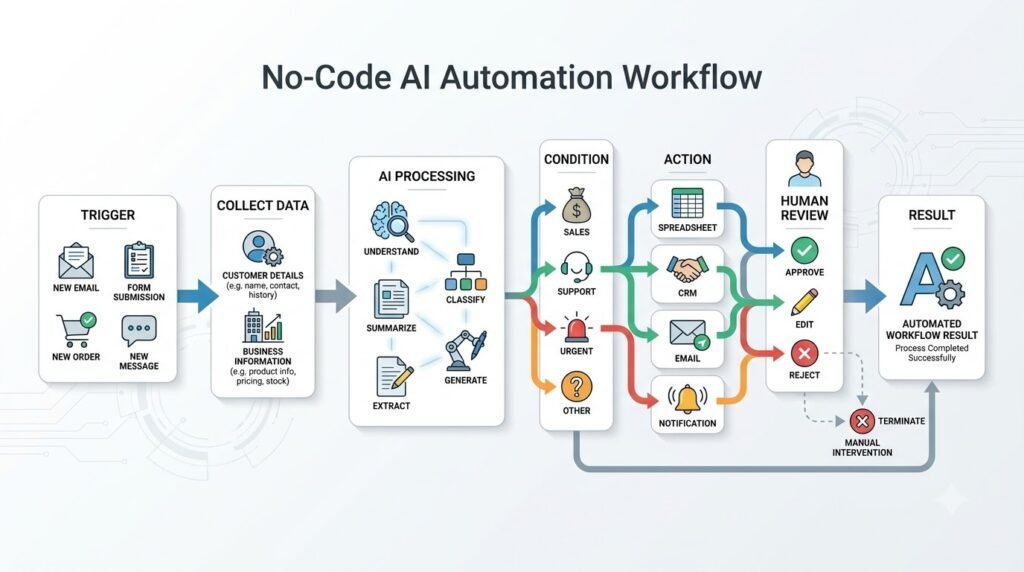
Step 1: Repetitive Task Identify ಮಾಡಿ
ಮೊದಲು ಈ question ಕೇಳಿಕೊಳ್ಳಿ:
“ನಾನು ಪ್ರತಿದಿನ ಯಾವ ಕೆಲಸವನ್ನು ಮತ್ತೆ ಮತ್ತೆ ಮಾಡುತ್ತಿದ್ದೇನೆ?”
ಒಂದು notebook ಅಥವಾ spreadsheet ತೆಗೆದುಕೊಂಡು tasks list ಮಾಡಿ.
ಉದಾಹರಣೆಗೆ:
| Task | Frequency | Manual Time |
|---|---|---|
| Email sorting | Daily | 30 min |
| Lead entry | Daily | 20 min |
| Social post scheduling | Daily | 25 min |
| Weekly report | Weekly | 60 min |
| Customer classification | Daily | 40 min |
ಇಲ್ಲಿ high-frequency ಮತ್ತು high-time tasks ಮೊದಲು automate ಮಾಡಬೇಕು.
Step 2: Task ಅನ್ನು Workflow ಆಗಿ Break ಮಾಡಿ
ಒಂದು ದೊಡ್ಡ task ಅನ್ನು automate ಮಾಡಲು ಪ್ರಯತ್ನಿಸುವುದು beginnerಗೆ difficult.
ಅದನ್ನು small stepsಗೆ divide ಮಾಡಿ.
ಉದಾಹರಣೆ:
Customer Enquiry Process
Customer submits form
↓
Get customer details
↓
Save data
↓
AI reads message
↓
AI classifies enquiry
↓
Create summary
↓
Send notification
↓
Prepare response
ಇದು workflow.
AI Automation build ಮಾಡುವ ಮೊದಲು workflow ಅನ್ನು paper ಮೇಲೆ draw ಮಾಡುವುದು ಬಹಳ useful.
Step 3: Trigger Select ಮಾಡಿ
Trigger ಎಂದರೆ automation start ಮಾಡುವ event.
Common triggers:
New email
New form response
New spreadsheet row
New order
New calendar event
New CRM lead
Scheduled time
New file upload
ಉದಾಹರಣೆಗೆ:
New Google Form response
ಇದನ್ನು trigger ಆಗಿ select ಮಾಡಬಹುದು.
Zapierನ current workflow model ಕೂಡ trigger ಮತ್ತು action ಎಂಬ basic building blocks ಮೇಲೆ ಕೆಲಸ ಮಾಡುತ್ತದೆ.
Zapier’s trigger and action workflow
Step 4: Data Collect ಮಾಡಿ
Trigger ನಂತರ required information collect ಮಾಡಬೇಕು.
ಉದಾಹರಣೆಗೆ customer formನಲ್ಲಿ:
Name
Phone
Company
Message
Service required
ಇವೆಲ್ಲ fields ಇರಬಹುದು.
ಇದನ್ನು next automation stepಗೆ pass ಮಾಡಬಹುದು.
ಈ processನಲ್ಲಿ data mapping ಮುಖ್ಯ.
ಅಂದರೆ previous stepನಲ್ಲಿ ಬಂದ data ಅನ್ನು next stepನ correct fieldಗೆ connect ಮಾಡುವುದು.
Step 5: AI ಅನ್ನು ಸರಿಯಾದ ಜಾಗದಲ್ಲಿ Add ಮಾಡಿ
ಇದು ಅತ್ಯಂತ important step.
ಪ್ರತಿಯೊಂದು stepಗೂ AI add ಮಾಡಬೇಡಿ.
AI useful ಆಗುವ location identify ಮಾಡಿ.
Customer message:
“ನನಗೆ website create ಮಾಡಬೇಕು. Pricing details ಮತ್ತು delivery time ತಿಳಿಸಬಹುದೇ?”
AIಗೆ instruction:
Identify the customer intent, summarize the requirement, and classify the lead as Website, Marketing, Support, or Other.
AI output:
Intent: Website enquiry
Summary: Customer wants website development pricing and delivery timeline.
Category: Website
ಈ output ಅನ್ನು next automation stepಗೆ ಬಳಸಬಹುದು.
Step 6: AIಗೆ Clear Instructions ಕೊಡಿ
AI automationನಲ್ಲಿ prompt quality ಬಹಳ important.
ಒಂದು vague prompt:
“Analyze this message.”
ಇದು enough ಅಲ್ಲ.
Better prompt:
“Read the customer message. Identify the main requirement. Classify it into Website, Marketing, Support, or Other. Return only the category and a one-sentence summary.”
ಇಲ್ಲಿ:
- Task clear
- Categories fixed
- Output format defined
- Unnecessary text avoided
ಇದರಿಂದ automation predictable ಆಗುತ್ತದೆ.
Step 7: Output ಅನ್ನು Structured ಆಗಿ ಇರಿಸಿ
AI response free-form text ಆಗಿದ್ದರೆ automationಗೆ next stepನಲ್ಲಿ process ಮಾಡುವುದು ಕಷ್ಟವಾಗಬಹುದು.
ಅದಕ್ಕಾಗಿ structured output better.
ಉದಾಹರಣೆ:
Category: Website
Priority: Medium
Summary: Customer wants website pricing.
Recommended Action: Send pricing information.
ಇಂತಹ structured output ಅನ್ನು automation platform ಮುಂದಿನ stepsನಲ್ಲಿ ಬಳಸಬಹುದು.
Step 8: Filter ಅಥವಾ Condition ಸೇರಿಸಿ
ಇಲ್ಲಿ workflow smart ಆಗುತ್ತದೆ.
ಉದಾಹರಣೆಗೆ:
AI Category = Support
→ Support team
AI Category = Sales
→ Sales team
AI Category = Urgent
→ Immediate human notification
AI Category = Spam
→ Do not send to sales
ಇದನ್ನು conditional logic ಎಂದು ಕರೆಯಬಹುದು.
Makeನ visual workflow modelನಲ್ಲಿ filters, data transformation ಮತ್ತು conditional routing ಮುಂತಾದ capabilities ಬಳಸಬಹುದು.
Step 9: Human Approval ಸೇರಿಸಿ
AIಗೆ ಎಲ್ಲ decisions ಕೊಡಬೇಡಿ.
ವಿಶೇಷವಾಗಿ:
Money
Legal
Medical
Customer complaints
Refunds
Contracts
Account changes
Sensitive personal data
ಇಂತಹ areasನಲ್ಲಿ human review ಇರಬೇಕು.
ಒಂದು practical workflow:
AI creates draft → Human reviews → Human approves → Automation sends
ಇದು ಹೆಚ್ಚು safe.
n8n ಕೂಡ current AI workflow capabilitiesನಲ್ಲಿ high-impact actionsಗೆ human approval ಮತ್ತು execution inspectionಗೆ ಒತ್ತು ನೀಡುತ್ತದೆ.
Practical Example 1: Email Automation
ಒಬ್ಬ freelancerಗೆ ಪ್ರತಿದಿನ 30–50 emails ಬರುತ್ತವೆ ಎಂದುಕೊಳ್ಳಿ.
Manual process:
Email open
↓
Read
↓
Understand
↓
Categorize
↓
Reply
ಇದನ್ನು automate ಮಾಡಬಹುದು.
Workflow
New Email
↓
AI reads email
↓
Classify:
Sales / Support / Personal / Newsletter
↓
Generate summary
↓
If Sales:
Create lead
↓
If Support:
Create support task
↓
If Newsletter:
Archive or label
↓
If important:
Send notification
ಇಲ್ಲಿ AI classification ಮಾಡುತ್ತದೆ.
Automation actual actions ಮಾಡುತ್ತದೆ.
Human sensitive repliesಗೆ approval ನೀಡಬಹುದು.
Practical Example 2: Lead Generation Automation
ಒಂದು websiteನಲ್ಲಿ contact form ಇದೆ.
Customer submits:
Name
Business
Requirement
Budget
Automation
Form Submission
↓
Google Sheet
↓
AI reads requirement
↓
Lead classification
↓
Priority assignment
↓
CRM entry
↓
Sales notification
↓
AI-generated reply draft
ಇದರಿಂದ sales teamಗೆ manually lead sorting ಮಾಡುವ ಸಮಯ ಕಡಿಮೆಯಾಗಬಹುದು.
Practical Example 3: Content Creation Workflow
Content creatorsಗೆ repetitive work ಬಹಳ ಇರುತ್ತದೆ.
ಒಂದು content idea spreadsheetನಲ್ಲಿ add ಮಾಡಿದಾಗ:
New Content Idea
↓
AI generates outline
↓
AI creates short summary
↓
AI suggests title options
↓
Save to content database
↓
Notify creator
ಇಲ್ಲಿ AI complete article automatically publish ಮಾಡುವುದಕ್ಕಿಂತ content preparation assistant ಆಗಿ ಬಳಸುವುದು safer.
Final article, fact-checking ಮತ್ತು publishing human controlನಲ್ಲಿ ಇರಬಹುದು.
Content workflowನಲ್ಲಿ outline, summary ಅಥವಾ draft generationಗೆ AI Writing Tools ಬಳಸುವುದರಿಂದ manual preparation time ಕಡಿಮೆಯಾಗಬಹುದು.
Practical Example 4: Weekly Business Report
ಒಂದು Google Sheetನಲ್ಲಿ sales data ಇದೆ ಎಂದುಕೊಳ್ಳಿ.
ಪ್ರತಿ Friday manual report prepare ಮಾಡಬೇಕಾದರೆ:
Scheduled Trigger
↓
Read spreadsheet
↓
Calculate totals
↓
AI summarizes trends
↓
Generate report
↓
Send email
ಇಲ್ಲಿ traditional automation calculations ಮಾಡಬಹುದು.
AI narrative summary ಮಾಡಬಹುದು.
ಈ combination powerful.
Practical Example 5: Customer Support
Customer message:
“ನನ್ನ order ಇನ್ನೂ ಬಂದಿಲ್ಲ. Tracking update ಬೇಕು.”
Workflow:
New Customer Message
↓
AI identifies intent = Delivery Status
↓
Extract order number
↓
Check order system
↓
Retrieve status
↓
Generate response
↓
Human approval if required
↓
Send response
ಇಲ್ಲಿ AI language understanding ಮಾಡುತ್ತದೆ.
Automation data retrieval ಮತ್ತು message routing ಮಾಡುತ್ತದೆ.
No-Code AI Automationನಲ್ಲಿ AI ಅನ್ನು ಎಲ್ಲಿ ಬಳಸಬೇಕು?
ಒಂದು simple framework ನೆನಪಿಟ್ಟುಕೊಳ್ಳಿ.
AIಗೆ ಸೂಕ್ತವಾದ ಕೆಲಸಗಳು
Understand
Messy text ಅರ್ಥಮಾಡಿಕೊಳ್ಳುವುದು.
Classify
Information categoriesಗೆ divide ಮಾಡುವುದು.
Summarize
Long content short ಮಾಡುವುದು.
Extract
Textನಿಂದ specific information ತೆಗೆದುಕೊಳ್ಳುವುದು.
Generate
Drafts ಮತ್ತು content create ಮಾಡುವುದು.
Recommend
Possible next steps suggest ಮಾಡುವುದು.
Traditional Automationಗೆ ಸೂಕ್ತವಾದ ಕೆಲಸಗಳು
Move
Data ಒಂದು appನಿಂದ ಮತ್ತೊಂದಕ್ಕೆ transfer ಮಾಡುವುದು.
Store
Information databaseನಲ್ಲಿ save ಮಾಡುವುದು.
Notify
Email ಅಥವಾ notification ಕಳುಹಿಸುವುದು.
Schedule
ನಿಗದಿತ ಸಮಯದಲ್ಲಿ workflow run ಮಾಡುವುದು.
Calculate
Fixed mathematical calculations ಮಾಡುವುದು.
Check
Fixed rules verify ಮಾಡುವುದು.
Best systemsನಲ್ಲಿ ಎರಡನ್ನೂ combine ಮಾಡುವುದು.
Beginners ಮಾಡುವ 7 Common No-Code AI Automation Mistakes
1. Everything Automate ಮಾಡಲು ಪ್ರಯತ್ನಿಸುವುದು
ಮೊದಲ ದಿನವೇ complete business automate ಮಾಡಲು ಪ್ರಯತ್ನಿಸಬೇಡಿ.
ಒಂದು small workflow start ಮಾಡಿ.
2. AIಗೆ Unnecessary Tasks ಕೊಡುವುದು
Simple “copy this field to another field” ಕೆಲಸಕ್ಕೆ AI ಬೇಕಾಗಿಲ್ಲ.
AI usage cost ಮತ್ತು complexity unnecessary ಆಗಬಹುದು.
3. Human Review ತೆಗೆದುಹಾಕುವುದು
High-risk actionsಗೆ human approval ಇರಬೇಕು.
Automation ಎಂದರೆ human judgment completely remove ಮಾಡುವುದು ಅಲ್ಲ.
4. Poor Prompt ಬಳಸುವುದು
“Analyze this” ರೀತಿಯ vague prompt automationನಲ್ಲಿ inconsistent output ಕೊಡಬಹುದು.
Task, context ಮತ್ತು expected format clearly specify ಮಾಡಿ.
5. Error Handling Ignore ಮಾಡುವುದು
Workflow fail ಆದರೆ ಏನು ಆಗುತ್ತದೆ?
Email send ಆಗದಿದ್ದರೆ?
AI invalid category ಕೊಟ್ಟರೆ?
Spreadsheet unavailable ಇದ್ದರೆ?
API connection fail ಆದರೆ?
ಈ situationsಗೆ fallback plan ಇರಬೇಕು.
6. Testing ಇಲ್ಲದೆ Publish ಮಾಡುವುದು
Automation publish ಮಾಡುವ ಮೊದಲು multiple test cases run ಮಾಡಿ.
Normal input.
Empty input.
Wrong input.
Long input.
Unexpected input.
ಇವೆಲ್ಲ test ಮಾಡಿ.
7. Sensitive Data ಎಲ್ಲೆಡೆ ಕಳುಹಿಸುವುದು
Customer personal information, passwords, financial information ಅಥವಾ confidential business data ಅನ್ನು unnecessary AI servicesಗೆ ಕಳುಹಿಸಬೇಡಿ.
ಯಾವ data ಯಾವ serviceಗೆ ಹೋಗುತ್ತಿದೆ ಎಂಬುದನ್ನು understand ಮಾಡಿ.
No-Code AI Automation Workflow ಅನ್ನು Test ಹೇಗೆ ಮಾಡಬೇಕು?
ಒಂದು workflow successful ಆಗಿದೆ ಎಂದರೆ ಅದು reliable ಆಗಿದೆ ಎಂದು ಅರ್ಥವಲ್ಲ.
Testingಗಾಗಿ ಕನಿಷ್ಠ ಈ five cases ಬಳಸಿ:
Test 1: Normal Input
Expected data.
Test 2: Empty Input
Required field missing.
Test 3: Unexpected Input
Completely different message.
Test 4: Long Input
Very large text.
Test 5: AI Uncertain Output
AI expected category ಕೊಡದ situation.
ನಂತರ ಕೇಳಿ:
“Workflow fail ಆದರೆ safe ಆಗಿ stop ಆಗುತ್ತದೆಯೇ?”
ಇದು important.
No-Code AI Automationನಲ್ಲಿ Cost ಹೇಗೆ Control ಮಾಡುವುದು?
Automation build ಮಾಡುವಾಗ users ಸಾಮಾನ್ಯವಾಗಿ AI usage ಮಾತ್ರ ಗಮನಿಸುತ್ತಾರೆ.
ಆದರೆ total costನಲ್ಲಿ ಹಲವು components ಇರಬಹುದು.
Automation platform subscription.
AI model usage.
Third-party apps.
Email/SMS services.
Storage.
API usage.
ಆದ್ದರಿಂದ workflow design ಮಾಡುವಾಗ unnecessary AI calls ಕಡಿಮೆ ಮಾಡಿ.
ಉದಾಹರಣೆಗೆ:
ಪ್ರತಿ emailಗೂ AI call ಮಾಡುವ ಬದಲು ಮೊದಲು rule-based filter ಹಾಕಬಹುದು.
If sender is newsletter → archive
If sender is customer → AI analysis
ಇದರಿಂದ AI usage reduce ಆಗಬಹುದು.
Zapier ಕೂಡ deterministic workಗೆ conventional automation ಸಾಕಾಗುವ ಸಂದರ್ಭಗಳಲ್ಲಿ AI agentic approach ಬಳಸಬೇಕಾದ ಅಗತ್ಯವಿಲ್ಲ ಎಂದು ತನ್ನ 2026 guidanceನಲ್ಲಿ ವಿವರಿಸುತ್ತದೆ.
Free Tools ಬಳಸಿ No-Code AI Automation Start ಮಾಡಬಹುದೇ?
ಹೌದು, basic learningಗೆ free tiers ಅಥವಾ trials ಇರುವ platforms ಬಳಸಬಹುದು.
ಆದರೆ “free” ಎಂದರೆ unlimited automation ಎಂದಲ್ಲ.
Free plansನಲ್ಲಿ ಸಾಮಾನ್ಯವಾಗಿ:
Task limits
Workflow limits
AI usage limits
Execution limits
App restrictions
ಮುಂತಾದ limitations ಇರಬಹುದು.
ಆದ್ದರಿಂದ ಮೊದಲು workflow logic learn ಮಾಡಿ.
ನಂತರ businessಗೆ actually value ಕೊಡುತ್ತದೆಯೇ ಎಂದು test ಮಾಡಿ.
Value prove ಆದ ನಂತರ paid plan consider ಮಾಡುವುದು better.
Zapier vs Make vs n8n vs Power Automate
| Platform | Beginner Friendliness | Best Use |
|---|---|---|
| Zapier | High | Simple app-to-app automation |
| Make | Medium | Visual and complex workflows |
| n8n | Medium | Flexible AI workflows and advanced automation |
| Power Automate | Medium | Microsoft ecosystem |
Zapier app connectivity ಮತ್ತು straightforward trigger-action workflowsಗೆ strong option. Make visual complexity ಮತ್ತು branching workflowsಗೆ useful. n8n ಹೆಚ್ಚು control ಮತ್ತು advanced AI workflow flexibility ನೀಡುತ್ತದೆ. Microsoft ecosystem already ಬಳಸುತ್ತಿದ್ದರೆ Power Automate practical choice ಆಗಬಹುದು.
Tool select ಮಾಡುವಾಗ “ಯಾವುದು best?” ಎಂದು ಮಾತ್ರ ಕೇಳಬೇಡಿ.
ಬದಲಿಗೆ:
“ನನ್ನ workflowಗೆ ಯಾವ platform simplest ಮತ್ತು reliable?”
ಎಂದು ಕೇಳಿ.
ನಿಮ್ಮ ಮೊದಲ No-Code AI Automationಗೆ ಈ Workflow ಪ್ರಯತ್ನಿಸಿ
Beginner ಆಗಿದ್ದರೆ ಈ simple workflow ಉತ್ತಮ starting point.
Workflow
Google Form
↓
Google Sheet
↓
AI Classification
↓
AI Summary
↓
Email Notification
ಇದರ purpose:
ಒಬ್ಬ customer form submit ಮಾಡಿದಾಗ:
- Data automatically save ಆಗುತ್ತದೆ.
- AI requirement identify ಮಾಡುತ್ತದೆ.
- AI short summary ಮಾಡುತ್ತದೆ.
- You ಅಥವಾ teamಗೆ notification ಬರುತ್ತದೆ.
ಇದರಲ್ಲಿ ನೀವು ಕಲಿಯುವ concepts:
Trigger
Action
Data mapping
AI prompt
Structured output
Filter
Notification
Testing
ಇವು ಅರ್ಥವಾದ ನಂತರ ಹೆಚ್ಚು complex automation build ಮಾಡುವುದು easy ಆಗುತ್ತದೆ.
No-Code AI Automationಗಾಗಿ ಒಂದು Reusable Blueprint
ಯಾವುದೇ repetitive task ಕಂಡಾಗ ಈ template ಬಳಸಿ.
1. Trigger
What starts the workflow?
2. Input
What information enters the workflow?
3. AI Task
What does AI need to understand, classify, summarize or generate?
4. Rule
What condition determines the next action?
5. Action
What should the automation do?
6. Human Review
Does a person need to approve anything?
7. Output
What should happen at the end?
8. Error Handling
What happens if something fails?
ಈ 8 questionsಗೆ answer ಬರೆಯಲು ಸಾಧ್ಯವಾದರೆ, ಬಹಳಷ್ಟು no-code automation ideas ಅನ್ನು workflow ಆಗಿ convert ಮಾಡಬಹುದು.
No-Code AI Automation ಮತ್ತು AI Agents ಒಂದೇನಾ?
ಇಲ್ಲ.
ಇದು 2026ರಲ್ಲಿ important distinction.
ಒಂದು traditional workflow:
Trigger → Action → Action → Result
Fixed path.
AI Automation:
Trigger → AI processing → Rules → Actions
ಇಲ್ಲಿ AI interpretation ಸೇರಿದೆ.
AI Agent:
Goal → AI decides steps → Uses tools → Observes result → Continues
Agent ಹೆಚ್ಚು dynamic ಆಗಿರಬಹುದು.
AI agents multiple tools ಮತ್ತು external systems ಜೊತೆ connect ಆಗುವಾಗ Model Context Protocol (MCP) ರೀತಿಯ standards ಕೂಡ important ಆಗುತ್ತವೆ, ಏಕೆಂದರೆ agent ಮತ್ತು tools ನಡುವಿನ connection ಅನ್ನು structured ರೀತಿಯಲ್ಲಿ manage ಮಾಡಲು ಅವು ಸಹಾಯ ಮಾಡುತ್ತವೆ.
ಆದರೆ beginnerಗೆ agent build ಮಾಡುವ ಮೊದಲು simple automation ಕಲಿಯುವುದು better.
ಏಕೆಂದರೆ automationನಲ್ಲಿ:
- Trigger clear
- Steps visible
- Rules predictable
- Errors easier to diagnose
ಇರುತ್ತವೆ.
ಮೊದಲು automation.
ನಂತರ AI-powered automation.
ಆಮೇಲೆ ಅಗತ್ಯವಿದ್ದರೆ AI agents.
Simple automation ಕಲಿತ ನಂತರ users ತಮ್ಮ own personal AI assistant workflows ಕೂಡ build ಮಾಡಬಹುದು, ಆದರೆ ಅದಕ್ಕೂ ಮೊದಲು triggers, actions, AI processing ಮತ್ತು human approvalಗಳ basic logic ಅರ್ಥಮಾಡಿಕೊಳ್ಳುವುದು ಮುಖ್ಯ.
Small Businessಗೆ No-Code AI Automation ಎಲ್ಲಿ ಹೆಚ್ಚು Useful?
Small business ownersಗೆ repetitive administration ದೊಡ್ಡ time drain ಆಗಬಹುದು.
ಉದಾಹರಣೆಗೆ:
Lead Management
Lead form → AI qualification → CRM → Notification
Customer Support
Customer message → AI classification → Support queue
Content Marketing
Idea → AI outline → Content database → Reminder
Invoices
New order → Data extraction → Spreadsheet → Notification
Reporting
Weekly data → Analysis → AI summary → Email report
Appointment Management
Booking → Calendar → Confirmation → Reminder
ಇಲ್ಲಿ objective “AI use ಮಾಡಬೇಕು” ಎನ್ನುವುದಲ್ಲ.
Objective:
Manual repetitive work ಕಡಿಮೆ ಮಾಡಿ human time ಅನ್ನು higher-value workಗೆ shift ಮಾಡುವುದು.
No-Code AI Automation ಕಲಿಯಲು Coding ಬೇಕೇ?
Basic AI Automationಗೆ coding ಕಡ್ಡಾಯವಲ್ಲ.
No-code platforms visual builders, triggers, actions, filters ಮತ್ತು integrations ಮೂಲಕ workflows build ಮಾಡಲು ಅವಕಾಶ ನೀಡುತ್ತವೆ.
ಆದರೆ automation skill develop ಆದಂತೆ ಕೆಲವು technical concepts ಕಲಿಯುವುದು useful:
API
Webhook
JSON
Data mapping
Authentication
Conditions
Variables
Error handling
ಈ concepts programming language ಕಲಿಯುವುದಕ್ಕಿಂತ different.
Coding ಬರದಿದ್ದರೂ workflow logic ಅರ್ಥಮಾಡಿಕೊಳ್ಳಬಹುದು.
ನಂತರ advanced levelಗೆ ಹೋದಾಗ JavaScript ಅಥವಾ Python knowledge optional advantage ಆಗಬಹುದು.
Make ಕೂಡ visual automation ಜೊತೆಗೆ more advanced customizationಗಾಗಿ JavaScript ಅಥವಾ Python capabilities ನೀಡುತ್ತದೆ.
No-Code AI Automationನಲ್ಲಿ Human Skill ಏಕೆ ಇನ್ನೂ Important?
Automation ಹೆಚ್ಚು ಕೆಲಸ ಮಾಡಬಹುದು.
ಆದರೆ automation ಯಾವ ಕೆಲಸ ಮಾಡಬೇಕು ಎಂಬುದನ್ನು human decide ಮಾಡಬೇಕು.
ಒಂದು bad process ಅನ್ನು automate ಮಾಡಿದರೆ:
Bad Process → Faster Bad Process
ಆಗುತ್ತದೆ.
ಆದ್ದರಿಂದ automationಗೂ ಮೊದಲು process improve ಮಾಡಿ.
ಮೊದಲು ಕೇಳಿ:
“ಈ task ನಿಜವಾಗಿಯೂ ಬೇಕೇ?”
“ಇದನ್ನು simplify ಮಾಡಬಹುದೇ?”
“ಒಂದು step remove ಮಾಡಬಹುದೇ?”
ಆಮೇಲೆ automate ಮಾಡಿ.
ಅದರಿಂದ AI Automation productivity tool ಆಗುತ್ತದೆ; unnecessary complexity ಆಗುವುದಿಲ್ಲ.
30-Minute No-Code AI Automation Planning Exercise
ಇಂದು ನೀವು automation start ಮಾಡಬೇಕಾದರೆ ಈ exercise ಮಾಡಿ.
First 5 Minutes
ನೀವು ಕಳೆದ ವಾರ repeatedly ಮಾಡಿದ tasks list ಮಾಡಿ.
Next 5 Minutes
ಪ್ರತಿ taskಗೆ frequency ಮತ್ತು time estimate ಬರೆಯಿರಿ.
Next 5 Minutes
Most repetitive task select ಮಾಡಿ.
Next 5 Minutes
Workflow ಅನ್ನು:
Trigger → AI → Rule → Action
ಎಂದು ಬರೆಯಿರಿ.
Next 5 Minutes
Zapier, Make, n8n ಅಥವಾ Power Automateನಲ್ಲಿ ಯಾವ platform suitable ಎಂದು decide ಮಾಡಿ.
Final 5 Minutes
Test data create ಮಾಡಿ.
ಇಷ್ಟು ಮಾಡಿದರೂ automation learningಗೆ strong starting point ಸಿಗುತ್ತದೆ.
No-Code AI Automationನಲ್ಲಿ ಮುಂದಿನ ಹಂತ ಏನು?
ಒಂದು simple workflow successfully build ಮಾಡಿದ ನಂತರ:
ಮೊದಲಿಗೆ multiple actions add ಮಾಡಿ.
ನಂತರ filters add ಮಾಡಿ.
ನಂತರ AI classification add ಮಾಡಿ.
ನಂತರ human approval add ಮಾಡಿ.
ನಂತರ error handling add ಮಾಡಿ.
ಆಮೇಲೆ multiple apps connect ಮಾಡಿ.
ಅದರ ನಂತರ ಬೇಕಾದರೆ AI agents explore ಮಾಡಿ.
ಈ progression beginnerಗೆ ಹೆಚ್ಚು practical:
Manual Task
↓
Simple Automation
↓
AI-Assisted Automation
↓
Multi-Step Workflow
↓
AI Agent
ಒಮ್ಮೆಲೆ last stageಗೆ jump ಮಾಡುವ ಅಗತ್ಯವಿಲ್ಲ.
Conclusion
No-Code AI Automation ಎಂದರೆ complicated robots ಅಥವಾ advanced programming ಮಾತ್ರ ಅಲ್ಲ.
ಒಂದು repetitive task ಅನ್ನು identify ಮಾಡಿ, ಅದನ್ನು small stepsಗೆ break ಮಾಡಿ, trigger ಮತ್ತು actions define ಮಾಡಿ, AI ಅನ್ನು ಬೇಕಾದ ಜಾಗದಲ್ಲಿ ಮಾತ್ರ add ಮಾಡಿ, ನಂತರ workflow ಅನ್ನು test ಮಾಡಿ — ಇದೇ basic approach.
Zapierನಲ್ಲಿ trigger-action workflows ಮೂಲಕ apps connect ಮಾಡಬಹುದು. Make visual scenarios ಮೂಲಕ more complex processes build ಮಾಡಲು ಅವಕಾಶ ನೀಡುತ್ತದೆ. n8n advanced AI workflows, agents ಮತ್ತು human-in-the-loop controlsಗೆ flexibility ನೀಡುತ್ತದೆ. Microsoft ecosystem ಬಳಸುವವರಿಗೆ Power Automate automated ಮತ್ತು scheduled flows ಜೊತೆಗೆ AI capabilities ಒದಗಿಸುತ್ತದೆ.
ಆದರೆ ಇಲ್ಲಿ ಅತ್ಯಂತ important lesson ಒಂದು ಇದೆ.
ಪ್ರತಿಯೊಂದು taskಗೂ AI ಬೇಕಾಗಿಲ್ಲ.
Simple, predictable ಕೆಲಸಕ್ಕೆ normal automation ಸಾಕು.
Information ಅರ್ಥಮಾಡಿಕೊಳ್ಳಬೇಕಾದಾಗ, classify ಮಾಡಬೇಕಾದಾಗ, summarize ಮಾಡಬೇಕಾದಾಗ ಅಥವಾ draft generate ಮಾಡಬೇಕಾದಾಗ AI ಸೇರಿಸಿ.
ಮತ್ತು sensitive ಅಥವಾ high-impact actionಗಳ ಮೊದಲು human review ಇಡಿ.
ನೀವು beginner ಆಗಿದ್ದರೆ ಮೊದಲ automation ತುಂಬಾ ದೊಡ್ಡದಾಗಿರಬೇಕಿಲ್ಲ.
ಒಂದು simple workflow ಸಾಕು:
New Form → AI Classification → Summary → Notification
ಅದು ಕೆಲಸ ಮಾಡಿದ ನಂತರ ಇನ್ನೊಂದು workflow build ಮಾಡಿ.
ಹೀಗೆ ಒಂದೊಂದೇ repetitive task ಅನ್ನು automate ಮಾಡುತ್ತಾ ಹೋದರೆ, eventually ನಿಮ್ಮ personal work ಅಥವಾ small businessಗಾಗಿ ಒಂದು connected No-Code AI Automation system ನಿರ್ಮಿಸಬಹುದು.
ಇದರ ನಿಜವಾದ benefit AI ಬಳಸುವುದಲ್ಲ.
ನಿಮ್ಮ ಸಮಯವನ್ನು repetitive workನಿಂದ ತೆಗೆದು, ಹೆಚ್ಚು valuable ಕೆಲಸಕ್ಕೆ ಬಳಸುವುದು.