
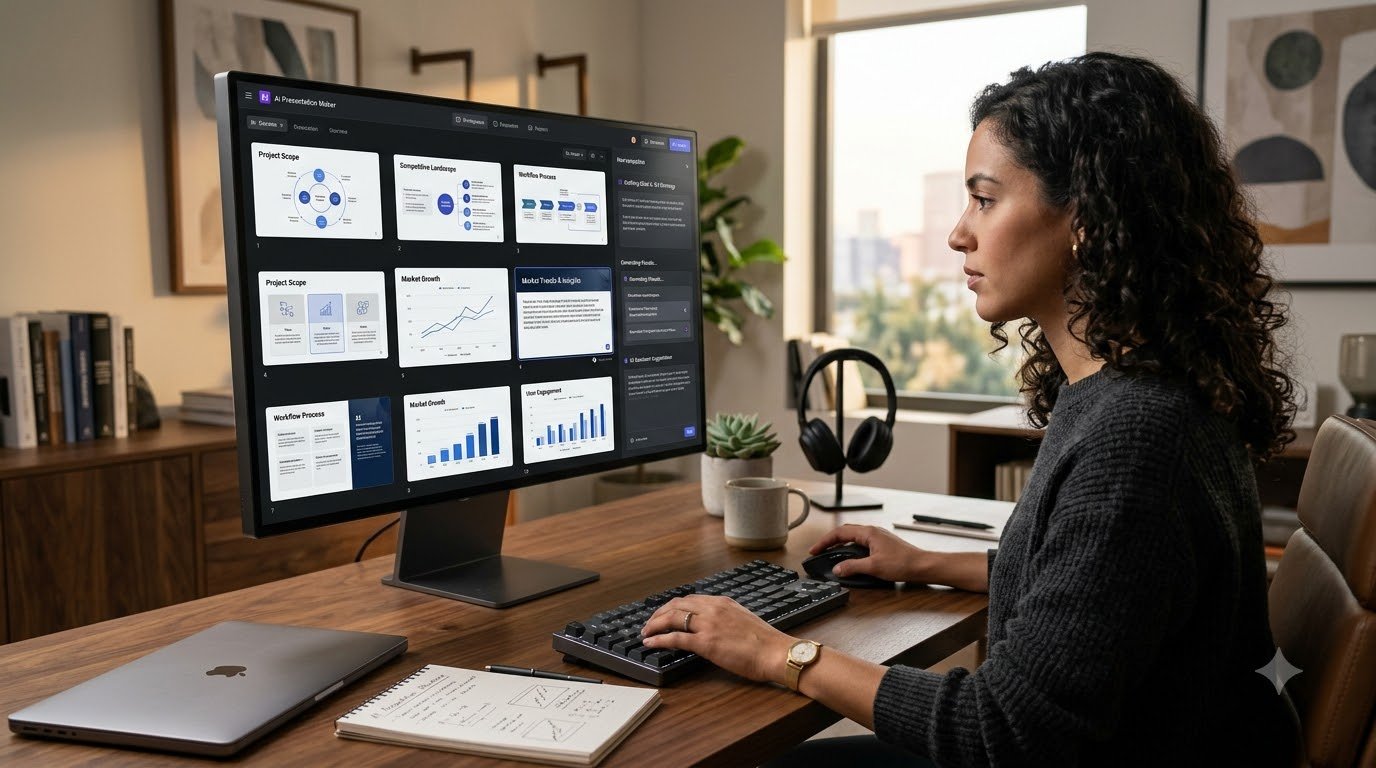
How to Create AI Presentations with AI Presentation Maker: Complete Guide
Introduction
How to Create AI Presentations using an AI Presentation Maker has become much easier because AI can help with topic research, presentation outlines, slide content, visuals and initial design. ಆದರೆ professional presentation create ಮಾಡುವಾಗ AI output ಅನ್ನು As it is ಬಳಸುವುದಕ್ಕಿಂತ, AI draft ನಂತರ human editing ಮತ್ತು fact-checking ಮಾಡುವುದು ಮುಖ್ಯ.
ಒಂದು professional presentation create ಮಾಡಲು ಮೊದಲು blank PowerPoint ಅಥವಾ Google Slides file open ಮಾಡಿ, topic research ಮಾಡಬೇಕು, outline ಬರೆಯಬೇಕು, slide content prepare ಮಾಡಬೇಕು, images ಹುಡುಕಬೇಕು ಮತ್ತು ಕೊನೆಯಲ್ಲಿ design ಮಾಡಬೇಕು. ಈ entire processಗೆ ಸಾಕಷ್ಟು ಸಮಯ ಬೇಕಾಗಬಹುದು.
ಇಲ್ಲಿಯೇ AI Presentation Maker useful ಆಗುತ್ತದೆ. AI ಬಳಸಿ topicನಿಂದ outline, slide content, visual ideas ಮತ್ತು presentation designನ initial draft ಅನ್ನು ವೇಗವಾಗಿ create ಮಾಡಬಹುದು.
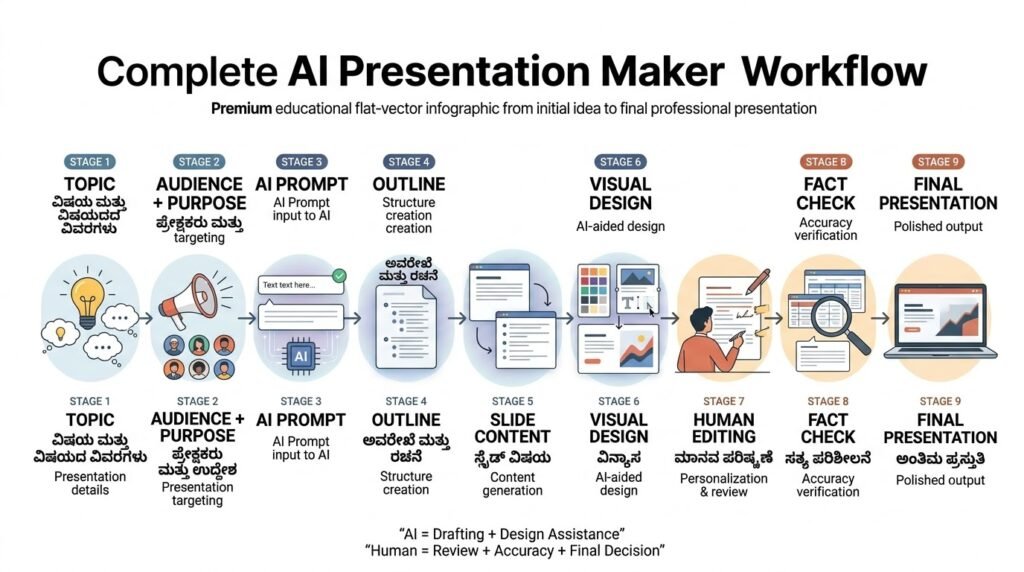
ಆದರೆ AI ಕೊಟ್ಟ presentation ಅನ್ನು like that final version ಆಗಿ ಬಳಸುವುದು ಉತ್ತಮ workflow ಅಲ್ಲ. AI Draft → Human Editing → Fact Checking → Final Presentation ಎಂಬ approach ಹೆಚ್ಚು practical.
Quick Workflow
Topic → Audience + Purpose → AI Prompt → Outline → Slide Content → Visual Design → Human Editing → Fact Check → Final Presentation
AI Presentation Maker ಎಂದರೇನು?
AI Presentation Maker ಎನ್ನುವುದು Artificial Intelligence ಬಳಸಿಕೊಂಡು presentation create ಮಾಡಲು ಸಹಾಯ ಮಾಡುವ tool ಅಥವಾ software.
ನೀವು ಒಂದು topic, audience, purpose ಅಥವಾ prompt ನೀಡಿದಾಗ, ಕೆಲವು AI Presentation Maker tools presentation outline, slide titles, text, layouts, images, diagrams ಅಥವಾ design suggestions generate ಮಾಡಬಹುದು.
ಸರಳವಾಗಿ ಹೇಳುವುದಾದರೆ, ನೀವು blank slideನಿಂದ start ಮಾಡುವ ಬದಲು AIನಿಂದ first draft ಪಡೆಯಬಹುದು.
ಉದಾಹರಣೆಗೆ, “Small Business Ownersಗಾಗಿ AI Automation” ಎಂಬ topic ಕೊಟ್ಟರೆ AI:
- Introduction
- AI Automation ಎಂದರೇನು?
- Businessನಲ್ಲಿ ಬಳಸುವ ವಿಧಾನಗಳು
- Benefits
- Examples
- Limitations
- Conclusion
ಎಂಬ basic structure suggest ಮಾಡಬಹುದು.
ನಂತರ ನೀವು ನಿಮ್ಮ knowledge ಮತ್ತು examples ಸೇರಿಸಿ presentation ಅನ್ನು improve ಮಾಡಬಹುದು.
ಈ guideನಲ್ಲಿ How to Create AI Presentations ಎಂಬ process ಅನ್ನು topic selectionನಿಂದ final presentationವರೆಗೆ practical workflow ಮೂಲಕ ನೋಡೋಣ.
AI Presentation Maker ಯಾಕೆ Useful?
Presentation creationನಲ್ಲಿ research, structure ಮತ್ತು slide drafting repetitive ಆಗಿರುವುದರಿಂದ AI ಇಲ್ಲಿ ಸಮಯ ಉಳಿಸಲು ಸಹಾಯ ಮಾಡಬಹುದು.
Traditional workflowನಲ್ಲಿ ನೀವು topic research ಮಾಡಿ, outline ಬರೆಯಿರಿ, ಪ್ರತಿಯೊಂದು slide create ಮಾಡಿ, visuals ಹುಡುಕಿ ಮತ್ತು design adjust ಮಾಡಬೇಕು.
AI-assisted workflowನಲ್ಲಿ ಈ ಕೆಲಸಗಳ initial draft ಅನ್ನು AI handle ಮಾಡಬಹುದು.
ಅದರ ಮುಖ್ಯ advantage “ಒಂದು clickನಲ್ಲಿ perfect PPT” ಸಿಗುವುದು ಅಲ್ಲ. ಬದಲಾಗಿ blank-page problem ಕಡಿಮೆ ಮಾಡಿ, ಒಂದು idea ಅನ್ನು structured presentation ಆಗಿ convert ಮಾಡಲು ಸಹಾಯ ಮಾಡುವುದು.
Students seminar presentation create ಮಾಡಲು, teachers lesson slides prepare ಮಾಡಲು, YouTubers educational contentಗೆ slides ಬಳಸಲು ಮತ್ತು small businesses pitch decks ಅಥವಾ training presentations create ಮಾಡಲು ಇದನ್ನು ಬಳಸಬಹುದು.
How to Create AI Presentations ಎನ್ನುವುದು ಕೇವಲ slides generate ಮಾಡುವ process ಅಲ್ಲ; topic research, content structure, visual communication ಮತ್ತು human review ಕೂಡ ಅದರ ಭಾಗಗಳಾಗಿವೆ.
AI tools ಅನ್ನು presentation creationಗೆ ಮಾತ್ರವಲ್ಲದೆ daily productivity workflowsನಲ್ಲಿ ಬಳಸಲು ಬಯಸಿದರೆ, How to Create Your Own Personal AI Assistant Without Coding guide ಕೂಡ useful ಆಗಬಹುದು.
AI Presentation Maker ಬಳಸುವ ಮೊದಲು ಏನು Prepare ಮಾಡಬೇಕು?
AI tool open ಮಾಡುವ ಮೊದಲು ಮೂರು ವಿಷಯಗಳನ್ನು clear ಮಾಡಿಕೊಳ್ಳಿ:
1. Topic
ನೀವು ಯಾವ ವಿಷಯದ ಬಗ್ಗೆ presentation ಮಾಡುತ್ತಿದ್ದೀರಿ?
2. Audience
Students, customers, employees, clients ಅಥವಾ general audience ಯಾರು?
3. Purpose
Education, training, sales, business proposal, seminar ಅಥವಾ awareness — presentationನ goal ಏನು?
ಉದಾಹರಣೆಗೆ “AI” ಎಂದು ಮಾತ್ರ prompt ಮಾಡುವುದಕ್ಕಿಂತ:
“Kannada-speaking beginnersಗಾಗಿ AI Automation ಬಗ್ಗೆ 10-slide educational presentation create ಮಾಡಿ.”
ಎಂದು ಹೇಳಿದರೆ AIಗೆ direction ಹೆಚ್ಚು clear ಆಗುತ್ತದೆ.
How to Create AI Presentations workflowನಲ್ಲಿ tool open ಮಾಡುವ ಮೊದಲು topic, audience ಮತ್ತು presentation purpose ಅನ್ನು clear ಮಾಡುವುದು ಉತ್ತಮ starting point.
AI Presentation Makerಗೆ ಉತ್ತಮ Prompt ಹೇಗೆ ಬರೆಯಬೇಕು?
AI Presentation Makerನ output quality promptನ quality ಮೇಲೆ ಸಾಕಷ್ಟು depend ಆಗುತ್ತದೆ.
ಒಂದು simple prompt formula:
Topic + Audience + Purpose + Slide Count + Language + Style + Important Points
ಉದಾಹರಣೆಗೆ:
“Create a 10-slide presentation about AI Automation for small business owners. Use simple Kannada-English hybrid language. Keep it beginner-friendly and practical. Include real-world examples, benefits, limitations, safety considerations and a final action checklist.”
ಇಲ್ಲಿ topic ಮಾತ್ರವಲ್ಲದೆ audience, slide count, language, difficulty level ಮತ್ತು required sections ಕೂಡ specify ಮಾಡಲಾಗಿದೆ.
Generic prompt:
“Create a presentation about AI.”
ಇದಕ್ಕಿಂತ specific prompt:
“Create a 10-slide beginner presentation about AI tools for Kannada YouTubers, covering research, script writing, thumbnails, video editing and productivity.”
ಹೆಚ್ಚು useful ಆಗಿರುತ್ತದೆ.
How to Create AI Presentations ಮಾಡುವಾಗ promptನಲ್ಲಿ audience, purpose, slide count ಮತ್ತು language specify ಮಾಡಿದರೆ AI-generated output ಹೆಚ್ಚು relevant ಆಗುತ್ತದೆ.
AI ಮೂಲಕ Presentation Outline ಹೇಗೆ Create ಮಾಡುವುದು?
ಮೊದಲು AIಗೆ complete presentation ಬರೆಯಲು ಹೇಳುವ ಬದಲು outline generate ಮಾಡಲು ಕೇಳುವುದು ಉತ್ತಮ.
ಉದಾಹರಣೆಗೆ AI Automation topicಗೆ:
- AI Automation ಎಂದರೇನು?
- Traditional workflowನಲ್ಲಿ ಇರುವ problems
- AI Automation ಹೇಗೆ ಕೆಲಸ ಮಾಡುತ್ತದೆ?
- Common use cases
- Small business examples
- Benefits
- Limitations
- Safety considerations
- Beginner workflow
- Conclusion
ಎಂಬ structure ಬರಬಹುದು.
ಈ outline ಅನ್ನು ನೀವು review ಮಾಡಿ unnecessary sections remove ಮಾಡಬಹುದು ಮತ್ತು missing topics add ಮಾಡಬಹುದು.
ಇದು presentation creationನಲ್ಲಿ ಒಂದು important step. ಏಕೆಂದರೆ ಒಳ್ಳೆಯ structure ಇದ್ದರೆ ನಂತರದ slides create ಮಾಡುವುದು ಸುಲಭವಾಗುತ್ತದೆ.
How to Create AI Presentations workflowನಲ್ಲಿ outline ಒಂದು important stage, ಏಕೆಂದರೆ ಇದೇ ನಂತರದ slide structureಗೆ foundation ಆಗುತ್ತದೆ.
AI Presentationನಲ್ಲಿ Slide Structure ಹೇಗಿರಬೇಕು?
ಪ್ರತಿಯೊಂದು slideಗೂ ಒಂದು clear purpose ಇರಬೇಕು.
ಒಂದು beginner-friendly presentation structure:
Slide 1: Title
Slide 2: Problem ಅಥವಾ Introduction
Slide 3: Basic Concept
Slide 4: How It Works
Slide 5: Practical Example
Slide 6: Benefits
Slide 7: Limitations
Slide 8: Action Plan
Slide 9: Key Takeaways
Slide 10: Conclusion
ಇದು fixed formula ಅಲ್ಲ. Topic ಮತ್ತು audienceಗೆ ಅನುಗುಣವಾಗಿ slides ಬದಲಾಯಿಸಬಹುದು.
ಮುಖ್ಯವಾಗಿ ಒಂದು slide = ಒಂದು primary message ಎಂಬ rule ನೆನಪಿಟ್ಟುಕೊಳ್ಳಿ.
ಉತ್ತಮ How to Create AI Presentations workflowನಲ್ಲಿ ಪ್ರತಿಯೊಂದು slideಗೂ ಒಂದು clear message ಮತ್ತು logical position ಇರಬೇಕು.
AI Presentation Makerನಲ್ಲಿ Slide Content ಹೇಗೆ Create ಮಾಡುವುದು?
AI-generated slideನಲ್ಲಿ long paragraph ಹಾಕುವುದನ್ನು avoid ಮಾಡುವುದು ಉತ್ತಮ.
ಉದಾಹರಣೆಗೆ “Benefits of AI Automation” slideನಲ್ಲಿ 150-word paragraph ಹಾಕುವ ಬದಲು:
- Repetitive tasks automate ಮಾಡಬಹುದು
- Manual effort ಕಡಿಮೆ ಮಾಡಬಹುದು
- Workflow faster ಆಗಬಹುದು
- Creative workಗೆ ಹೆಚ್ಚು time ಸಿಗಬಹುದು
ಎಂಬ concise points ಹೆಚ್ಚು readable ಆಗಿರುತ್ತವೆ.
Presentation ಒಂದು article ಅಲ್ಲ. Audience slide ಓದುತ್ತಿರುವಾಗ presenter ಮಾತನ್ನೂ ಕೇಳುತ್ತಿರುತ್ತಾರೆ. ಆದ್ದರಿಂದ slideನಲ್ಲಿ main idea ಮಾತ್ರ ಇಟ್ಟು, detailed explanation ಅನ್ನು presenter notes ಅಥವಾ spoken explanationಗೆ ಬಳಸಬಹುದು.
How to Create AI Presentations ಮಾಡುವಾಗ slideನಲ್ಲಿ concise information ಇಟ್ಟು, detailed explanation ಅನ್ನು presenter notes ಅಥವಾ spoken explanationಗೆ ಬಳಸುವುದು ಉತ್ತಮ.
AI Presentation Makerನಲ್ಲಿ Visuals ಯಾಕೆ ಮುಖ್ಯ?
Professional presentationನಲ್ಲಿ text ಮಾತ್ರ ಇದ್ದರೆ ಅದು documentನಂತೆ ಕಾಣಬಹುದು. Relevant images, diagrams ಮತ್ತು charts ಬಳಸಿದಾಗ complex information ಅನ್ನು quickly explain ಮಾಡಲು ಸಹಾಯವಾಗುತ್ತದೆ.
ಆದರೆ ಪ್ರತಿಯೊಂದು slideಗೂ random AI image ಹಾಕುವುದು ಒಳ್ಳೆಯ design ಅಲ್ಲ.
Visual presentationನ message ಅನ್ನು support ಮಾಡಬೇಕು.
ಉದಾಹರಣೆಗೆ AI workflow explain ಮಾಡುವಾಗ:
Input → AI Processing → Output → Human Review
ಎಂಬ simple diagram long paragraphಗಿಂತ ಹೆಚ್ಚು quickly concept explain ಮಾಡಬಹುದು.
ಅದೇ ರೀತಿ numbers ಅಥವಾ business data ಇದ್ದರೆ chart ಬಳಸಬಹುದು.
How to Create AI Presentations ಮಾಡುವಾಗ visuals ಅನ್ನು decorationಗಾಗಿ ಮಾತ್ರವಲ್ಲದೆ complex information ಅನ್ನು quickly explain ಮಾಡಲು ಬಳಸಬೇಕು.
AI Presentation Makerನಲ್ಲಿ Charts ಮತ್ತು Data ಹೇಗೆ ಬಳಸಬೇಕು?
AI ಕೆಲವು presentation toolsನಲ್ಲಿ charts ಅಥವಾ data visualisation suggestions ನೀಡಬಹುದು. ಆದರೆ AI-generated numbers ಅನ್ನು blindly trust ಮಾಡಬಾರದು.
Statistics, market size, company revenue, research findings ಅಥವಾ financial information ಬಳಸುತ್ತಿದ್ದರೆ original source verify ಮಾಡಿ.
ಒಳ್ಳೆಯ workflow:
Original Data → Verify → AI Visualization → Human Review → Final Slide
Beautiful chartಗಿಂತ correct chart ಮುಖ್ಯ.
How to Create AI Presentations workflowನಲ್ಲಿ AI-generated charts ಬಳಸಿದರೂ underlying data ಅನ್ನು original source ಮೂಲಕ verify ಮಾಡುವುದು ಮುಖ್ಯ.
AI Presentation Makerನಲ್ಲಿ Kannada + English Hybrid Language
Kannada audienceಗಾಗಿ presentation ಮಾಡುತ್ತಿದ್ದರೆ pure English content ಎಲ್ಲರಿಗೂ comfortable ಆಗದೇ ಇರಬಹುದು. ಅದೇ ಸಮಯದಲ್ಲಿ AI, Automation, Prompt, Workflow, Data, Machine Learning ಮುಂತಾದ technical terms ಅನ್ನು forcefully Kannadaಗೆ translate ಮಾಡಿದರೆ meaning confusing ಆಗಬಹುದು.
ಆದ್ದರಿಂದ Kannada sentence structure ಜೊತೆಗೆ familiar English technical terms ಬಳಸುವುದು practical.
ಉದಾಹರಣೆಗೆ:
“AI Automation repetitive tasks ಅನ್ನು automatically handle ಮಾಡಲು ಸಹಾಯ ಮಾಡುತ್ತದೆ.”
ಇದು Kannada audienceಗೆ natural ಆಗಿರಬಹುದು ಮತ್ತು technical meaning ಕೂಡ ಉಳಿಯುತ್ತದೆ.
AI toolಗೆ promptನಲ್ಲಿ:
“Use simple Kannada-English hybrid language. Keep technical AI terms in English and explain them naturally in Kannada.”
ಎಂದು specify ಮಾಡಬಹುದು.
Kannada audienceಗಾಗಿ How to Create AI Presentations ಮಾಡುವಾಗ Kannada sentence structure ಜೊತೆಗೆ familiar English technical terms ಬಳಸುವುದು practical approach ಆಗಿದೆ.
AI-Generated Presentation ಅನ್ನು Human Edit ಯಾಕೆ ಮಾಡಬೇಕು?
AI first draft strong ಆಗಿದ್ದರೂ ಅದು ನಿಮ್ಮ exact audience, business context ಅಥವಾ teaching style ಅನ್ನು ಸಂಪೂರ್ಣವಾಗಿ ಅರ್ಥಮಾಡಿಕೊಂಡಿದೆ ಎಂದು assume ಮಾಡಬಾರದು.
Final presentationನಲ್ಲಿ ಈ ನಾಲ್ಕು ವಿಷಯಗಳನ್ನು check ಮಾಡಿ:
Accuracy: Facts ಸರಿಯಾಗಿವೆಯೇ?
Relevance: Audienceಗೆ ಬೇಕಾದ information ಇದೆಯೇ?
Clarity: Slide easy ಆಗಿ ಅರ್ಥವಾಗುತ್ತದೆಯೇ?
Consistency: Fonts, spacing, colours ಮತ್ತು design consistent ಆಗಿವೆಯೇ?
AI ಅನ್ನು drafting assistant ಆಗಿ ಬಳಸಿ; final decision-maker ಆಗಿ ಅಲ್ಲ.
How to Create AI Presentations ಮಾಡುವಾಗ AI draft ಅನ್ನು final presentation ಎಂದು consider ಮಾಡದೆ, human editing ಮೂಲಕ context ಮತ್ತು accuracy improve ಮಾಡಬೇಕು.
AI-Generated Content ಅನ್ನು Fact-Check ಮಾಡುವುದು ಹೇಗೆ?
AI-generated presentationನಲ್ಲಿ current technology information, statistics ಅಥವಾ research findings ಇದ್ದರೆ fact-checking ಬಹಳ ಮುಖ್ಯ.
ವಿಶೇಷವಾಗಿ ಈ informationಗಳನ್ನು verify ಮಾಡಿ:
- Statistics
- Market data
- Company information
- Product pricing
- Research findings
- Government policies
- Current AI features
Important claimsಗೆ official company documentation, government website, university source ಅಥವಾ original research paper ಬಳಸುವುದು ಉತ್ತಮ.
AI content correct ಆಗಿ ಕಾಣಬಹುದು. ಆದರೆ “confidently written” ಎಂದರೆ “factually correct” ಎಂದಲ್ಲ.
AI-generated contentನಲ್ಲಿ accuracy ಮತ್ತು data reliability ಯಾಕೆ ಮುಖ್ಯ ಎಂಬುದನ್ನು deeper ಆಗಿ ಅರ್ಥಮಾಡಿಕೊಳ್ಳಲು AI Data Observability ಎಂದರೇನು? AI Systemsನ Data Quality ಮತ್ತು Reliability ಹೇಗೆ ಕಾಪಾಡಬಹುದು? article ಓದಬಹುದು.
AI Presentation Maker ಮತ್ತು PowerPoint ಅನ್ನು ಹೇಗೆ ಬಳಸಬಹುದು?
AI Presentation Maker ಮತ್ತು PowerPoint ಅನ್ನು competitors ಎಂದು ನೋಡಬೇಕಾಗಿಲ್ಲ. ಎರಡನ್ನೂ workflowನಲ್ಲಿ combine ಮಾಡಬಹುದು.
ಮೊದಲು AI ಮೂಲಕ topic research, outline ಮತ್ತು initial slide content prepare ಮಾಡಿ. ನಂತರ PowerPointನಲ್ಲಿ final formatting, charts, speaker notes, animations ಮತ್ತು branding adjust ಮಾಡಬಹುದು.
ಈ approach blank PowerPoint screenನಿಂದ starting ಮಾಡುವ ಸಮಯವನ್ನು ಕಡಿಮೆ ಮಾಡಬಹುದು.
Existing PowerPoint presentation ಇದ್ದರೂ AI ಅನ್ನು redesign ideas, slide simplification ಅಥವಾ content restructuringಗಾಗಿ ಬಳಸಬಹುದು.
ಆದರೆ confidential business documents ಅನ್ನು external AI toolಗೆ upload ಮಾಡುವ ಮೊದಲು privacy ಮತ್ತು data-handling policies ಪರಿಶೀಲಿಸಿ.
Presentation workflow ಅನ್ನು ಮುಂದೆ automation ಮತ್ತು different AI tools ಜೊತೆ connect ಮಾಡುವ ಆಸಕ್ತಿ ಇದ್ದರೆ, Model Context Protocol (MCP) Explained: Complete Beginner Guide with AI Agent Examples (2026) ಮೂಲಕ AI tools ನಡುವಿನ connectivity ಬಗ್ಗೆ ಇನ್ನಷ್ಟು ತಿಳಿದುಕೊಳ್ಳಬಹುದು.
Microsoft PowerPointನಲ್ಲಿ Copilot ಬಳಸಿಕೊಂಡು prompt ಅಥವಾ reference file ಆಧರಿಸಿ presentation draft ಮಾಡಬಹುದು ಮತ್ತು ನಂತರ slides ಅನ್ನು refine ಮಾಡಬಹುದು. Microsoft Support — Create a new presentation with Copilot in PowerPoint
AI Presentation Maker ಮತ್ತು Google Slides
Google Slides team collaborationಗೆ useful ಆಗಿರುವುದರಿಂದ AI-assisted workflow ಜೊತೆಗೆ ಬಳಸಬಹುದು.
ಒಬ್ಬರು research ಮಾಡಬಹುದು, ಮತ್ತೊಬ್ಬರು content edit ಮಾಡಬಹುದು ಮತ್ತು ಇನ್ನೊಬ್ಬರು final design review ಮಾಡಬಹುದು.
AI initial structure ಮತ್ತು draftingನಲ್ಲಿ help ಮಾಡಿದರೂ team members final information ಮತ್ತು presentation quality ಅನ್ನು review ಮಾಡಬೇಕು.
Google Slidesನಲ್ಲಿ Gemini ಬಳಸಿ topic ಮತ್ತು goals ಅನ್ನು prompt ಮೂಲಕ ನೀಡಿ editable presentation generate ಮಾಡಬಹುದು; generated deck ಅನ್ನು ನಂತರ manually refine ಮಾಡಬಹುದು. Google Docs Editors Help — Generate presentations with Gemini in Google Slides
Students ಮತ್ತು Teachersಗಾಗಿ AI Presentation Maker
Students research topic, seminar ಅಥವಾ project presentationಗೆ AI Presentation Maker ಬಳಸಬಹುದು.
ಆದರೆ AI output ಅನ್ನು 그대로 academic submission ಆಗಿ ಬಳಸುವುದಕ್ಕಿಂತ topic ಅನ್ನು ಸ್ವತಃ ಅರ್ಥಮಾಡಿಕೊಂಡು examples, explanations ಮತ್ತು references ಸೇರಿಸುವುದು ಉತ್ತಮ.
Teachers lesson topic ಅನ್ನು introduction, concept, example, activity ಮತ್ತು recap slides ಆಗಿ structure ಮಾಡಲು AI ಸಹಾಯ ಪಡೆಯಬಹುದು.
ಇಲ್ಲಿ AI ಒಂದು teaching assistant ಆಗಿರಬಹುದು; teacherನ subject knowledgeಗೆ replacement ಅಲ್ಲ.
Students ಮತ್ತು teachersಗೆ How to Create AI Presentations workflow research material ಅನ್ನು structured educational slides ಆಗಿ convert ಮಾಡಲು ಸಹಾಯ ಮಾಡಬಹುದು.
YouTubers ಮತ್ತು Content Creatorsಗಾಗಿ AI Presentation Maker
YouTubers ಒಂದು topic ಅನ್ನು multiple content formatsಗೆ repurpose ಮಾಡಬಹುದು.
ಒಂದು practical workflow:
YouTube Topic → Research → Script → Presentation Slides → Screen Recording → Video
Educational YouTube channelsಗೆ presentation slides ಅನ್ನು videoನಲ್ಲಿ ಬಳಸಬಹುದು. Webinar ಅಥವಾ online classಗೂ ಅದೇ slides reuse ಮಾಡಬಹುದು.
Kannada creatorsಗೆ AI initial structure generate ಮಾಡಲು ಸಹಾಯ ಮಾಡಬಹುದು; ನಂತರ Kannada-English Hybrid languageನಲ್ಲಿ audienceಗೆ natural ಆಗುವಂತೆ content edit ಮಾಡಬಹುದು.
YouTubersಗೆ How to Create AI Presentations workflow ಒಂದು topic ಅನ್ನು script, slides ಮತ್ತು educational video content ಆಗಿ repurpose ಮಾಡಲು ಸಹಾಯ ಮಾಡಬಹುದು.
Business Pitch Deckಗಾಗಿ AI Presentation Maker
Business pitch deckನಲ್ಲಿ beautiful design ಮಾತ್ರ ಸಾಕಾಗುವುದಿಲ್ಲ. Business story clear ಆಗಿರಬೇಕು.
ಸಾಮಾನ್ಯ structure:
- Problem
- Solution
- Product or Service
- Target Customers
- Business Model
- Market Opportunity
- Competitive Landscape
- Growth Strategy
- Financial Information
- Next Step
ಎಲ್ಲ businessಗೂ ಎಲ್ಲಾ slides ಬೇಕಾಗಿಲ್ಲ. Audience ಮತ್ತು business stageಗೆ relevant information ಮಾತ್ರ ಇಡಿ.
AI-generated market data ಅಥವಾ financial numbers ಇದ್ದರೆ source verification ಕಡ್ಡಾಯವಾಗಿ ಮಾಡಿ.
Free vs Paid AI Presentation Tools
ಕೆಲವು AI Presentation Maker tools free usage ನೀಡಬಹುದು. ಆದರೆ free planನಲ್ಲಿ AI generations, templates, exports ಅಥವಾ other featuresಗೆ limitations ಇರಬಹುದು.
Paid plansನಲ್ಲಿ additional generations, premium templates, collaboration ಅಥವಾ advanced features ಸಿಗಬಹುದು.
ಆದರೆ pricing ಮತ್ತು features frequently change ಆಗಬಹುದು. ಆದ್ದರಿಂದ subscription ತೆಗೆದುಕೊಳ್ಳುವ ಮೊದಲು official pricing page ಅನ್ನು check ಮಾಡಿ.
Simple requirement ಇದ್ದರೆ ಮೊದಲು free optionನಲ್ಲಿ workflow test ಮಾಡುವುದು practical.
Canvaನ AI Presentation Maker ಕೂಡ conceptನಿಂದ initial presentation draft create ಮಾಡಲು ಬಳಸಬಹುದು, ನಂತರ ಅದರ editorನಲ್ಲಿ content ಮತ್ತು branding ಅನ್ನು further customise ಮಾಡಬಹುದು. Canva — AI Presentation Maker
AI Presentation Maker Tool ಆಯ್ಕೆ ಮಾಡುವಾಗ ಏನು Check ಮಾಡಬೇಕು?
Tool select ಮಾಡುವಾಗ popularityಗಿಂತ ನಿಮ್ಮ requirement ಮುಖ್ಯ.
ಈ questions ಕೇಳಿಕೊಳ್ಳಿ:
- ನಾನು ಯಾವ type of presentations create ಮಾಡುತ್ತೇನೆ?
- ತಿಂಗಳಿಗೆ ಎಷ್ಟು presentations ಬೇಕು?
- PPTX ಅಥವಾ PDF export ಬೇಕೇ?
- Collaboration ಬೇಕೇ?
- Templates quality ಹೇಗಿದೆ?
- Kannada text rendering ಸರಿಯಾಗಿದೆಯೇ?
- Privacy requirements ಏನು?
- Free plan ಸಾಕೇ?
- Paid planನ cost ನನ್ನ usageಗೆ justify ಆಗುತ್ತದೆಯೇ?
ಈ checklist unnecessary subscriptions ತಪ್ಪಿಸಲು ಸಹಾಯ ಮಾಡುತ್ತದೆ.
Gamma ಕೂಡ AI ಮೂಲಕ presentation draft create ಮಾಡಿ ನಂತರ ಅದನ್ನು refine ಮತ್ತು customise ಮಾಡಲು workflow ನೀಡುತ್ತದೆ. Gamma — AI Presentation Maker
Privacy ಮತ್ತು Copyright ಬಗ್ಗೆ ಏನು ಗಮನಿಸಬೇಕು?
Business documents, customer information, financial data ಅಥವಾ unreleased product information ಅನ್ನು AI toolಗೆ upload ಮಾಡುವ ಮೊದಲು ಅದರ privacy policy ಮತ್ತು data handling terms ಪರಿಶೀಲಿಸಿ.
ಅದೇ ರೀತಿ internetನಲ್ಲಿ ಸಿಕ್ಕ image ಅನ್ನು freely use ಮಾಡಬಹುದು ಎಂದು assume ಮಾಡಬೇಡಿ. Presentation commercial useಗಾಗಿ ಇದ್ದರೆ image licensing ಅಥವಾ usage rights check ಮಾಡಿ.
Original visuals, properly licensed assets ಅಥವಾ toolನ permitted AI-generated content ಬಳಸುವುದು safer workflow.
AI systems ಜೊತೆ ಕೆಲಸ ಮಾಡುವಾಗ privacy ಮತ್ತು security considerations ಬಗ್ಗೆ ಇನ್ನಷ್ಟು ತಿಳಿದುಕೊಳ್ಳಲು OpenAI Astra Security: Why OpenAI Paused Some Work Over Rising AI Agent Risks article ಅನ್ನು ಮುಂದುವರಿಸಿ ಓದಬಹುದು.
AI Presentation Maker ಮೂಲಕ Digital Products Create ಮಾಡಬಹುದೇ?
Presentation skill ಅನ್ನು digital productsಗೆ ಕೂಡ convert ಮಾಡಬಹುದು.
ಉದಾಹರಣೆಗೆ:
- PowerPoint Presentation Templates
- Business Pitch Deck Templates
- YouTube Presentation Templates
- Kannada Education Slide Templates
- Training Presentation Packs
- Presentation Prompt Packs
- Presentation Checklists
ಆದರೆ simple AI-generated slides ಮಾತ್ರ sell ಮಾಡುವುದಕ್ಕಿಂತ specific audienceಗೆ practical solution ನೀಡುವ product create ಮಾಡುವುದು ಹೆಚ್ಚು useful.
ಒಂದು possible path:
Learn → Create Portfolio → Pick a Niche → Build Templates → Test with Users → Create Digital Product
AI ಇಲ್ಲಿ production speed ಹೆಚ್ಚಿಸಲು ಸಹಾಯ ಮಾಡಬಹುದು.
AI Presentation Maker ಬಳಸುವಾಗ Common Mistakes
Too Much Text
Slide ಅನ್ನು article ಆಗಿ ಮಾಡಬೇಡಿ. Main message ಮಾತ್ರ highlight ಮಾಡಿ.
Generic Prompt
Topic ಮಾತ್ರ ಕೊಡುವುದರಿಂದ generic output ಬರಬಹುದು. Audience, purpose ಮತ್ತು structure specify ಮಾಡಿ.
No Fact Checking
AI-generated statistics ಅಥವಾ current information ಅನ್ನು verify ಮಾಡದೆ ಬಳಸಬೇಡಿ.
Random Visuals
Visual attractive ಆಗಿರುವುದಷ್ಟೇ ಸಾಕಾಗುವುದಿಲ್ಲ. ಅದು slideನ messageಗೆ relevant ಆಗಿರಬೇಕು.
No Human Editing
AI first draft ಅನ್ನು final presentation ಎಂದು consider ಮಾಡಬೇಡಿ.
Too Many Slides
ಹೆಚ್ಚು slides ಎಂದರೆ automatically better presentation ಎಂದಲ್ಲ.
Professional AI Presentation Workflow
ಒಂದು complete workflow ಅನ್ನು ಈ 10 stepsನಲ್ಲಿ ನೆನಪಿಟ್ಟುಕೊಳ್ಳಬಹುದು:
Step 1: Topic select ಮಾಡಿ.
Step 2: Audience define ಮಾಡಿ.
Step 3: Purpose clear ಮಾಡಿ.
Step 4: AI Presentation Makerಗೆ detailed prompt ಕೊಡಿ.
Step 5: Outline review ಮಾಡಿ.
Step 6: Slide content ಮತ್ತು visuals generate ಮಾಡಿ.
Step 7: Kannada-English Hybrid languageನಲ್ಲಿ content polish ಮಾಡಿ.
Step 8: Facts ಮತ್ತು statistics verify ಮಾಡಿ.
Step 9: Design ಮತ್ತು layout finalise ಮಾಡಿ.
Step 10: Presentation modeನಲ್ಲಿ practice ಮಾಡಿ ಮತ್ತು final export ಮಾಡಿ.
ಈ workflowನಲ್ಲಿ AI repetitive drafting ಕೆಲಸವನ್ನು speed up ಮಾಡುತ್ತದೆ; human final quality ಅನ್ನು control ಮಾಡುತ್ತಾರೆ.
ಈ complete workflow ಅನ್ನು follow ಮಾಡಿದರೆ How to Create AI Presentations ಎನ್ನುವ task blank slideನಿಂದ start ಮಾಡುವ ಬದಲು structured AI-assisted process ಆಗುತ್ತದೆ.
AI Presentation Makerಗಾಗಿ Final Checklist
Presentation export ಮಾಡುವ ಮೊದಲು:
- Topic clear ಇದೆಯೇ?
- Audienceಗೆ suitable ಆಗಿದೆಯೇ?
- ಪ್ರತಿಯೊಂದು slideಗೂ clear message ಇದೆಯೇ?
- Text ತುಂಬಾ ಹೆಚ್ಚಾಗಿದೆಯೇ?
- Visuals relevant ಆಗಿವೆಯೇ?
- Fonts ಮತ್ತು design consistent ಆಗಿವೆಯೇ?
- Chartsನಲ್ಲಿ data correct ಆಗಿದೆಯೇ?
- Facts verify ಮಾಡಲಾಗಿದೆಯೇ?
- Kannada-English language natural ಆಗಿದೆಯೇ?
- Conclusion clear ಆಗಿದೆಯೇ?
- Presentation modeನಲ್ಲಿ test ಮಾಡಲಾಗಿದೆಯೇ?
ಎಲ್ಲವು ಸರಿಯಾಗಿದ್ದರೆ presentation publish ಅಥವಾ present ಮಾಡಲು ready.
Key Takeaways
AI Presentation Maker blank slideನಿಂದ professional presentation draftವರೆಗೆ ಹೋಗುವ process ಅನ್ನು faster ಮಾಡಬಹುದು.
ಆದರೆ tool ಮಾತ್ರ presentationನ quality decide ಮಾಡುವುದಿಲ್ಲ. Good Prompt + Clear Structure + Relevant Visuals + Human Editing + Fact Checking ಮುಖ್ಯ.
Kannada audienceಗಾಗಿ Kannada sentence structure ಜೊತೆಗೆ familiar English technical terms ಬಳಸಿದರೆ presentation ಹೆಚ್ಚು natural ಮತ್ತು understandable ಆಗಬಹುದು.
AI ಅನ್ನು complete replacement ಎಂದು ನೋಡುವ ಬದಲು presentation creation assistant ಆಗಿ ಬಳಸುವುದು practical approach.
In This Article You Learned
ಈ guideನಲ್ಲಿ AI Presentation Maker ಎಂದರೇನು, ಅದು ಹೇಗೆ ಕೆಲಸ ಮಾಡುತ್ತದೆ ಮತ್ತು topicನಿಂದ final presentationವರೆಗೆ workflow ಹೇಗಿರಬೇಕು ಎಂಬುದನ್ನು ನೋಡಿದೆವು.
Prompt ಹೇಗೆ ಬರೆಯಬೇಕು, outline ಹೇಗೆ create ಮಾಡಬೇಕು, slide content ಮತ್ತು visuals ಹೇಗೆ plan ಮಾಡಬೇಕು, Kannada-English Hybrid presentation ಹೇಗೆ prepare ಮಾಡಬೇಕು ಎಂಬುದನ್ನೂ ತಿಳಿದುಕೊಂಡಿರಿ.
ಅದರ ಜೊತೆಗೆ PowerPoint, Google Slides, education, YouTube, business pitch decks, free vs paid tools, privacy, copyright ಮತ್ತು digital-product opportunities ಬಗ್ಗೆ ತಿಳಿದುಕೊಂಡಿರಿ.
Final Article Summary
AI Presentation Maker ಅನ್ನು ಬಳಸುವ best way ಎಂದರೆ:
AI Draft → Human Review → Fact Check → Final Presentation
ಮೊದಲು topic, audience ಮತ್ತು purpose clear ಮಾಡಿ. ನಂತರ specific prompt ಬಳಸಿ outline ಮತ್ತು slide draft generate ಮಾಡಿ.
AI output ಅನ್ನು ನಿಮ್ಮ own knowledge, examples ಮತ್ತು audience requirementsಗೆ ತಕ್ಕಂತೆ edit ಮಾಡಿ. Visuals relevant ಆಗಿರಲಿ. Important information verify ಮಾಡಿ. ಕೊನೆಯಲ್ಲಿ presentation modeನಲ್ಲಿ test ಮಾಡಿ.
ಈ workflow follow ಮಾಡಿದರೆ AIನ speed ಮತ್ತು human judgment ಎರಡನ್ನೂ combine ಮಾಡಬಹುದು.
ಅಂತಿಮವಾಗಿ, How to Create AI Presentations ಕಲಿಯುವುದು ಒಂದು AI tool ಬಳಸುವುದನ್ನು ಕಲಿಯುವುದಕ್ಕಿಂತ ಹೆಚ್ಚು. ಇದು prompting, storytelling, visual communication, editing ಮತ್ತು fact-checking ಅನ್ನು ಒಟ್ಟಿಗೆ ಬಳಸುವ workflow ಆಗಿದೆ.
Conclusion
AI Presentation Maker presentation creationನಲ್ಲಿ repetitive ಕೆಲಸವನ್ನು ಕಡಿಮೆ ಮಾಡಿ, ideas ಅನ್ನು structured visual communication ಆಗಿ convert ಮಾಡಲು ಸಹಾಯ ಮಾಡುತ್ತದೆ.
Studentsಗೆ seminars, teachersಗೆ lessons, YouTubersಗೆ educational content, freelancersಗೆ client presentations ಮತ್ತು businessesಗೆ pitch decks ಅಥವಾ training material create ಮಾಡಲು ಇದು useful ಆಗಬಹುದು.
ಆದರೆ professional result ಪಡೆಯಲು AI ಮೇಲೆ ಸಂಪೂರ್ಣವಾಗಿ depend ಮಾಡಬೇಡಿ.
AI ನಿಮಗೆ first draft ಕೊಡಲಿ. Final presentation ಅನ್ನು ನೀವು control ಮಾಡಿ.
ಈ simple approach ಮೂಲಕ presentation creation faster ಆಗುವುದರ ಜೊತೆಗೆ content ಹೆಚ್ಚು relevant, accurate ಮತ್ತು audience-friendly ಆಗಬಹುದು.
FAQs
AI Presentation Maker ಎಂದರೇನು?
AI Presentation Maker ಎನ್ನುವುದು AI ಬಳಸಿಕೊಂಡು presentation outline, slide content, visuals ಮತ್ತು design suggestions generate ಮಾಡಲು ಸಹಾಯ ಮಾಡುವ tool ಅಥವಾ software.
AI Presentation Maker free ಆಗಿದೆಯೇ?
ಕೆಲವು tools free plans ಅಥವಾ limited free usage ನೀಡಬಹುದು. ಆದರೆ features, AI generations ಮತ್ತು export options tool-to-tool ಬದಲಾಗುತ್ತವೆ. Current pricing ಮತ್ತು features ಅನ್ನು official websiteನಲ್ಲಿ ಪರಿಶೀಲಿಸಿ.
AI Presentation Maker PowerPoint ಅನ್ನು replace ಮಾಡುತ್ತದೆಯೇ?
ಅಗತ್ಯವಿಲ್ಲ. AI Presentation Maker initial drafting ಮತ್ತು designನಲ್ಲಿ ಸಹಾಯ ಮಾಡಬಹುದು. PowerPointನಲ್ಲಿ final editing ಮತ್ತು presentation formatting ಮಾಡಬಹುದು.
AI Presentation Maker Kannada support ಮಾಡುತ್ತದೆಯೇ?
Toolನ language support ಬದಲಾಗಬಹುದು. Kannada audienceಗಾಗಿ ಬಳಸುವ ಮೊದಲು Kannada text rendering ಮತ್ತು export quality test ಮಾಡುವುದು ಉತ್ತಮ.
AI Presentation Maker studentsಗೆ useful ಆಗಿದೆಯೇ?
ಹೌದು. Seminar, project ಮತ್ತು educational presentationಗೆ outline ಮತ್ತು initial slide content create ಮಾಡಲು ಬಳಸಬಹುದು. ಆದರೆ academic workನಲ್ಲಿ information verify ಮಾಡಿ ನಿಮ್ಮ own understanding ಸೇರಿಸುವುದು ಮುಖ್ಯ.
AI Presentation Maker businessಗೆ ಹೇಗೆ ಸಹಾಯ ಮಾಡುತ್ತದೆ?
Pitch decks, sales presentations, training material ಮತ್ತು internal presentationsಗೆ initial structure ಮತ್ತು content drafting faster ಮಾಡಲು ಸಹಾಯ ಮಾಡಬಹುದು.
AI Presentation Maker ಮೂಲಕ digital products sell ಮಾಡಬಹುದೇ?
ಹೌದು. Presentation templates, pitch-deck templates, training slide packs ಮತ್ತು presentation prompt packs ಮುಂತಾದ products create ಮಾಡಬಹುದು. Commercial use ಮಾಡುವಾಗ asset licenses ಮತ್ತು platform terms check ಮಾಡಿ.
Continue Learning
AI Presentation Maker ನಂತರ AI productivity, AI automation ಮತ್ತು AI assistants ಬಗ್ಗೆ ಕಲಿಯುವುದರಿಂದ ನಿಮ್ಮ overall workflow ಇನ್ನಷ್ಟು improve ಮಾಡಬಹುದು.
AI tools ಅನ್ನು workflowsಗೆ connect ಮಾಡುವಾಗ AI agents ಮತ್ತು automation ಹೇಗೆ ಕೆಲಸ ಮಾಡುತ್ತವೆ ಎಂಬುದನ್ನು ತಿಳಿದುಕೊಳ್ಳುವುದು useful.
AI-generated information ಬಳಸುವ workflowsನಲ್ಲಿ data quality ಮತ್ತು reliability ಕೂಡ ಮುಖ್ಯ. Professional use casesನಲ್ಲಿ fact-checking habit ಬೆಳೆಸಿಕೊಳ್ಳುವುದು ಉತ್ತಮ.
Final CTA
ನಿಮ್ಮ next presentation create ಮಾಡುವಾಗ blank slideನಿಂದ start ಮಾಡುವ ಬದಲು ಮೊದಲು AI Presentation Maker ಬಳಸಿ topic → outline → slide draft workflow try ಮಾಡಿ.
ನಂತರ ನಿಮ್ಮ own knowledge, examples ಮತ್ತು Kannada-English Hybrid communication style ಸೇರಿಸಿ final presentation ಅನ್ನು human-edit ಮಾಡಿ.
AI ನಿಮ್ಮ presentation ಅನ್ನು replace ಮಾಡುವ tool ಅಲ್ಲ — ಸರಿಯಾಗಿ ಬಳಸಿದರೆ ನಿಮ್ಮ presentation workflow ಅನ್ನು faster ಮಾಡುವ smart assistant.