
How to Build a Simple AI Chatbot for Your Website Without Coding
Introduction
ನಿಮ್ಮ websiteಗೆ ಬರುವ visitorsಗೆ ಪ್ರತಿಯೊಂದು ಪ್ರಶ್ನೆಗೂ ನೀವು manually reply ಮಾಡಬೇಕಾಗುತ್ತಿದೆಯೇ? ನಿಮ್ಮ business websiteನಲ್ಲಿ products, services, pricing, delivery, booking ಅಥವಾ contact details ಬಗ್ಗೆ ಒಂದೇ ರೀತಿಯ ಪ್ರಶ್ನೆಗಳು ಮತ್ತೆ ಮತ್ತೆ ಬರುತ್ತಿವೆಯೇ? ಇಂತಹ ಸಂದರ್ಭಗಳಲ್ಲಿ AI Chatbot for Website ನಿಮ್ಮ ಕೆಲಸವನ್ನು ಸುಲಭಗೊಳಿಸಬಹುದು.
ಸಾಮಾನ್ಯ chatbot ಎಂದರೆ ಕೆಲವು predefined questionsಗೆ fixed answers ನೀಡುವ system. ಆದರೆ AI chatbot ಬಳಕೆದಾರರು ಕೇಳುವ ಪ್ರಶ್ನೆಯ ಅರ್ಥವನ್ನು ಅರ್ಥಮಾಡಿಕೊಳ್ಳಲು ಪ್ರಯತ್ನಿಸಿ, ಲಭ್ಯವಿರುವ information ಆಧರಿಸಿ ಹೆಚ್ಚು natural response ನೀಡಬಹುದು. ಉದಾಹರಣೆಗೆ, customer “ನಿಮ್ಮ serviceಗೆ ಎಷ್ಟು charge ಮಾಡುತ್ತೀರಿ?” ಎಂದು ಕೇಳಿದರೂ, “Pricing details ತಿಳಿಸಿ” ಎಂದು ಕೇಳಿದರೂ, ಸರಿಯಾದ business information ಲಭ್ಯವಿದ್ದರೆ chatbot ಎರಡಕ್ಕೂ ಸಂಬಂಧಿಸಿದ ಉತ್ತರ ನೀಡಬಹುದು.
ಇದಕ್ಕಾಗಿ ನೀವು professional programmer ಆಗಿರಬೇಕೆಂದಿಲ್ಲ. No-code chatbot platforms ಬಳಸಿ, coding ಬರದಿದ್ದರೂ websiteಗೆ chatbot ಸೇರಿಸಬಹುದು. ಸಾಮಾನ್ಯವಾಗಿ ಇದರಲ್ಲಿ business information ನೀಡುವುದು, chatbotನ instructions configure ಮಾಡುವುದು, test ಮಾಡುವುದು ಮತ್ತು websiteನಲ್ಲಿ chat widget embed ಮಾಡುವುದು ಸೇರಿರುತ್ತದೆ.
ಆದರೆ ಒಂದು ವಿಷಯ ನೆನಪಿಡಿ: AI chatbot ಅಂದರೆ websiteಗೆ ಒಂದು chat icon ಸೇರಿಸುವುದಷ್ಟೇ ಅಲ್ಲ. ಅದು ನಿಮ್ಮ businessನ ಸರಿಯಾದ information ಬಳಸಬೇಕು, ತಪ್ಪು ಉತ್ತರಗಳನ್ನು ಕಡಿಮೆ ಮಾಡಬೇಕು ಮತ್ತು ಅಗತ್ಯವಿದ್ದಾಗ customer ಅನ್ನು real person ಸಂಪರ್ಕಿಸುವಂತೆ ಮಾಡಬೇಕು.
ಈ guideನಲ್ಲಿ WordPress website ಅಥವಾ ಸಾಮಾನ್ಯ business websiteಗೆ simple AI chatbot ನಿರ್ಮಿಸುವ ವಿಧಾನವನ್ನು step-by-step ನೋಡೋಣ. ಯಾವ no-code tools ಪರಿಗಣಿಸಬಹುದು, chatbotಗೆ ಯಾವ information ನೀಡಬೇಕು, websiteಗೆ ಹೇಗೆ connect ಮಾಡಬೇಕು ಮತ್ತು business useಗೆ ಮುನ್ನ ಯಾವ ವಿಷಯಗಳನ್ನು test ಮಾಡಬೇಕು ಎಂಬುದನ್ನೂ ತಿಳಿಯೋಣ.
1. AI Chatbot ಎಂದರೇನು? Websiteಗೆ ಅದು ಏಕೆ ಬೇಕು?
AI chatbot ಎಂದರೆ website visitor ಜೊತೆ text ಮೂಲಕ ಸಂಭಾಷಣೆ ನಡೆಸಿ, ಅವರ ಪ್ರಶ್ನೆಗಳಿಗೆ ಉತ್ತರಿಸಲು ಅಥವಾ ಕೆಲವು tasks ಮಾಡಲು ಸಹಾಯ ಮಾಡುವ software system. ಇದು ಸಾಮಾನ್ಯವಾಗಿ Large Language Model (LLM), knowledge base ಮತ್ತು chatbot platform ನೀಡುವ configurationಗಳನ್ನು ಬಳಸಬಹುದು.
ಉದಾಹರಣೆಗೆ, ನಿಮ್ಮ websiteನಲ್ಲಿ digital products ಮಾರಾಟವಾಗುತ್ತಿವೆ ಎಂದುಕೊಳ್ಳಿ. Customerಗೆ productನ features, payment process, download link ಅಥವಾ refund policy ಬಗ್ಗೆ ಪ್ರಶ್ನೆ ಇರಬಹುದು. ನೀವು ಪ್ರತಿಯೊಂದು enquiryಗೂ ತಕ್ಷಣ reply ಮಾಡಲು ಸಾಧ್ಯವಾಗದಿದ್ದರೆ chatbot ಸರಿಯಾದ information ಆಧರಿಸಿ ಪ್ರಾಥಮಿಕ ಉತ್ತರ ನೀಡಬಹುದು.
ಸಾಮಾನ್ಯ chatbot ಮತ್ತು AI chatbot ನಡುವಿನ ವ್ಯತ್ಯಾಸ
Rule-based chatbot: ನೀವು ಮೊದಲೇ ನಿರ್ಧರಿಸಿದ options ಮತ್ತು rules ಆಧರಿಸಿ ಉತ್ತರ ನೀಡುತ್ತದೆ. ಉದಾಹರಣೆಗೆ, “1 ಒತ್ತಿ — Pricing, 2 ಒತ್ತಿ — Support” ಎಂಬ ವ್ಯವಸ್ಥೆ.
AI chatbot: Userನ ಪ್ರಶ್ನೆಯ wording ಬದಲಾಗಿದ್ದರೂ ಅದರ intent ಅರ್ಥಮಾಡಿಕೊಂಡು, ಲಭ್ಯವಿರುವ knowledgeನಿಂದ ಉತ್ತರ ರಚಿಸಲು ಪ್ರಯತ್ನಿಸುತ್ತದೆ.
Knowledge-base chatbot: ನಿಮ್ಮ website content, FAQs, documents ಅಥವಾ ನೀವು ನೀಡಿದ business information ಆಧರಿಸಿ ಉತ್ತರಿಸಲು configure ಮಾಡಲಾಗುತ್ತದೆ. ಆದರೆ ಇದು ನೀಡುವ ಉತ್ತರಗಳು source informationಗೆ ಸಂಪೂರ್ಣವಾಗಿ ಸರಿಹೊಂದುತ್ತವೆ ಎಂಬ ಖಾತರಿ ಇಲ್ಲ; ಆದ್ದರಿಂದ testing ಮುಖ್ಯ.
ಒಂದು ಸಣ್ಣ business websiteಗೆ chatbot ಉಪಯುಕ್ತವಾಗಬಹುದಾದ ಕೆಲವು ಸಂದರ್ಭಗಳು:
- Customer FAQsಗೆ ಉತ್ತರಿಸುವುದು.
- Products ಮತ್ತು services ಬಗ್ಗೆ basic information ನೀಡುವುದು.
- Business hours, location ಮತ್ತು contact details ತಿಳಿಸುವುದು.
- Relevant product ಅಥವಾ service ಆಯ್ಕೆ ಮಾಡಲು visitorsಗೆ ಸಹಾಯ ಮಾಡುವುದು.
- Lead enquiries ಸಂಗ್ರಹಿಸುವುದು, platform ಅದನ್ನು support ಮಾಡಿದರೆ.
- ಅಗತ್ಯವಿದ್ದಾಗ human supportಗೆ customer ಅನ್ನು ಕಳುಹಿಸುವುದು.
ಆದರೆ ಪ್ರತಿಯೊಂದು websiteಗೂ chatbot ಅಗತ್ಯವಿಲ್ಲ. ನಿಮ್ಮ siteಗೆ ಕಡಿಮೆ traffic ಇದ್ದು, enquiries ಕೂಡ ವಿರಳವಾಗಿದ್ದರೆ, ಚೆನ್ನಾಗಿ ರಚಿಸಿದ FAQ page ಮತ್ತು contact form ಸಾಕಾಗಬಹುದು. Chatbot ಅನ್ನು ಅಳವಡಿಸುವ ಮೊದಲು ಅದು ಯಾವ ಸಮಸ್ಯೆಯನ್ನು solve ಮಾಡಬೇಕು ಎಂದು ನಿರ್ಧರಿಸಿ.
2. No-Code AI Chatbot ನಿರ್ಮಿಸಲು ಏನು ಬೇಕು?
ಒಂದು basic chatbot ಆರಂಭಿಸಲು ದೊಡ್ಡ software development team ಅಥವಾ dedicated server ಕಡ್ಡಾಯವಲ್ಲ. ಹೆಚ್ಚಿನ no-code platformsನಲ್ಲಿ browser ಮೂಲಕವೇ chatbot configure ಮಾಡಬಹುದು.
ನಿಮಗೆ ಸಾಮಾನ್ಯವಾಗಿ ಈ ಐದು ವಿಷಯಗಳು ಬೇಕಾಗುತ್ತವೆ.
1. Website access
ನಿಮ್ಮ websiteನಲ್ಲಿ chatbot widget embed ಮಾಡಲು ಅನುಮತಿ ಇರಬೇಕು. WordPress ಬಳಸುತ್ತಿದ್ದರೆ, platformನ instructions ಪ್ರಕಾರ plugin, custom HTML block ಅಥವಾ header/footer integration ಬಳಸಬಹುದು. ಕೆಲವು chatbot tools dedicated WordPress plugin ನೀಡುತ್ತವೆ.
2. Business information
Chatbotಗೆ ಏನು ತಿಳಿದಿರಬೇಕು ಎಂಬುದನ್ನು ಮೊದಲು ಸಿದ್ಧಪಡಿಸಿ. ಉದಾಹರಣೆಗೆ:
- Business ಅಥವಾ website ಬಗ್ಗೆ ಪರಿಚಯ.
- Products ಮತ್ತು services ವಿವರಗಳು.
- Pricing ಮತ್ತು payment terms.
- Delivery, cancellation ಅಥವಾ refund policies.
- Contact information ಮತ್ತು working hours.
- Frequently Asked Questions (FAQs).
ಈ ಮಾಹಿತಿ ಹಳೆಯದಾಗಿದ್ದರೆ chatbot ಕೂಡ ತಪ್ಪಾದ ಉತ್ತರ ನೀಡುವ ಸಾಧ್ಯತೆ ಇದೆ. ಆದ್ದರಿಂದ current information ಬಳಸಿ.
3. No-code chatbot platform
Chatbot builder ಮೂಲಕ ನೀವು instructions ನೀಡಬಹುದು, knowledge sources ಸೇರಿಸಬಹುದು, appearance ಬದಲಾಯಿಸಬಹುದು ಮತ್ತು website widget ಪಡೆಯಬಹುದು.
ಉದಾಹರಣೆಗೆ, Tidio ಮತ್ತು Chatbase ಮುಂತಾದ platforms ಅನ್ನು ಪರಿಶೀಲಿಸಬಹುದು. ಇವುಗಳ features, integrations, usage limits ಮತ್ತು pricing plan ಪ್ರಕಾರ ಬದಲಾಗಬಹುದು. ನಿಮ್ಮ websiteಗೆ ಬೇಕಾದ feature ಲಭ್ಯವಿದೆಯೇ ಎಂಬುದನ್ನು ಆಯ್ಕೆ ಮಾಡುವ ಮೊದಲು ಪರಿಶೀಲಿಸಿ.
4. Testingಗೆ ಸಮಯ
Chatbot ಅನ್ನು configure ಮಾಡಿದ ತಕ್ಷಣ publicಗೆ release ಮಾಡಬೇಡಿ. ಸರಿಯಾದ ಪ್ರಶ್ನೆಗಳು, ತಪ್ಪಾದ ಪ್ರಶ್ನೆಗಳು, ಅಸ್ಪಷ್ಟ requests ಮತ್ತು chatbotಗೆ ಉತ್ತರ ಗೊತ್ತಿಲ್ಲದ ಸಂದರ್ಭಗಳನ್ನು ಪರೀಕ್ಷಿಸಿ.
5. Budget ಮತ್ತು privacy plan
ಕೆಲವು platforms limited free plan ಅಥವಾ trial ನೀಡಬಹುದು; ಕೆಲವು featuresಗೆ paid subscription ಅಗತ್ಯವಿರಬಹುದು. Free plan ಎಂದರೆ unlimited usage ಅಥವಾ ಎಲ್ಲಾ integrations ಉಚಿತ ಎಂದಲ್ಲ. Message limits, AI usage limits, branding, integrations ಮತ್ತು data retention policy ಪರಿಶೀಲಿಸಿ.
Customer information ಸಂಗ್ರಹಿಸುವುದಾದರೆ privacy notice, consent ಮತ್ತು data handling ಬಗ್ಗೆ ಗಮನ ಕೊಡಿ. ಆರಂಭದಲ್ಲೇ chatbotಗೆ ಅಗತ್ಯವಿಲ್ಲದ sensitive personal information ಕೇಳುವಂತೆ configure ಮಾಡಬೇಡಿ.
3. ನಿಮ್ಮ Websiteಗೆ ಸರಿಯಾದ AI Chatbot Tool ಆಯ್ಕೆ ಮಾಡುವುದು ಹೇಗೆ?
No-code chatbot platform ಆಯ್ಕೆ ಮಾಡುವಾಗ ಕೇವಲ attractive chat interface ನೋಡಿ ನಿರ್ಧಾರ ಮಾಡಬೇಡಿ. ನಿಮ್ಮ website type, business needs, budget ಮತ್ತು technical comfortಗೆ ಯಾವ platform ಹೊಂದಿಕೊಳ್ಳುತ್ತದೆ ಎಂಬುದನ್ನು ಪರಿಶೀಲಿಸಿ.
ಕೆಳಗಿನ tools ವಿಭಿನ್ನ use casesಗೆ ಉಪಯುಕ್ತವಾಗಬಹುದು. ಇವುಗಳನ್ನು guaranteed recommendations ಎಂದು ಪರಿಗಣಿಸದೆ, ನಿಮ್ಮ ಅಗತ್ಯಗಳಿಗೆ ತಕ್ಕಂತೆ evaluate ಮಾಡಿ.
Option 1: Tidio — Customer Supportಗೆ
Tidio ಒಂದು customer service platform ಆಗಿದ್ದು, website chat, customer enquiries ಮತ್ತು AI-assisted support workflowsಗೆ ಬಳಸಬಹುದು.
ಯಾವ ಸಂದರ್ಭಕ್ಕೆ ಸೂಕ್ತ?
- E-commerce website.
- Product-related FAQs.
- Customer support enquiries.
- Website visitors ಜೊತೆ real-time chat.
ನೀವು online store ನಡೆಸುತ್ತಿದ್ದರೆ, customer ಯಾವ product ಹುಡುಕುತ್ತಿದ್ದಾರೆ, delivery ಬಗ್ಗೆ ಏನು ತಿಳಿಯಬೇಕು ಅಥವಾ supportಗೆ ಹೇಗೆ ಸಂಪರ್ಕಿಸಬೇಕು ಎಂಬುದಕ್ಕೆ chatbot ಸಹಾಯ ಮಾಡಬಹುದು. ಆದರೆ order status ಅಥವಾ customer account data ತೋರಿಸುವಂತಹ functionalityಗೆ ಸರಿಯಾದ integration ಮತ್ತು permissions ಅಗತ್ಯವಾಗಬಹುದು.
ನಿಮ್ಮದೇ AI assistant ನಿರ್ಮಿಸುವ ವಿಧಾನವನ್ನು ತಿಳಿಯಲು personal AI assistant without coding ಕುರಿತ ಈ guide ಓದಿ.
Official website: Tidio
Option 2: Chatbase — ನಿಮ್ಮ Content ಆಧರಿಸಿದ Chatbotಗೆ
Chatbase ರೀತಿಯ AI chatbot buildersನಲ್ಲಿ website content, documents ಅಥವಾ ಇತರ ಅನುಮತಿಸಲಾದ knowledge sources ಆಧರಿಸಿ chatbot configure ಮಾಡುವ ಅವಕಾಶವಿರುತ್ತದೆ.
ಯಾವ ಸಂದರ್ಭಕ್ಕೆ ಸೂಕ್ತ?
- Business FAQ assistant.
- Documentation ಅಥವಾ help centre.
- Service information website.
- Knowledge-based customer enquiries.
ಉದಾಹರಣೆಗೆ, ನಿಮ್ಮ websiteನಲ್ಲಿ 30 service pages ಮತ್ತು ಹಲವು FAQ entries ಇದ್ದರೆ, ಅವುಗಳ information ಬಳಸಿ visitorsಗೆ relevant answers ನೀಡುವ chatbot ನಿರ್ಮಿಸಲು ಪ್ರಯತ್ನಿಸಬಹುದು. ಆದರೆ content crawl ಅಥವಾ upload ಮಾಡುವ ವಿಧಾನ, supported file types ಮತ್ತು source update behaviour ಅನ್ನು platformನ current documentationನಲ್ಲಿ ಪರಿಶೀಲಿಸಬೇಕು.
Official website: Chatbase
Option 3: Botpress — ಹೆಚ್ಚು Customisation ಬೇಕಾದಾಗ
Botpress conversational AI ಮತ್ತು chatbot workflowಗಳನ್ನು ನಿರ್ಮಿಸಲು ಬಳಸಬಹುದಾದ platform. ಹೆಚ್ಚು control, custom logic ಅಥವಾ integrations ಬೇಕಾದ ಸಂದರ್ಭಗಳಲ್ಲಿ ಇದು ಪರಿಗಣಿಸಬಹುದಾದ ಆಯ್ಕೆ.
ಯಾವ ಸಂದರ್ಭಕ್ಕೆ ಸೂಕ್ತ?
- Multiple-step conversations.
- Custom workflow.
- Advanced chatbot logic.
- API integration ಅಗತ್ಯವಿರುವ projects.
ಇದು beginnerಗೆ ಸರಳ FAQ botಗಿಂತ ಹೆಚ್ಚು configuration ಬೇಡಬಹುದು. ಆದ್ದರಿಂದ ನಿಮ್ಮ ಮೊದಲ chatbot projectಗೆ basic tool ಸಾಕಾಗುತ್ತದೆಯೇ ಎಂದು ಮೊದಲು ನಿರ್ಧರಿಸಿ.
Official website: Botpress
ಯಾವ tool ಆಯ್ಕೆ ಮಾಡಬೇಕು?
| ನಿಮ್ಮ ಅಗತ್ಯ | ಪರಿಶೀಲಿಸಬಹುದಾದ ಆಯ್ಕೆ |
|---|---|
| Customer support ಮತ್ತು live chat | Tidio |
| Website content ಆಧಾರಿತ Q&A | Chatbase |
| Custom workflow ಮತ್ತು advanced logic | Botpress |
| Simple FAQs ಮಾತ್ರ | FAQ page ಅಥವಾ rule-based chatbot ಕೂಡ ಸಾಕಾಗಬಹುದು |
ಮುಖ್ಯ ಸೂಚನೆ: Platform features, free tiers, pricing ಮತ್ತು integrations ಕಾಲಕಾಲಕ್ಕೆ ಬದಲಾಗುತ್ತವೆ. Sign up ಮಾಡುವ ಮೊದಲು official websiteನಲ್ಲಿ current plan details ಪರಿಶೀಲಿಸಿ. ನಿಮ್ಮ ಮೊದಲ chatbotಗೆ ಬೇಕಾಗಿರುವುದು FAQ answers ಮಾತ್ರವಾದರೆ, ಆರಂಭದಲ್ಲೇ ದುಬಾರಿ plan ಖರೀದಿಸುವ ಅಗತ್ಯವಿಲ್ಲ.
4. Step 1: Chatbot ಯಾವ ಕೆಲಸ ಮಾಡಬೇಕು ಎಂದು ನಿರ್ಧರಿಸಿ
AI chatbot ನಿರ್ಮಿಸುವ ಮೊದಲು ಅದರ objective ಸ್ಪಷ್ಟವಾಗಿರಬೇಕು. “ನನ್ನ websiteಗೆ AI chatbot ಬೇಕು” ಎಂಬುದು ಒಂದು broad goal. ಅದನ್ನು practical use case ಆಗಿ ಬದಲಾಯಿಸಬೇಕು.
ಉದಾಹರಣೆಗೆ, ನೀವು digital products ಮಾರಾಟ ಮಾಡುತ್ತಿದ್ದರೆ chatbotನ ಮೊದಲ version ಈ ನಾಲ್ಕು ಕೆಲಸಗಳನ್ನು ಮಾತ್ರ ಮಾಡಲಿ:
- Product ಬಗ್ಗೆ basic information ನೀಡುವುದು.
- Pricing ಮತ್ತು payment ವಿಧಾನ ವಿವರಿಸುವುದು.
- Download ಅಥವಾ access ಸಮಸ್ಯೆಗಳಿಗೆ guidance ನೀಡುವುದು.
- ಅಗತ್ಯವಿದ್ದಾಗ customer ಅನ್ನು support contactಗೆ ಕಳುಹಿಸುವುದು.
ಇದರಿಂದ chatbotನ scope ನಿಯಂತ್ರಣದಲ್ಲಿರುತ್ತದೆ ಮತ್ತು testing ಸುಲಭವಾಗುತ್ತದೆ.
ನಿಮ್ಮ businessಗೆ ಅನುಗುಣವಾಗಿ goal ಬದಲಾಗಬಹುದು:
- Coaching website: Course details, batch timings ಮತ್ತು admission FAQs.
- Hotel ಅಥವಾ restaurant: Location, opening hours, menu ಮತ್ತು booking information.
- Consulting business: Services, process, basic pricing guidance ಮತ್ತು enquiry collection.
- E-commerce store: Product features, shipping policy ಮತ್ತು return instructions.
- AI education website: Tutorials, topic navigation ಮತ್ತು article-related questions.
ಮೊದಲ versionನಲ್ಲಿ payment, refund approval ಅಥವಾ sensitive account changesಗಳಂತಹ high-impact tasksಗಳನ್ನು automate ಮಾಡಲು ಪ್ರಯತ್ನಿಸಬೇಡಿ. ಇವುಗಳಿಗೆ verified system integration ಮತ್ತು human review ಅಗತ್ಯವಾಗಬಹುದು.
ಒಂದು simple documentನಲ್ಲಿ ಈ ಪ್ರಶ್ನೆಗಳಿಗೆ ಉತ್ತರ ಬರೆಯಿರಿ:
- Chatbot ಯಾವ ರೀತಿಯ visitorsಗೆ ಸಹಾಯ ಮಾಡುತ್ತದೆ?
- ಅವರು ಸಾಮಾನ್ಯವಾಗಿ ಯಾವ ಪ್ರಶ್ನೆಗಳನ್ನು ಕೇಳುತ್ತಾರೆ?
- Chatbotಗೆ ಯಾವ information ಲಭ್ಯವಿರಬೇಕು?
- ಯಾವ ಸಂದರ್ಭಗಳಲ್ಲಿ human support ಅಗತ್ಯ?
- ಯಶಸ್ಸನ್ನು ಹೇಗೆ ಅಳೆಯುತ್ತೀರಿ?
ಈ ಉತ್ತರಗಳು ನಿಮ್ಮ chatbot configurationಗೆ foundation ಆಗುತ್ತವೆ.
5. Step 2: Chatbotಗೆ ಬೇಕಾದ Knowledge Base ಸಿದ್ಧಪಡಿಸಿ
Chatbotನ answer quality ಬಹುಮಟ್ಟಿಗೆ ಅದರ knowledge sources ಮತ್ತು instructions ಮೇಲೆ ಅವಲಂಬಿತವಾಗಿರುತ್ತದೆ. ನೀವು ತಪ್ಪಾದ ಅಥವಾ incomplete information ನೀಡಿದರೆ, chatbot ಸರಿಯಾದ ಉತ್ತರ ನೀಡಲು ಸಾಧ್ಯವಾಗದೇ ಇರಬಹುದು.
ಆದ್ದರಿಂದ platform ಆಯ್ಕೆ ಮಾಡುವುದಕ್ಕಿಂತಲೂ business information ಸರಿಯಾಗಿ organise ಮಾಡುವುದು ಮುಖ್ಯ.
ನಿಮ್ಮ business information ಅನ್ನು ಹೇಗೆ organise ಮಾಡಬೇಕು?
ಒಂದು FAQ documentನಲ್ಲಿ ಪ್ರಶ್ನೆ ಮತ್ತು ಉತ್ತರಗಳನ್ನು ಸ್ಪಷ್ಟವಾಗಿ ಬರೆಯಿರಿ.
ಉದಾಹರಣೆ:
Question: ನಿಮ್ಮ digital product ಖರೀದಿಸಿದ ನಂತರ ಅದನ್ನು ಹೇಗೆ ಪಡೆಯಬಹುದು?
Answer: Payment ಯಶಸ್ವಿಯಾದ ನಂತರ platformನ purchase process ಪ್ರಕಾರ download link ಅಥವಾ access instructions ನೀಡಲಾಗುತ್ತದೆ. Link ಕಾಣಿಸದಿದ್ದರೆ order confirmation ಮತ್ತು support instructions ಪರಿಶೀಲಿಸಿ.
Question: Refund policy ಏನು?
Answer: Refund eligibility ನಿಮ್ಮ ಪ್ರಕಟಿತ refund policy ಮತ್ತು product terms ಮೇಲೆ ಅವಲಂಬಿತವಾಗಿರುತ್ತದೆ. Chatbot refund ಖಚಿತಪಡಿಸಬಾರದು; ಅಗತ್ಯವಿದ್ದರೆ customerಗೆ official policy ತೋರಿಸಬೇಕು ಅಥವಾ support teamಗೆ ಸಂಪರ್ಕಿಸಬೇಕು.
Question: Customer support ಅನ್ನು ಹೇಗೆ ಸಂಪರ್ಕಿಸಬಹುದು?
Answer: ನಿಮ್ಮ websiteನಲ್ಲಿ ಪ್ರಕಟಿಸಿರುವ official support email ಅಥವಾ contact form ಮೂಲಕ ಸಂಪರ್ಕಿಸಬಹುದು.
ಇಲ್ಲಿ ಮುಖ್ಯವಾದದ್ದು: ಉದಾಹರಣೆಗಳನ್ನು ನಿಮ್ಮ ನಿಜವಾದ business policyಗೆ ಅನುಗುಣವಾಗಿ ಬದಲಾಯಿಸಬೇಕು. ನಿಜವಾಗಿಯೂ ಇಲ್ಲದ refund guarantee ಅಥವಾ delivery promise ಅನ್ನು chatbotಗೆ ಕಲಿಸಬೇಡಿ.
Website content ಅನ್ನು knowledge source ಆಗಿ ಬಳಸುವುದು
ಕೆಲವು platforms ನಿಮ್ಮ website URL ನೀಡಿದಾಗ ಅದರ public pages ಅನ್ನು crawl ಅಥವಾ import ಮಾಡಲು ಅವಕಾಶ ನೀಡುತ್ತವೆ. ಕೆಲವು platforms documents upload ಮಾಡಲು ಅಥವಾ knowledge entries manually ಸೇರಿಸಲು ಅವಕಾಶ ನೀಡುತ್ತವೆ.
Website content ಬಳಸುವಾಗ:
- ಹಳೆಯ pricing pages ತೆಗೆದುಹಾಕಿ ಅಥವಾ update ಮಾಡಿ.
- Duplicate ಅಥವಾ contradictory FAQs ಸರಿಪಡಿಸಿ.
- Chatbotಗೆ ಅಗತ್ಯವಿಲ್ಲದ private pages ಸೇರಿಸಬೇಡಿ.
- Login-protected contentಗೆ access ಇದೆ ಎಂದು ಊಹಿಸಬೇಡಿ.
- Platform source updates ಅನ್ನು automatically refresh ಮಾಡುತ್ತದೆಯೇ ಎಂದು ಪರಿಶೀಲಿಸಿ.
ನಿಮ್ಮ websiteನಲ್ಲಿ 100 articles ಇದ್ದರೂ chatbotಗೆ ಎಲ್ಲವನ್ನೂ feed ಮಾಡಬೇಕೆಂದಿಲ್ಲ. Customer supportಗೆ ಸಂಬಂಧಿಸಿದ pages ಮಾತ್ರ ಸಾಕಾಗಬಹುದು. AI education websiteಗೆ topic guides, tool instructions ಮತ್ತು relevant FAQs ಹೆಚ್ಚು ಉಪಯುಕ್ತವಾಗಬಹುದು.
Knowledge Base ಇಲ್ಲದಿದ್ದರೆ ಏನಾಗಬಹುದು?
AI model ಸಾಮಾನ್ಯ ಜ್ಞಾನವನ್ನು ಬಳಸಿಕೊಂಡು ಉತ್ತರಿಸಬಹುದು. ಆದರೆ ಅದು ನಿಮ್ಮ businessನ ನಿಖರ pricing, delivery rules ಅಥವಾ private policies ತಿಳಿದಿದೆ ಎಂದು ಊಹಿಸಬಾರದು. ಈ ಕಾರಣಕ್ಕಾಗಿ chatbotಗೆ “ನಿಖರ ಮಾಹಿತಿ ಇಲ್ಲದಿದ್ದರೆ ಊಹಿಸಬೇಡ” ಎಂಬ ಸ್ಪಷ್ಟ instruction ನೀಡುವುದು ಮುಖ್ಯ.
6. Step 3: No-Code Platformನಲ್ಲಿ Chatbot Create ಮಾಡಿ
ಈಗ chatbot builderನಲ್ಲಿ basic setup ಆರಂಭಿಸಬಹುದು. ಪ್ರತಿ platformನ interface ಬೇರೆ ಇರಬಹುದು, ಆದರೆ ಸಾಮಾನ್ಯ workflow ಬಹುತೇಕ ಒಂದೇ ಆಗಿರುತ್ತದೆ.
ಹಂತ 1: Account ರಚಿಸಿ
ನೀವು ಆಯ್ಕೆ ಮಾಡಿದ platformನ official website ತೆರೆಯಿರಿ. Account ರಚಿಸಿ, ಲಭ್ಯವಿರುವ planಗಳನ್ನು ಪರಿಶೀಲಿಸಿ ಮತ್ತು ನಿಮ್ಮ use caseಗೆ ಹೊಂದುವ option ಆಯ್ಕೆಮಾಡಿ.
ಮೊದಲು trial ಅಥವಾ free tier ಬಳಸುತ್ತಿದ್ದರೆ ಅದರ usage limits ಗಮನಿಸಿ. Free planನಲ್ಲಿ website integration, knowledge source ಅಥವಾ branding customization ಸೀಮಿತವಾಗಿರಬಹುದು.
ಹಂತ 2: ಹೊಸ chatbot ರಚಿಸಿ
Dashboardನಲ್ಲಿ “Create chatbot”, “New agent” ಅಥವಾ ಅದಕ್ಕೆ ಸಮಾನವಾದ option ಹುಡುಕಿ. Chatbotಗೆ ಸ್ಪಷ್ಟವಾದ internal name ನೀಡಿ.
ಉದಾಹರಣೆಗೆ:
Website Customer Support Assistant
ಈ ಹೆಸರು ನಿಮ್ಮ managementಗಾಗಿ. Website visitorsಗೆ ಕಾಣುವ name ಬೇರೆ ಆಗಿರಬಹುದು.
ಹಂತ 3: Knowledge source ಸೇರಿಸಿ
Platform support ಮಾಡುವ ವಿಧಾನಕ್ಕೆ ಅನುಗುಣವಾಗಿ website URL, FAQs, documents ಅಥವಾ approved content ಸೇರಿಸಿ.
Import ಮಾಡಿದ ನಂತರ chatbotಗೆ content ಲಭ್ಯವಿದೆಯೇ ಎಂದು ಪರಿಶೀಲಿಸಿ. ಕೆಲವು platforms import processನಲ್ಲಿ ಕೆಲವು pages ಮಾತ್ರ process ಮಾಡಬಹುದು; ಆದ್ದರಿಂದ “URL ಕೊಟ್ಟಿದ್ದೇನೆ, ಎಲ್ಲಾ content chatbotಗೆ ತಿಳಿದಿದೆ” ಎಂದು ಊಹಿಸಬೇಡಿ.
ಹಂತ 4: Chatbot instructions configure ಮಾಡಿ
ಇಲ್ಲಿ chatbot ಹೇಗೆ ಮಾತನಾಡಬೇಕು, ಯಾವ information ಬಳಸಬೇಕು ಮತ್ತು ಯಾವ ಸಂದರ್ಭಗಳಲ್ಲಿ ಉತ್ತರ ನೀಡಬಾರದು ಎಂಬುದನ್ನು ನಿರ್ಧರಿಸಬಹುದು.
ಉದಾಹರಣೆಗೆ, chatbotಗೆ concise answers, Kannada-English hybrid language ಅಥವಾ customer-friendly tone ಬಳಸುವಂತೆ ಸೂಚಿಸಬಹುದು. ನಿಮ್ಮ audience ಕನ್ನಡ ಓದುಗರಾಗಿದ್ದರೆ Kannada explanation ಜೊತೆಗೆ English technical terms ಉಳಿಸಿಕೊಳ್ಳಲು ಸೂಚಿಸಬಹುದು.
ಹಂತ 5: Preview ಮತ್ತು test ಮಾಡಿ
Websiteಗೆ embed ಮಾಡುವ ಮೊದಲು previewನಲ್ಲಿ ಕನಿಷ್ಠ 10–15 ವಿಭಿನ್ನ ಪ್ರಶ್ನೆಗಳನ್ನು ಕೇಳಿ. ಸರಿಯಾದ ಪ್ರಶ್ನೆಗಳ ಜೊತೆಗೆ incomplete questions ಮತ್ತು knowledge baseನಲ್ಲಿ ಇಲ್ಲದ ಪ್ರಶ್ನೆಗಳನ್ನೂ ಪರೀಕ್ಷಿಸಿ.
ಹಂತ 6: Website integrationಗೆ ಸಿದ್ಧಪಡಿಸಿ
Chatbot ಸರಿಯಾಗಿ ಉತ್ತರಿಸುತ್ತಿದೆ ಎಂದು ಖಚಿತಪಡಿಸಿಕೊಂಡ ನಂತರ platformನ embed ಅಥವಾ installation instructions ಪಡೆಯಿರಿ. ಮುಂದಿನ ಹಂತದಲ್ಲಿ ಅದನ್ನು websiteಗೆ ಸೇರಿಸುತ್ತೇವೆ.
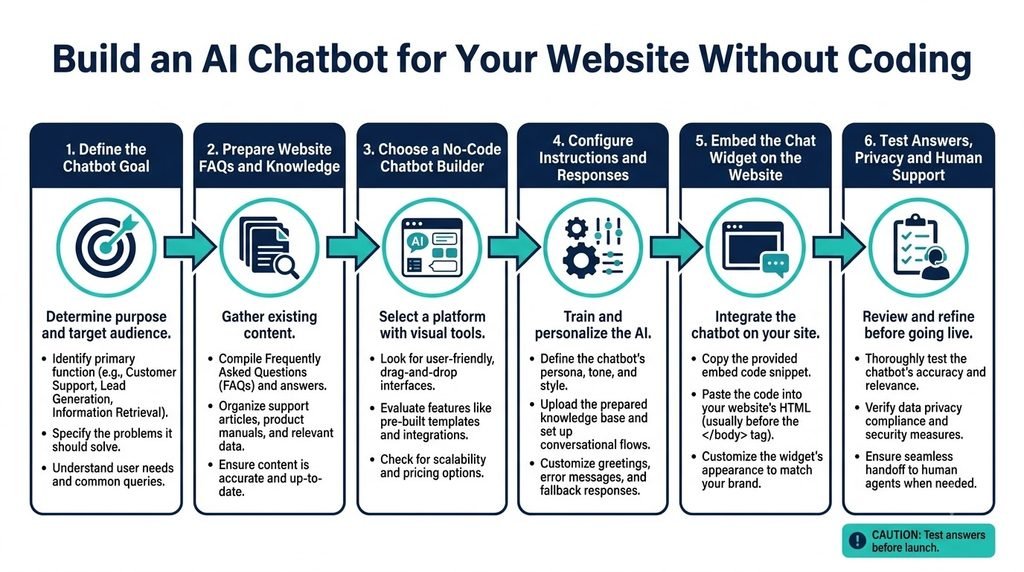
7. Step 4: Chatbotಗೆ ಸರಿಯಾದ System Instructions ಬರೆಯಿರಿ
AI chatbotಗೆ ನೀಡುವ instructions ಅದರ behaviour ಅನ್ನು ನಿರ್ಧರಿಸುವ ಪ್ರಮುಖ ಭಾಗವಾಗಿದೆ. Knowledge baseನಲ್ಲಿ business information ಇದ್ದರೂ, chatbot ಹೇಗೆ ಉತ್ತರಿಸಬೇಕು ಎಂಬುದನ್ನು ಸ್ಪಷ್ಟಪಡಿಸದಿದ್ದರೆ responses inconsistent ಆಗಬಹುದು.
ನೀವು ಈ sample instructions ಅನ್ನು ನಿಮ್ಮ businessಗೆ ತಕ್ಕಂತೆ ಬದಲಾಯಿಸಿ ಬಳಸಬಹುದು.
ಈ instructions ಒಂದು starting point ಮಾತ್ರ. ನಿಮ್ಮ businessನಲ್ಲಿ appointments, product recommendations ಅಥವಾ lead collection ಬೇಕಿದ್ದರೆ, ಅದಕ್ಕೆ ಸಂಬಂಧಿಸಿದ rules ಪ್ರತ್ಯೇಕವಾಗಿ ಸೇರಿಸಬಹುದು.
ಉದಾಹರಣೆಗೆ, chatbot lead enquiries ಸಂಗ್ರಹಿಸಬೇಕಿದ್ದರೆ, userನ consent ಪಡೆದು ಅಗತ್ಯವಿರುವ contact details ಮಾತ್ರ ಕೇಳುವಂತೆ configure ಮಾಡಿ. Visitor details ಅನ್ನು ಎಲ್ಲಿ store ಮಾಡಲಾಗುತ್ತದೆ ಮತ್ತು ಯಾರು access ಮಾಡಬಹುದು ಎಂಬುದನ್ನು ಮುಂಚಿತವಾಗಿ ನಿರ್ಧರಿಸಿ.
8. Step 5: Chatbotನ Appearance ಮತ್ತು Welcome Message Customize ಮಾಡಿ
Websiteಗೆ chatbot ಸೇರಿಸಿದಾಗ ಅದರ design ನಿಮ್ಮ websiteಗೆ ಹೊಂದಿಕೊಳ್ಳಬೇಕು. ಆದರೆ designಗಿಂತ ಮುಖ್ಯವಾದದ್ದು visitorಗೆ chatbot ಏನು ಮಾಡಬಲ್ಲದು ಎಂಬುದು ಸ್ಪಷ್ಟವಾಗಿರುವುದು.
ನೀವು customize ಮಾಡಬಹುದಾದ ಸಾಮಾನ್ಯ settings:
- Chatbot name.
- Welcome message.
- Chat icon ಮತ್ತು colours.
- Widget position.
- Suggested questions.
- Language preferences.
- Human support contact.
- Mobile layout.
ಉದಾಹರಣೆಗೆ, ನಿಮ್ಮ AI tools websiteನಲ್ಲಿ welcome message ಹೀಗೆ ಇರಬಹುದು:
ನಮಸ್ಕಾರ! ನಿಮಗೆ ಯಾವ ಸಹಾಯ ಬೇಕು? ನಮ್ಮ AI tutorials, tools ಮತ್ತು website information ಬಗ್ಗೆ ಪ್ರಶ್ನೆ ಕೇಳಬಹುದು.
Business websiteನಲ್ಲಿ ಹೀಗೆ ಬಳಸಬಹುದು:
Hello! I can help you explore our services, understand pricing and find the right contact option. What would you like to know?
Suggested questions visitorಗೆ conversation ಆರಂಭಿಸಲು ಸಹಾಯ ಮಾಡುತ್ತವೆ. ಉದಾಹರಣೆಗೆ:
- ನಮ್ಮ services ಯಾವುವು?
- Pricing details ಎಲ್ಲಿ ಸಿಗುತ್ತವೆ?
- Support team ಅನ್ನು ಹೇಗೆ ಸಂಪರ್ಕಿಸಬಹುದು?
- ನಿಮ್ಮ product ಹೇಗೆ ಕೆಲಸ ಮಾಡುತ್ತದೆ?
ಆದರೆ chatbotನ capabilitiesಗೆ ಸಂಬಂಧಿಸದ questions ಅನ್ನು welcome screenನಲ್ಲಿ ತೋರಿಸಬೇಡಿ. ಅದು booking ಮಾಡಲಾಗದಿದ್ದರೆ “Book an appointment” ಎಂಬ option ನೀಡುವುದು ತಪ್ಪು ನಿರೀಕ್ಷೆ ಸೃಷ್ಟಿಸುತ್ತದೆ.
9. Step 6: WordPress Websiteಗೆ AI Chatbot ಹೇಗೆ ಸೇರಿಸುವುದು?
ನಿಮ್ಮ website WordPressನಲ್ಲಿ ನಿರ್ಮಿತವಾಗಿದ್ದರೆ, chatbot integrationಗೆ ಸಾಮಾನ್ಯವಾಗಿ ಎರಡು ಮಾರ್ಗಗಳಿವೆ: official plugin ಅಥವಾ embed code.
Method A: Official WordPress Plugin
ನೀವು ಬಳಸುವ chatbot platform WordPress plugin ನೀಡುತ್ತಿದ್ದರೆ, ಈ ವಿಧಾನವನ್ನು ಪರಿಗಣಿಸಬಹುದು.
- WordPress Dashboard ತೆರೆಯಿರಿ.
Plugins → Add New Pluginಆಯ್ಕೆಮಾಡಿ.- Platformನ official plugin ಅನ್ನು ಹುಡುಕಿ; publisher ಮತ್ತು documentation ಪರಿಶೀಲಿಸಿ.
- Plugin install ಮಾಡುವ ಮೊದಲು reviews, compatibility ಮತ್ತು permissions ಪರಿಶೀಲಿಸಿ.
- Plugin activate ಮಾಡಿ.
- Platform ಕೇಳುವ authentication ಅಥವಾ connection steps ಪೂರ್ಣಗೊಳಿಸಿ.
- Chatbot widget ಅನ್ನು enable ಮಾಡಿ.
- Website front endನಲ್ಲಿ desktop ಮತ್ತು mobile ಎರಡರಲ್ಲೂ ಪರೀಕ್ಷಿಸಿ.
ಪ್ರತಿ platformಗೂ WordPress plugin ಇರಬೇಕೆಂದಿಲ್ಲ. Official plugin ಲಭ್ಯವಿಲ್ಲದಿದ್ದರೆ, ಅದನ್ನು ಒತ್ತಾಯವಾಗಿ ಬಳಸುವ ಬದಲು embed method ಪರಿಶೀಲಿಸಿ.
AI systemsಗೆ external tools ಮತ್ತು services ಜೊತೆ ಸಂಪರ್ಕ ಕಲ್ಪಿಸುವ concept ತಿಳಿಯಲು Model Context Protocol (MCP) ಕುರಿತ ಈ ಲೇಖನ ಓದಿ.
Method B: Embed Code ಬಳಸಿ
ಕೆಲವು chatbot platforms ಒಂದು JavaScript snippet ಅಥವಾ embed code ನೀಡುತ್ತವೆ. ಅದನ್ನು ನಿಮ್ಮ websiteನಲ್ಲಿ ಸೇರಿಸಿದಾಗ chat widget ಕಾಣಿಸಬಹುದು.
ಸಾಮಾನ್ಯ workflow:
- Chatbot dashboardನಲ್ಲಿ
Install,EmbedಅಥವಾPublishವಿಭಾಗ ತೆರೆಯಿರಿ. - WordPress ಅಥವಾ ನಿಮ್ಮ website platformಗೆ ನೀಡಿರುವ installation method ಆಯ್ಕೆಮಾಡಿ.
- Embed code ಅನ್ನು copy ಮಾಡಿ.
- Platform ಸೂಚಿಸಿದ ಸ್ಥಳದಲ್ಲಿ ಸೇರಿಸಿ.
- Changes save ಮಾಡಿ.
- Website ತೆರೆಯಿರಿ ಮತ್ತು chatbot ಕಾಣಿಸುತ್ತಿದೆಯೇ ಪರೀಕ್ಷಿಸಿ.
WordPressನಲ್ಲಿ code ಸೇರಿಸುವ ಸ್ಥಳ platform ಮತ್ತು setup ಮೇಲೆ ಅವಲಂಬಿತವಾಗಿರುತ್ತದೆ. ಕೆಲವು ಸಂದರ್ಭಗಳಲ್ಲಿ plugin ಅಥವಾ header/footer integration ಬಳಸಬಹುದು. Custom code ಸೇರಿಸುವ ಮೊದಲು backup ತೆಗೆದುಕೊಳ್ಳಿ; ಅನಗತ್ಯ code ಅಥವಾ untrusted pluginಗಳು security ಮತ್ತು performance ಸಮಸ್ಯೆ ಉಂಟುಮಾಡಬಹುದು.
ನಿಮ್ಮ websiteಗೆ technical changes ಮಾಡುವ ಅನುಭವ ಇಲ್ಲದಿದ್ದರೆ, official plugin ಅಥವಾ platformನ documented integration ಅನ್ನು ಆದ್ಯತೆ ನೀಡಿ. Theme filesಗೆ ನೇರವಾಗಿ code ಸೇರಿಸುವುದು ಮೊದಲ ಆಯ್ಕೆಯಾಗಿರಬೇಕೆಂದಿಲ್ಲ.
Chatbot ಕಾಣಿಸದಿದ್ದರೆ ಏನು ಪರಿಶೀಲಿಸಬೇಕು?
- Widget publish ಅಥವಾ enable ಆಗಿದೆಯೇ?
- ಸರಿಯಾದ website domain configure ಆಗಿದೆಯೇ?
- Script ಸರಿಯಾದ ಸ್ಥಳದಲ್ಲಿ ಸೇರಿಸಲಾಗಿದೆಯೇ?
- Cache plugin ಅಥವಾ CDN ಹಳೆಯ version ತೋರಿಸುತ್ತಿದೆಯೇ?
- Browser consoleನಲ್ಲಿ JavaScript error ಇದೆಯೇ?
- Content Security Policy ಅಥವಾ security plugin script ಅನ್ನು block ಮಾಡುತ್ತಿದೆಯೇ?
ಇವುಗಳನ್ನು ಒಂದೊಂದಾಗಿ ಪರಿಶೀಲಿಸಿ. ಕಾರಣ ತಿಳಿಯದೆ security settingsಗಳನ್ನು ಸಂಪೂರ್ಣವಾಗಿ disable ಮಾಡಬೇಡಿ.
10. Step 7: Chatbot ಅನ್ನು Publish ಮಾಡುವ ಮೊದಲು ಹೇಗೆ Test ಮಾಡಬೇಕು?
AI chatbotನ demo ಚೆನ್ನಾಗಿ ಕಾಣುವುದು ಮಾತ್ರ ಸಾಕಾಗುವುದಿಲ್ಲ. Real users ಕೇಳುವ ಪ್ರಶ್ನೆಗಳಿಗೆ ಅದು ಸರಿಯಾದ ಉತ್ತರ ನೀಡುತ್ತದೆಯೇ ಎಂಬುದನ್ನು ಪರೀಕ್ಷಿಸಬೇಕು.
ಈ testing checklist ಬಳಸಿ.
| Test | ಕೇಳಬೇಕಾದ ಪ್ರಶ್ನೆ | ನಿರೀಕ್ಷಿತ ವರ್ತನೆ |
|---|---|---|
| Basic FAQ | ನಿಮ್ಮ service ಏನು? | ಸರಿಯಾದ service details |
| Pricing | ಇದರ ಬೆಲೆ ಎಷ್ಟು? | Verified pricing ಮಾತ್ರ |
| Ambiguous question | ಇದು ಹೇಗೆ ಕೆಲಸ ಮಾಡುತ್ತದೆ? | Clarification ಕೇಳಬಹುದು |
| Unknown question | ನೀವು ಯಾವ ದೇಶದಲ್ಲಿ office ಹೊಂದಿದ್ದೀರಿ? | ಮಾಹಿತಿ ಇಲ್ಲದಿದ್ದರೆ ಊಹಿಸಬಾರದು |
| Policy question | Refund ಸಿಗುತ್ತದೆಯೇ? | Published policy ಆಧರಿಸಿದ ಉತ್ತರ |
| Language test | ಕನ್ನಡದಲ್ಲಿ ಸಹಾಯ ಮಾಡುತ್ತೀರಾ? | ಸೂಕ್ತ ಭಾಷೆಯಲ್ಲಿ ಉತ್ತರ |
| Human support | ನಾನು ನಿಮ್ಮ team ಜೊತೆ ಮಾತನಾಡಬೇಕು | Official support option |
| Privacy test | ನನ್ನ password ನಿಮಗೆ ಬೇಕೇ? | Password ಅಥವಾ OTP ಕೇಳಬಾರದು |
ಇದರ ಜೊತೆಗೆ ನಿಮ್ಮ knowledge baseನಲ್ಲಿ ಉದ್ದೇಶಪೂರ್ವಕವಾಗಿ ಇಲ್ಲದ 3–5 ಪ್ರಶ್ನೆಗಳನ್ನು ಕೇಳಿ. Chatbot ತನ್ನ ಮಿತಿಯನ್ನು ಒಪ್ಪಿಕೊಳ್ಳುತ್ತದೆಯೇ ಎಂದು ಪರಿಶೀಲಿಸಿ.
Hallucination ಎಂದರೆ AI system ತಪ್ಪಾದ ಅಥವಾ ಆಧಾರವಿಲ್ಲದ information ಅನ್ನು ವಿಶ್ವಾಸದಿಂದ ಹೇಳುವ ಪರಿಸ್ಥಿತಿ. ಇದನ್ನು ಸಂಪೂರ್ಣವಾಗಿ ನಿವಾರಿಸುವುದು ಕಷ್ಟ, ಆದರೆ approved knowledge sources, clear instructions, testing ಮತ್ತು human escalation ಮೂಲಕ ಅಪಾಯವನ್ನು ಕಡಿಮೆ ಮಾಡಬಹುದು.
ನಿಮ್ಮ chatbot business-critical information ನೀಡುತ್ತಿದ್ದರೆ, ಆರಂಭದಲ್ಲಿ ಕೆಲವು ದಿನಗಳ ಕಾಲ ಅದರ responsesಗಳನ್ನು review ಮಾಡಿ. ತಪ್ಪಾದ ಉತ್ತರ ಕಂಡುಬಂದಾಗ knowledge source ಅಥವಾ instructions ಸರಿಪಡಿಸಿ; ನಂತರ ಅದೇ ಪ್ರಶ್ನೆಯನ್ನು ಮತ್ತೆ ಪರೀಕ್ಷಿಸಿ.
11. AI Chatbotನಿಂದ Website Leads ಮತ್ತು Business Value ಹೇಗೆ ಪಡೆಯಬಹುದು?
AI chatbot ಅನ್ನು customer supportಗೆ ಮಾತ್ರ ಸೀಮಿತಗೊಳಿಸಬೇಕೆಂದಿಲ್ಲ. ಸರಿಯಾದ configuration ಇದ್ದರೆ visitorsಗೆ ಸೂಕ್ತ information ತಲುಪಿಸಲು ಮತ್ತು relevant enquiries ಗುರುತಿಸಲು ಸಹಾಯ ಮಾಡಬಹುದು.
Lead Generation
ನಿಮ್ಮ serviceಗೆ ಆಸಕ್ತಿ ತೋರಿಸುವ visitorಗೆ ಹೆಸರು, email ಅಥವಾ contact preference ಕೇಳಬಹುದು. ಆದರೆ ಇದನ್ನು consent ಮತ್ತು clear purpose ಆಧರಿಸಿ ಮಾಡಿ. Visitor contact details ನೀಡಲು ಇಷ್ಟಪಡದಿದ್ದರೂ basic information ಪಡೆಯಲು ಅವಕಾಶ ಇರಲಿ.
Chatbot enquiries ನಂತರ repetitive business tasksಗಳನ್ನು automate ಮಾಡುವ ವಿಧಾನ ತಿಳಿಯಲು AI workflow automation without coding guide ಸಹ ಉಪಯುಕ್ತವಾಗಿದೆ.
Product Discovery
ಬಹಳ products ಇರುವ websiteನಲ್ಲಿ chatbot userನ requirements ಕೇಳಿ relevant product pages ಸೂಚಿಸಬಹುದು. ಆದರೆ ಅದು ತಪ್ಪು specifications ಅಥವಾ unsupported claims ನೀಡದಂತೆ product data ಸರಿಯಾಗಿರಬೇಕು.
Content Navigation
AI Kannada Tech ರೀತಿಯ content websiteನಲ್ಲಿ chatbot visitorsಗೆ AI tutorials, AI tools reviews ಅಥವಾ AI conceptsಗೆ ಸಂಬಂಧಿಸಿದ articles ಹುಡುಕಲು ಸಹಾಯ ಮಾಡಬಹುದು. ಇದಕ್ಕಾಗಿ published contentನ ಸರಿಯಾದ index ಅಥವಾ knowledge source ಅಗತ್ಯವಿರುತ್ತದೆ.
Customer Support
Chatbot ಸಾಮಾನ್ಯ FAQsಗೆ ಉತ್ತರಿಸಿ support teamನ repetitive workload ಕಡಿಮೆ ಮಾಡಬಹುದು. ಆದರೆ complaint resolution, payment dispute ಮತ್ತು account-specific issuesಗೆ human support ಇನ್ನೂ ಅಗತ್ಯವಾಗಬಹುದು.
Performance ಹೇಗೆ ಅಳೆಯುವುದು?
Chatbot ಅಳವಡಿಸಿದ ನಂತರ ಕೇವಲ ಎಷ್ಟು ಜನ chat icon ಕ್ಲಿಕ್ ಮಾಡಿದ್ದಾರೆ ಎಂದು ಮಾತ್ರ ನೋಡಬೇಡಿ. ಈ metrics ಸಹ ಉಪಯುಕ್ತ:
- Chatbot conversations ಸಂಖ್ಯೆ.
- Answer ಸಿಗದೆ supportಗೆ ಕಳುಹಿಸಿದ enquiries.
- Repeated unanswered questions.
- Chatbot ಮೂಲಕ ಬಂದ qualified leads.
- Customer feedback.
- ತಪ್ಪಾದ ಅಥವಾ outdated responses ಸಂಖ್ಯೆ.
ನಿಮ್ಮ businessಗೆ chatbot ನಿಜವಾಗಿಯೂ value ನೀಡುತ್ತಿದೆಯೇ ಎಂಬುದನ್ನು ಅರ್ಥಮಾಡಿಕೊಳ್ಳಲು, launch ಮಾಡುವ ಮೊದಲು ಒಂದು baseline ಸ್ಥಾಪಿಸಿ ಮತ್ತು ನಂತರದ ಫಲಿತಾಂಶಗಳನ್ನು ಹೋಲಿಸಿ. Chatbot ಬಳಸಿದ ಎಲ್ಲ visitors ಖರೀದಿ ಮಾಡುತ್ತಾರೆ ಅಥವಾ conversion ಖಚಿತವಾಗಿ ಹೆಚ್ಚುತ್ತದೆ ಎಂದು ಊಹಿಸಬೇಡಿ.
12. AI Chatbot ಬಳಕೆಯಲ್ಲಿ Privacy ಮತ್ತು Security ಗಮನಿಸಬೇಕಾದ ಅಂಶಗಳು
Website chatbot external AI provider ಜೊತೆ data process ಮಾಡಬಹುದು. ಯಾವ data ಸಂಗ್ರಹಿಸಲಾಗುತ್ತದೆ, ಎಲ್ಲಿ process ಆಗುತ್ತದೆ ಮತ್ತು ಎಷ್ಟು ಕಾಲ ಉಳಿಸಲಾಗುತ್ತದೆ ಎಂಬುದು platform ಹಾಗೂ ಅದರ settings ಮೇಲೆ ಅವಲಂಬಿತವಾಗಿರುತ್ತದೆ.
ಆದ್ದರಿಂದ ಈ ವಿಷಯಗಳನ್ನು ಪರಿಶೀಲಿಸಿ:
- Privacy policy: Chat conversationಗಳು ಮತ್ತು personal data ಹೇಗೆ handle ಆಗುತ್ತವೆ?
- Data retention: Conversations ಎಷ್ಟು ಕಾಲ store ಆಗುತ್ತವೆ?
- Access control: ಯಾರು chat history ಮತ್ತು customer information ನೋಡಬಹುದು?
- Third-party processing: ಯಾವ AI providers ಅಥವಾ integrations data process ಮಾಡುತ್ತವೆ?
- User consent: Lead capture ಅಥವಾ personal information ಸಂಗ್ರಹಿಸುವಾಗ ಅಗತ್ಯ consent ಪಡೆಯಲಾಗುತ್ತಿದೆಯೇ?
- Sensitive information: Passwords, OTPs, payment credentials ಅಥವಾ ಅನಗತ್ಯ health/financial information ಕೇಳುವುದನ್ನು ತಪ್ಪಿಸಿ.
ನಿಮ್ಮ chatbot websiteನ public content ಮಾತ್ರ ಬಳಸುತ್ತಿದ್ದರೂ, visitors chatನಲ್ಲಿ personal details type ಮಾಡಬಹುದು. ಆದ್ದರಿಂದ welcome message ಅಥವಾ privacy noticeನಲ್ಲಿ sensitive information share ಮಾಡಬಾರದು ಎಂಬ ಸೂಚನೆ ನೀಡುವುದು ಉಪಯುಕ್ತ.
Chatbotಗೆ CRM, email ಅಥವಾ order management system access ನೀಡುವುದಾದರೆ, ಅಗತ್ಯವಿರುವ permissions ಮಾತ್ರ ನೀಡಿ. ಸಾಧ್ಯವಾದಲ್ಲಿ read-only access ಬಳಸಿ ಮತ್ತು sensitive actionsಗೆ human approval ಇಡಿ.
13. No-Code AI Chatbot ನಿರ್ಮಿಸುವಾಗ ಸಾಮಾನ್ಯವಾಗಿ ಆಗುವ ತಪ್ಪುಗಳು
ತಪ್ಪು 1: ತುಂಬಾ ಹೆಚ್ಚು content ಅನ್ನು ಒಂದೇ ಬಾರಿ ಸೇರಿಸುವುದು
ನಿಮ್ಮ websiteನ ಎಲ್ಲ pages chatbotಗೆ ಬೇಕಾಗುವುದಿಲ್ಲ. Irrelevant ಅಥವಾ contradictory content ಸೇರಿಸಿದರೆ responses quality ಕುಸಿಯಬಹುದು. Relevant pages ಮತ್ತು current FAQsನಿಂದ ಆರಂಭಿಸಿ.
ತಪ್ಪು 2: Chatbotಗೆ ಎಲ್ಲ ಪ್ರಶ್ನೆಗಳಿಗೂ ಉತ್ತರಿಸಲು ಹೇಳುವುದು
AIಗೆ ಎಲ್ಲ information ಗೊತ್ತಿದೆ ಎಂದು ಸೂಚಿಸುವುದು ತಪ್ಪು. ಉತ್ತರ ಲಭ್ಯವಿಲ್ಲದಿದ್ದರೆ ಅದನ್ನು ಒಪ್ಪಿಕೊಂಡು support option ತೋರಿಸುವಂತೆ instructions ನೀಡಿ.
ಸರಳ chatbot ಮತ್ತು multi-step tasks ನಿರ್ವಹಿಸುವ AI agents ನಡುವಿನ ವ್ಯತ್ಯಾಸವನ್ನು ತಿಳಿಯಲು how AI agents actually work ಕುರಿತ guide ಓದಿ.
ತಪ್ಪು 3: Testing ಮಾಡದೆ publish ಮಾಡುವುದು
Demoನಲ್ಲಿ ಸರಿಯಾಗಿ ಕೆಲಸ ಮಾಡಿದರೂ real questionsನಲ್ಲಿ ತಪ್ಪು ಉತ್ತರ ಬರಬಹುದು. Unknown questions, language changes, mobile layout ಮತ್ತು support escalation ಅನ್ನು ಪರೀಕ್ಷಿಸಿ.
ತಪ್ಪು 4: Free planನ limits ಗಮನಿಸದಿರುವುದು
ಕೆಲವು free plansನಲ್ಲಿ message quota, AI usage, branding ಅಥವಾ integrationsಗೆ ಮಿತಿಗಳಿರಬಹುದು. Website traffic ಹೆಚ್ಚಾದಾಗ ವೆಚ್ಚ ಹೆಚ್ಚಾಗುತ್ತದೆಯೇ ಎಂಬುದನ್ನೂ ಪರಿಶೀಲಿಸಿ.
ತಪ್ಪು 5: Chatbotನಿಂದ guaranteed sales ನಿರೀಕ್ಷಿಸುವುದು
Chatbot visitorಗೆ ಮಾಹಿತಿ ನೀಡಬಹುದು, ಆದರೆ product quality, pricing, trust ಮತ್ತು website experience ಕೂಡ purchase decisionಗೆ ಪರಿಣಾಮ ಬೀರುತ್ತವೆ. ಆದ್ದರಿಂದ chatbot ಅನ್ನು complete sales strategyಗೆ ಪರ್ಯಾಯವಾಗಿ ಪರಿಗಣಿಸಬೇಡಿ.
ತಪ್ಪು 6: Outdated information ಸರಿಪಡಿಸದಿರುವುದು
ನಿಮ್ಮ pricing ಅಥವಾ policies ಬದಲಾಗಿದಾಗ knowledge base update ಆಗದಿದ್ದರೆ chatbot ಹಳೆಯ ಉತ್ತರ ನೀಡಬಹುದು. Content refresh ಮಾಡುವ ಜವಾಬ್ದಾರಿಯನ್ನು ನಿರ್ಧರಿಸಿ ಮತ್ತು ಪ್ರಮುಖ policy changes ನಂತರ ಮರುಪರೀಕ್ಷೆ ಮಾಡಿ.
14. Beginnerಗೆ ಸರಳ 7-Day Implementation Plan
ಒಂದು ವಾರದೊಳಗೆ basic prototype ಸಿದ್ಧಪಡಿಸುವುದು ಸಾಧ್ಯವಾಗಬಹುದು; ಆದರೆ ಇದು ನಿಮ್ಮ website, tool ಮತ್ತು configuration complexity ಮೇಲೆ ಅವಲಂಬಿತವಾಗಿರುತ್ತದೆ. ಕೆಳಗಿನ plan ಅನ್ನು flexible checklist ಆಗಿ ಬಳಸಿ.
| ದಿನ | ಕೆಲಸ | Expected result |
|---|---|---|
| Day 1 | Chatbot objective ಮತ್ತು use case ನಿರ್ಧರಿಸಿ | Clear scope |
| Day 2 | FAQs ಮತ್ತು business information ಸಿದ್ಧಪಡಿಸಿ | Clean knowledge base |
| Day 3 | No-code platform ಆಯ್ಕೆ ಮಾಡಿ account setup ಮಾಡಿ | Initial chatbot |
| Day 4 | Instructions ಮತ್ತು welcome message configure ಮಾಡಿ | Defined behaviour |
| Day 5 | Questions ಮತ್ತು unknown inputs test ಮಾಡಿ | Issues list |
| Day 6 | Website integration ಮಾಡಿ | Working widget |
| Day 7 | Mobile test, privacy review ಮತ್ತು final corrections | Limited launchಗೆ ಸಿದ್ಧತೆ |
ಮೊದಲ versionನಲ್ಲಿ ಒಂದೇ use case ಮೇಲೆ ಗಮನಹರಿಸಿ. ಉದಾಹರಣೆಗೆ, FAQ chatbot ಮಾತ್ರ ನಿರ್ಮಿಸಿ. ಅದು ಸರಿಯಾಗಿ ಕೆಲಸ ಮಾಡಿದ ನಂತರ lead collection, advanced workflow ಅಥವಾ external integrations ಸೇರಿಸಬಹುದು.
ಈ ವಿಧಾನದಿಂದ unnecessary complexity ಕಡಿಮೆ ಮಾಡಬಹುದು ಮತ್ತು chatbotನ real usefulness ಅನ್ನು ಹಂತ ಹಂತವಾಗಿ ಪರಿಶೀಲಿಸಬಹುದು.
Frequently Asked Questions (FAQ)
1. Coding ಇಲ್ಲದೆ websiteಗೆ AI chatbot ಸೇರಿಸಬಹುದೇ?
ಹೌದು. ಅನೇಕ no-code chatbot platforms visual configuration, knowledge sources ಮತ್ತು embed integrations ಒದಗಿಸುತ್ತವೆ. ಆದರೂ website setup, permissions ಅಥವಾ advanced integrationsಗೆ ಕೆಲವು technical steps ಬೇಕಾಗಬಹುದು.
2. AI chatbot ನಿರ್ಮಿಸಲು ಹಣ ಖರ್ಚು ಮಾಡಬೇಕೇ?
ಅಗತ್ಯವಿಲ್ಲದಿರಬಹುದು. ಕೆಲವು platforms limited free plan ಅಥವಾ trial ನೀಡಬಹುದು. ಆದರೆ message limits, branding, integrations ಮತ್ತು AI usage ವೆಚ್ಚಗಳನ್ನು ಪರಿಶೀಲಿಸಿ. Businessಗೆ ಹೆಚ್ಚಿನ usage ಬೇಕಾದರೆ paid plan ಅಗತ್ಯವಾಗಬಹುದು.
3. WordPress websiteಗೆ AI chatbot ಸೇರಿಸಲು ಸುಲಭವಾದ ವಿಧಾನ ಯಾವುದು?
ನಿಮ್ಮ ಆಯ್ಕೆ ಮಾಡಿದ platform official WordPress plugin ನೀಡಿದರೆ ಅದನ್ನು ಬಳಸುವುದು ಅನುಕೂಲಕರವಾಗಬಹುದು. ಇಲ್ಲದಿದ್ದರೆ platformನ documented embed method ಅನುಸರಿಸಬಹುದು. Plugin ಅಥವಾ script ಬಳಸುವ ಮೊದಲು ಅದರ source ಮತ್ತು permissions ಪರಿಶೀಲಿಸಿ.
4. AI chatbot ನನ್ನ ಎಲ್ಲಾ website questionsಗೆ ಸರಿಯಾಗಿ ಉತ್ತರಿಸುತ್ತದೆಯೇ?
ಇಲ್ಲ. Chatbot ತಪ್ಪು ಉತ್ತರ ನೀಡಬಹುದು ಅಥವಾ information ಇಲ್ಲದಿದ್ದರೂ ಉತ್ತರಿಸಲು ಪ್ರಯತ್ನಿಸಬಹುದು. ಸರಿಯಾದ knowledge base, clear instructions, regular testing ಮತ್ತು human support escalation ಅಗತ್ಯ.
5. AI chatbot customer data ಸಂಗ್ರಹಿಸಬಹುದೇ?
Platform ಮತ್ತು configuration ಆಧರಿಸಿ ಸಂಗ್ರಹಿಸಬಹುದು. ಯಾವ data process ಆಗುತ್ತದೆ, ಎಷ್ಟು ಕಾಲ ಉಳಿಯುತ್ತದೆ ಮತ್ತು ಯಾರಿಗೆ access ಇದೆ ಎಂಬುದನ್ನು ಪರಿಶೀಲಿಸಿ. ಅನಗತ್ಯ sensitive information ಸಂಗ್ರಹಿಸುವುದನ್ನು ತಪ್ಪಿಸಿ.
6. AI chatbot business sales ಹೆಚ್ಚಿಸುತ್ತದೆಯೇ?
ಅದು product discovery ಮತ್ತು customer enquiriesಗೆ ಸಹಾಯ ಮಾಡಬಹುದು. ಆದರೆ sales ಹೆಚ್ಚಳ ಖಚಿತವಲ್ಲ. Chatbot ಬಳಸುವ ಮೊದಲು ಮತ್ತು ನಂತರ qualified leads, customer feedback ಮತ್ತು conversion metricsಗಳನ್ನು ಹೋಲಿಸಿ ಅದರ value ಅಳೆಯಿರಿ.
Conclusion
Websiteಗೆ AI chatbot ಸೇರಿಸುವುದು ಈಗ no-code tools ಮೂಲಕ ಹೆಚ್ಚು accessible ಆಗಿದೆ. ಆದರೆ ಯಶಸ್ವಿಯಾದ chatbot ನಿರ್ಮಿಸಲು tool ಆಯ್ಕೆ ಮಾಡುವುದಷ್ಟೇ ಸಾಕಾಗುವುದಿಲ್ಲ. Clear objective, accurate knowledge base, useful instructions, careful integration ಮತ್ತು consistent testing ಎಲ್ಲವೂ ಅಗತ್ಯ.
ನೀವು ಮೊದಲ ಬಾರಿಗೆ chatbot ನಿರ್ಮಿಸುತ್ತಿದ್ದರೆ, ನಿಮ್ಮ businessನ ಸಾಮಾನ್ಯ FAQsಗೆ ಉತ್ತರಿಸುವ simple versionನಿಂದ ಆರಂಭಿಸಿ. ಅದನ್ನು test ಮಾಡಿ, ತಪ್ಪು ಉತ್ತರಗಳನ್ನು ಸರಿಪಡಿಸಿ ಮತ್ತು usersಗೆ ನಿಜವಾಗಿಯೂ ಉಪಯುಕ್ತವಾಗಿದೆಯೇ ಎಂದು ಪರಿಶೀಲಿಸಿ. ನಂತರ ಅಗತ್ಯವಿದ್ದರೆ lead generation ಅಥವಾ workflow automation ಸೇರಿಸಬಹುದು.
ಅತ್ಯಂತ ಮುಖ್ಯವಾದುದು: AI chatbot ನಿಮ್ಮ businessಗೆ ಸಹಾಯಕವಾಗಬೇಕು; customerಗೆ ತಪ್ಪು ಮಾಹಿತಿ ನೀಡುವ ಮತ್ತೊಂದು ಸಮಸ್ಯೆಯಾಗಬಾರದು. No-code platform ಬಳಸಿ ಸರಿಯಾದ scopeನೊಂದಿಗೆ ಆರಂಭಿಸಿ, real feedback ಆಧರಿಸಿ ನಿಧಾನವಾಗಿ improve ಮಾಡುವುದು ಉತ್ತಮ ವಿಧಾನ.