Best AI Video Generators Compared: Features, Pricing, Quality and Best Use Cases (2026)
Introduction
2026ರಲ್ಲಿ video creation landscape ತುಂಬಾ ವೇಗವಾಗಿ ಬದಲಾಗುತ್ತಿದೆ. ಹಿಂದೆ ಒಂದು professional video ಮಾಡಲು camera, lighting, microphone, editor, stock footage ಮತ್ತು ಹಲವು ಗಂಟೆಗಳ editing ಬೇಕಾಗುತ್ತಿತ್ತು. ಈಗ AI Video Generator tools ಮೂಲಕ text prompt, script ಅಥವಾ imageನಿಂದ video productionನ ಹಲವು stages ಅನ್ನು automate ಮಾಡಬಹುದು.
ಆದರೆ ಇಲ್ಲಿ ಒಂದು important problem ಇದೆ. Marketನಲ್ಲಿ AI video tools ತುಂಬಾ ಹೆಚ್ಚಾಗಿವೆ. Runway, HeyGen, InVideo AI, Pictory, Synthesia, VEED ಮತ್ತು Adobe Firefly ಹೀಗೆ ಪ್ರತಿಯೊಂದು platform ಕೂಡ ತನ್ನದೇ workflow ಮತ್ತು AI capabilities ಹೊಂದಿದೆ.
ಹೀಗಾಗಿ “ಯಾವುದು best AI video generator?” ಎನ್ನುವುದು simple question ಅಲ್ಲ.
ಒಂದು tool cinematic AI clipsಗೆ strong ಆಗಿರಬಹುದು. ಮತ್ತೊಂದು talking-avatar videosಗೆ better ಆಗಿರಬಹುದು. ಇನ್ನೊಂದು YouTube scriptನಿಂದ complete video ಮಾಡಬಹುದು. ಇನ್ನೊಂದು existing long video ಅನ್ನು shorts ಮತ್ತು social-media contentಗೆ repurpose ಮಾಡಲು ಹೆಚ್ಚು useful ಆಗಿರಬಹುದು.
ಅದಕ್ಕಾಗಿ ಈ comparisonನಲ್ಲಿ ನಾವು ಕೇವಲ features list ನೋಡುವುದಿಲ್ಲ. AI Video Generator ಆಯ್ಕೆ ಮಾಡುವಾಗ video quality, generation control, editing workflow, avatars, voice, languages, pricing, credits, output resolution ಮತ್ತು practical use cases ಎಲ್ಲವನ್ನೂ compare ಮಾಡುತ್ತೇವೆ.
Pricing ಕೂಡ September 2026ರಲ್ಲಿ official sourcesನಲ್ಲಿ ಕಾಣಿಸುತ್ತಿರುವ plans ಆಧರಿಸಿದೆ. AI toolsನ pricing ಮತ್ತು credits frequently ಬದಲಾಗಬಹುದಾದ್ದರಿಂದ purchase ಮಾಡುವ ಮೊದಲು official pricing page check ಮಾಡುವುದು ಮುಖ್ಯ.
AI Video Generator ಎಂದರೇನು?
AI Video Generator ಎಂದರೆ text, image, script ಅಥವಾ existing media input ಅನ್ನು ಬಳಸಿಕೊಂಡು AI ಮೂಲಕ video content create ಅಥವಾ transform ಮಾಡುವ software.
ಇದು ಒಂದೇ technology ಅಲ್ಲ. Different platforms different approaches ಬಳಸುತ್ತವೆ.
ಕೆಲವು tools:
- Text-to-video
- Image-to-video
- Script-to-video
- AI avatars
- AI voiceovers
- Video translation
- Automatic subtitles
- AI editing
- Background removal
- Video repurposing
- Generative video effects
ಇವುಗಳಲ್ಲಿ ಕೆಲವು tools ಒಂದು specific taskನಲ್ಲಿ strong ಆಗಿದ್ದರೆ, ಕೆಲವು complete video workflow ನೀಡುತ್ತವೆ.
ಉದಾಹರಣೆಗೆ, cinematic product shot ಬೇಕಾದರೆ generative video model useful. ಆದರೆ ಒಂದು 10-minute educational YouTube videoಗೆ script, voiceover, stock footage, captions ಮತ್ತು editing ಬೇಕಾದರೆ all-in-one platform ಹೆಚ್ಚು practical ಆಗಬಹುದು.
ಇದರಿಂದ best AI Video Generator ಹುಡುಕುವಾಗ toolನ popularityಗಿಂತ ನಿಮ್ಮ actual workflow ಮುಖ್ಯ.
2026ರಲ್ಲಿ AI Video Generators ಅನ್ನು ಹೇಗೆ Compare ಮಾಡಬೇಕು?
AI video tool ಆಯ್ಕೆ ಮಾಡುವಾಗ ನಾನು ಈ criteriaಗಳನ್ನು ಮುಖ್ಯವಾಗಿ ನೋಡುತ್ತೇನೆ.
1. Video Quality
Output realistic ಆಗಿದೆಯೇ? Motion natural ಆಗಿದೆಯೇ? Human hands, faces, objects ಮತ್ತು camera movementನಲ್ಲಿ artifacts ಎಷ್ಟು ಇವೆ?
2. Prompt Control
ನೀವು scene, camera movement, subject ಮತ್ತು motion ಅನ್ನು ಎಷ್ಟು precisely control ಮಾಡಬಹುದು?
3. Editing Workflow
Generation ನಂತರ video edit ಮಾಡಲು ಬೇರೆ software ಬೇಕೇ ಅಥವಾ ಅದೇ platformನಲ್ಲಿ editing ಮಾಡಬಹುದೇ?
4. AI Avatars
Talking presenter, digital twin ಅಥವಾ training video ಬೇಕಾದರೆ avatar quality ಮತ್ತು voice quality ಮುಖ್ಯ.
5. Voice and Language Support
International creatorsಗೆ languages ಮತ್ತು voice cloning ಬಹಳ important.
6. Credits ಮತ್ತು Pricing
Monthly subscription cheap ಆಗಿದೆ ಎಂದು ಮಾತ್ರ ಸಾಕಾಗುವುದಿಲ್ಲ. Actual video generationಗೆ ಎಷ್ಟು credits consume ಆಗುತ್ತವೆ ಎಂಬುದು ನೋಡಬೇಕು.
7. Commercial Use
YouTube, client projects, advertising ಅಥವಾ business useಗೆ generated content ಬಳಸಲು licensing terms ಏನು ಎಂಬುದನ್ನು ಪರಿಶೀಲಿಸಬೇಕು.
Best AI Video Generators Compared
1. Runway — Best for Creative AI Video Generation
Runway 2026ರಲ್ಲಿ creative AI video generationಗಾಗಿ ಪ್ರಮುಖ platformsಗಳಲ್ಲಿ ಒಂದಾಗಿದೆ. ಇದರ latest Gen-4.5 model text-to-video ಮತ್ತು image-to-video workflows support ಮಾಡುತ್ತದೆ. Runway ಪ್ರಕಾರ Gen-4.5 complex instructions, camera choreography, scene composition ಮತ್ತು motion ಅನ್ನು handle ಮಾಡಲು design ಮಾಡಲಾಗಿದೆ. Gen-4.5 generation 2–10 second clips ಮತ್ತು 720p output support ಮಾಡುತ್ತದೆ.
ಇದರ biggest advantage creative control.
ನೀವು ಒಂದು cinematic scene create ಮಾಡಬೇಕೆಂದರೆ promptನಲ್ಲಿ camera movement, subject movement, atmosphere ಮತ್ತು timing ಬಗ್ಗೆ detail ಕೊಡಬಹುದು. Image-to-video workflowನಲ್ಲಿ already-created imageಗೆ motion ಸೇರಿಸುವುದು ಕೂಡ useful.
Content creatorsಗೆ ಇದು ವಿಶೇಷವಾಗಿ useful. ಉದಾಹರಣೆಗೆ, ಒಂದು YouTube thumbnail ಅಥವಾ AI-generated image ಅನ್ನು short cinematic intro clip ಆಗಿ animate ಮಾಡಬಹುದು.
ಆದರೆ Runwayನಲ್ಲಿ ಒಂದು important consideration ಇದೆ: credits.
2026ರಲ್ಲಿ Runway plans credit-based model ಕಡೆಗೆ ಹೆಚ್ಚು shift ಆಗಿವೆ. Current information ಪ್ರಕಾರ Free planನಲ್ಲಿ one-time 125 credits ಸಿಗುತ್ತವೆ. Standardನಲ್ಲಿ 625 monthly credits, Proನಲ್ಲಿ 2,250, Maxನಲ್ಲಿ 9,500 credits ಇದೆ. Runway ಕೂಡ Unlimited plan ಅನ್ನು Max planನಿಂದ replace ಮಾಡುತ್ತಿದೆ; legacy Unlimited subscriptions November 30, 2026ರವರೆಗೆ transition periodನಲ್ಲಿ ಇವೆ.
Gen-4.5 video generation 12 credits per second ಬಳಸುತ್ತದೆ. ಅಂದರೆ high-quality generative clips repeatedly create ಮಾಡಿದರೆ credits relatively quickly consume ಆಗಬಹುದು.
Best for
- Cinematic AI videos
- Product visuals
- Creative storytelling
- YouTube intros
- Short-form visual content
- Image-to-video animation
- Experimental filmmaking
Limitation
Long-form YouTube videos ಅನ್ನು complete end-to-end workflowನಲ್ಲಿ create ಮಾಡಲು Runway alone always practical ಆಗುವುದಿಲ್ಲ. ಇದು generative visual creation ಕಡೆ ಹೆಚ್ಚು strong.
2. HeyGen — Best for AI Avatar and Presenter Videos
ನಿಮಗೆ camera ಮುಂದೆ appear ಆಗದೆ presenter-style videos create ಮಾಡಬೇಕಾದರೆ HeyGen ಬಹಳ relevant option.
HeyGenನ core strength AI avatars, voice generation, translation ಮತ್ತು presenter videos. ನೀವು script type ಮಾಡಿ avatar select ಮಾಡಿದ ನಂತರ presenter-style video generate ಮಾಡಬಹುದು.
Current official pricing ಪ್ರಕಾರ Free plan $0/monthನಲ್ಲಿ ತಿಂಗಳಿಗೆ 3 videos, ಪ್ರತಿಯೊಂದೂ 1 minuteವರೆಗೆ generate ಮಾಡಲು ಅವಕಾಶವಿದೆ. Creator plan $29/month ಮತ್ತು annual billingನಲ್ಲಿ $24/month equivalent ಆಗಿದೆ; ಅದರಲ್ಲಿ 600 credits, 1080p export, videos up to 30 minutes, watermark removal, voice cloning ಮತ್ತು 175+ languages/dialects ಸೇರಿವೆ. Pro $49/monthನಲ್ಲಿ 1,000 credits ಮತ್ತು 4K export ಸಿಗುತ್ತದೆ.
ಇದು YouTube creatorsಗೆ especially useful.
ಒಬ್ಬ creatorಗೆ “AI tool tutorial” video ಮಾಡಬೇಕಿದೆ ಎಂದು ಊಹಿಸಿ. Camera setup, lighting ಅಥವಾ recording ಇಲ್ಲದೆ script ಬರೆಯಬಹುದು, AI presenter select ಮಾಡಬಹುದು ಮತ್ತು voice સાથે video generate ಮಾಡಬಹುದು.
Business sideನಲ್ಲಿ training videos, product explainers, onboarding videos ಮತ್ತು multilingual marketing videos ಕೂಡ practical use cases.
HeyGenನಲ್ಲಿ languages ದೊಡ್ಡ advantage. English ಮಾತ್ರವಲ್ಲದೆ multiple languages ಮತ್ತು dialects support ಮಾಡುವುದರಿಂದ international audienceಗೆ content localize ಮಾಡಲು ಸಾಧ್ಯ.
ಆದರೆ avatar-based video ಮತ್ತು cinematic generative video ಒಂದೇ category ಅಲ್ಲ. HeyGenನಲ್ಲಿ realistic presenter video ಬೇಕಾದಾಗ value ಹೆಚ್ಚು. ಆದರೆ fantasy scene, cinematic environment ಅಥವಾ complex action sequence generate ಮಾಡಲು Runway ರೀತಿಯ generative video platform ಹೆಚ್ಚು suitable ಆಗಬಹುದು.
Best for
- AI presenter videos
- YouTube explainers
- Training videos
- Business presentations
- Multilingual videos
- Marketing videos
- AI avatar content
Limitation
ನಿಮ್ಮ main requirement cinematic storytelling ಅಥವಾ highly controlled generative scenes ಆಗಿದ್ದರೆ avatar-first workflow ನಿಮಗೆ ideal ಆಗದೇ ಇರಬಹುದು.
3. InVideo AI — Best for Fast Script-to-Video Creation
InVideo AIಯ strength speed ಮತ್ತು complete content workflow.
ನೀವು ಒಂದು topic ಅಥವಾ script ನೀಡಿದಾಗ AI-based workflow ಮೂಲಕ video structure, scenes, stock footage, voiceover ಮತ್ತು editing elements combine ಮಾಡಲು ಇದು useful.
Current pricing pageನಲ್ಲಿ annual billingನಲ್ಲಿ Starter plan $20 per seat/month ಎಂದು ತೋರಿಸಲಾಗುತ್ತಿದೆ ಮತ್ತು 400 credits/month ನೀಡುತ್ತದೆ. Planನಲ್ಲಿ AI generation capabilities, editor, stock footage ಮತ್ತು selected AI models access ಮುಂತಾದವು ಇವೆ; exact model availability planನಿಂದ planಗೆ ಬದಲಾಗಬಹುದು.
ಇದರ biggest advantage ಎಂದರೆ creatorಗೆ video productionನ ಹಲವು steps ಒಂದೇ environmentನಲ್ಲಿ handle ಮಾಡುವ ಸಾಧ್ಯತೆ.
ಒಬ್ಬ Kannada YouTuber “AI Agents ಎಂದರೇನು?” ಎಂಬ 8-minute video ಮಾಡಬೇಕೆಂದರೆ:
Topic → Script → Scenes → Voice → Stock footage → Captions → Edit → Export
ಎಂಬ workflowನಲ್ಲಿ time save ಆಗಬಹುದು.
ಇದು particularly faceless YouTube channelsಗೆ useful.
ಆದರೆ AI automatically create ಮಾಡಿದ first draft ಅನ್ನು 그대로 publish ಮಾಡುವುದು best workflow ಅಲ್ಲ. AI-selected footage ಕೆಲವೊಮ್ಮೆ generic ಆಗಿರಬಹುದು. Voice pacing ಕೂಡ human narrationಗೆ match ಆಗದೇ ಇರಬಹುದು.
ಆದ್ದರಿಂದ InVideo AI ಅನ್ನು “one-click finished movie generator” ಎಂದು ನೋಡುವುದಕ್ಕಿಂತ AI-assisted video production system ಎಂದು ನೋಡುವುದು practical.
Best for
- Faceless YouTube videos
- Explainer videos
- Social media videos
- Blog-to-video content
- Fast content production
- Marketing videos
Limitation
Highly cinematic, frame-by-frame creative control ಬೇಕಾದ usersಗೆ dedicated generative video tools ಹೆಚ್ಚು suitable ಆಗಬಹುದು.
4. Pictory — Best for Blog, Script and Existing Video Repurposing
Pictoryಯ main strength generative cinematic shotsಗಿಂತ content repurposing ಮತ್ತು practical video production.
ನೀವು blog article, script ಅಥವಾ existing long-form video ಹೊಂದಿದ್ದರೆ ಅದನ್ನು shorter video contentಗೆ transform ಮಾಡಲು Pictory useful.
Current pricingನಲ್ಲಿ annual billing ಮಾಡಿದಾಗ Starter $25/month, Professional $35/month ಮತ್ತು Team $119/month ಎಂದು official pricing page ತೋರಿಸುತ್ತದೆ. Starterನಲ್ಲಿ 2,400 video minutes/year, 5 GB storage ಮತ್ತು 1 brand kit ಇದೆ. Professionalನಲ್ಲಿ 7,200 minutes/year, 20 GB storage ಮತ್ತು 5 brand kits ಸಿಗುತ್ತವೆ.
Pictory stock footage ecosystem ಕೂಡ strong. Current plans Getty Images ಮತ್ತು Storyblocks content access ಅನ್ನು include ಮಾಡುತ್ತವೆ.
ಒಬ್ಬ bloggerಗೆ ಒಂದು 1,500-word article ಇದೆ ಎಂದು ಊಹಿಸಿ. ಅದೇ contentನಿಂದ:
- YouTube video
- LinkedIn video
- Short clips
- Social media snippets
- Captioned video
create ಮಾಡಬೇಕಾದರೆ Pictory workflow useful ಆಗಬಹುದು.
Existing webinar ಅಥವಾ long interview ಅನ್ನು shorter highlightsಗೆ convert ಮಾಡುವ workflow ಕೂಡ practical.
Best for
- Blog-to-video
- Script-to-video
- Long-video repurposing
- Educational content
- Marketing content
- Social media clips
- Existing content recycling
Limitation
Pure text-to-video cinematic generationಗಾಗಿ Pictoryಯನ್ನು Runway ರೀತಿಯ dedicated generative modelಗೆ direct competitor ಎಂದು ನೋಡಬಾರದು.
ಇದರ value content production efficiencyಯಲ್ಲಿ ಹೆಚ್ಚು.
5. Synthesia — Best for Professional Training and Business Videos
Synthesia AI avatar video categoryನಲ್ಲಿ strong position ಹೊಂದಿದೆ. ಇದು particularly enterprise training, internal communication, educational content ಮತ್ತು professional presenter videosಗೆ useful.
Synthesia 2026ರಲ್ಲಿ Basic, Starter, Creator ಮತ್ತು Enterprise plans ಹೊಂದಿದೆ. Official documentation ಪ್ರಕಾರ Basic free plan editor, avatars ಮತ್ತು voices test ಮಾಡಲು ಬಳಸಬಹುದು. Starter regular video creation ಆರಂಭಿಸುವ individual usersಗೆ ಮತ್ತು Creator ಹೆಚ್ಚು minutes, avatars ಮತ್ತು guest seats ಬೇಕಾಗುವ individuals ಅಥವಾ small teamsಗೆ designed ಆಗಿದೆ. Enterpriseನಲ್ಲಿ larger organizationsಗಾಗಿ unlimited minutes, shared workspaces, brand kits, SSO ಮತ್ತು higher API limits ಮುಂತಾದ capabilities ಇವೆ.
Synthesia ಈಗ credits-based usage ಕೂಡ ಬಳಸುತ್ತದೆ. Current documentation ಪ್ರಕಾರ Basicನಲ್ಲಿ 1,200 credits/month, Starterನಲ್ಲಿ 1,200 monthly credits ಅಥವಾ 14,500 annual credits ಮತ್ತು Creatorನಲ್ಲಿ 3,600 monthly credits ಅಥವಾ 44,000 annual credits ಇವೆ. One second of generated video 2 credits consume ಮಾಡುತ್ತದೆ.
ಇದರಿಂದ business usersಗೆ predictable usage planning ಸಾಧ್ಯವಾಗುತ್ತದೆ.
ಉದಾಹರಣೆಗೆ ಒಂದು companyಗೆ employee onboarding video create ಮಾಡಬೇಕಿದೆ. ಪ್ರತಿಯೊಂದು departmentಗೆ camera crew ಬಳಸಿ video shoot ಮಾಡುವ ಬದಲು AI avatar ಮೂಲಕ standardized training modules create ಮಾಡಬಹುದು.
ಇದು international companiesಗೆ multilingual trainingನಲ್ಲಿ ಕೂಡ useful.
Best for
- Corporate training
- Employee onboarding
- Educational videos
- Internal communication
- Professional presentations
- Multilingual business content
Limitation
Creative cinematic storytellingಗಾಗಿ ಇದು primary choice ಅಲ್ಲ. ಇದರ main strength professional avatar communication.
6. VEED — Best All-in-One AI Video Workflow
VEED ಒಂದು interesting categoryಯಲ್ಲಿದೆ. ಇದು pure generative video model ಮಾತ್ರವಲ್ಲ; AI video generation, avatars, subtitles, editing, translation, text-to-speech ಮತ್ತು traditional video editing ಅನ್ನು ಒಂದೇ platformನಲ್ಲಿ combine ಮಾಡುತ್ತದೆ.
VEEDನ current AI Video Generator text promptನಿಂದ video clips create ಮಾಡಲು editor ಒಳಗೇ ಕೆಲಸ ಮಾಡುತ್ತದೆ. Official documentation ಪ್ರಕಾರ AI Video Generator available across plans ಮತ್ತು AI credits ಬಳಸುತ್ತದೆ; free-plan AI credits ಕೆಲವು regionsನಲ್ಲಿ ಮಾತ್ರ available ಆಗಬಹುದು.
VEEDನ ದೊಡ್ಡ advantage workflow simplicity.
ಒಂದು video project create ಮಾಡಿದ ನಂತರ AI generation ಮಾತ್ರವಲ್ಲದೆ:
- Editing
- Subtitles
- Captions
- Voice
- Translation
- Screen recording
- Background removal
- Social formats
ಮುಂತಾದ tasks ಒಂದೇ platformನಲ್ಲಿ handle ಮಾಡಬಹುದು.
VEEDನ current published pricing informationನಲ್ಲಿ Free plan ಜೊತೆಗೆ Lite ಸುಮಾರು $19/user/month ಮತ್ತು Pro ಸುಮಾರು $29/user/month tiers listed ಆಗಿವೆ, ಆದರೆ exact pricing billing cycle ಮತ್ತು regionನಿಂದ ಬದಲಾಗಬಹುದು.
ಒಬ್ಬ social-media creatorಗೆ ಇದು useful because content creationನಲ್ಲಿ generationಗಿಂತ editing ಮತ್ತು publishing workflow ಕೂಡ equally important.
Best for
- Social media creators
- Reels and Shorts
- YouTube editing
- AI subtitles
- AI avatars
- Video translation
- All-in-one video workflow
Limitation
Pure generative video qualityಗೆ ಮಾತ್ರ priority ನೀಡುವ creatorಗೆ Runway ಅಥವಾ dedicated generative models ಹೆಚ್ಚು relevant ಆಗಬಹುದು.
7. Adobe Firefly — Best for Adobe-Centered Creative Workflows
Adobe Firefly video generation ಅನ್ನು already Adobe ecosystem ಬಳಸುತ್ತಿರುವ creatorsಗೆ consider ಮಾಡಬಹುದು.
Adobe Fireflyನಲ್ಲಿ generative video ಜೊತೆಗೆ Adobe Express, Photoshop ಮತ್ತು broader creative workflow integration ದೊರೆಯುತ್ತದೆ.
Current Adobe India information ಪ್ರಕಾರ Firefly plans generative credits ಆಧರಿಸಿವೆ. Firefly Pro Plus for teams, ಉದಾಹರಣೆಗೆ, 10,000 monthly generative credits ನೀಡುತ್ತದೆ ಮತ್ತು premium video generation access ಹೊಂದಿದೆ; Adobe ಹೇಳುವಂತೆ ಅದು up to 100 five-second videos ಅಥವಾ audio/video translation minutesಗೆ ಬಳಸಬಹುದು. Higher Firefly Premium for teams tierನಲ್ಲಿ 50,000 credits ಮತ್ತು Firefly Video modelಗೆ unlimited access ನೀಡಲಾಗುತ್ತದೆ.
Adobe ecosystem already ಬಳಸುತ್ತಿರುವ professional designer ಅಥವಾ marketing teamಗೆ ಇದು valuable.
ಒಂದು campaignನಲ್ಲಿ Photoshopನಲ್ಲಿ product image create ಮಾಡಿ, Fireflyನಲ್ಲಿ motion add ಮಾಡಿ, Expressನಲ್ಲಿ social format prepare ಮಾಡುವಂತಹ workflow ಸಾಧ್ಯ.
ಇದರಿಂದ separate tools ನಡುವೆ assets move ಮಾಡುವ need ಕಡಿಮೆಯಾಗಬಹುದು.
Best for
- Adobe users
- Marketing teams
- Product visuals
- Creative campaigns
- Image-to-video workflows
- Professional design workflows
Limitation
Occasional creatorಗೆ Adobe ecosystem unnecessary ಆಗಬಹುದು. ನೀವು simple YouTube video create ಮಾಡುತ್ತಿದ್ದರೆ all-in-one simpler tool ಹೆಚ್ಚು practical ಆಗಬಹುದು.
AI Video Generators: Quick Comparison
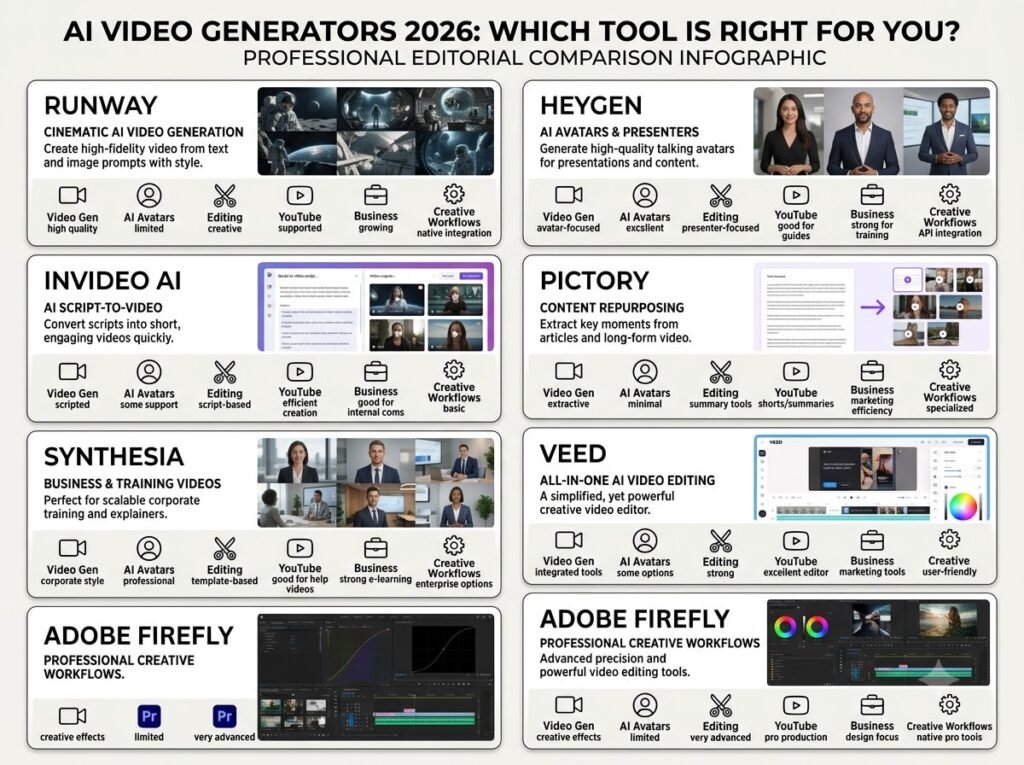
| AI Video Generator | Main Strength | Best Use Case | Avatar | Generative Video | Editing |
|---|---|---|---|---|---|
| Runway | Creative generation | Cinematic visuals | Limited | Strong | Strong |
| HeyGen | AI avatars | Presenter videos | Excellent | Good | Good |
| InVideo AI | Script-to-video | Faceless YouTube | Yes | Good | Strong |
| Pictory | Repurposing | Blog/video conversion | Yes | Moderate | Strong |
| Synthesia | Business avatars | Training | Excellent | Limited | Good |
| VEED | All-in-one workflow | Social + YouTube | Yes | Good | Excellent |
| Adobe Firefly | Creative ecosystem | Professional creative work | Limited | Strong | Strong |
AI Video Generator Pricing Comparison
Pricing ಅನ್ನು compare ಮಾಡುವಾಗ ಒಂದು mistake ಮಾಡಬಾರದು: monthly subscription price ಮಾತ್ರ ನೋಡಬೇಡಿ.
Credits ಎಷ್ಟು? ಒಂದು videoಗೆ ಎಷ್ಟು credits? 1080p ಅಥವಾ 4K? Watermark ಇದೆಯೇ? Voice cloning ಇದೆಯೇ? Commercial rights ಏನು? ಇವೆಲ್ಲವೂ actual cost ಮೇಲೆ ಪರಿಣಾಮ ಬೀರುತ್ತವೆ.
| Tool | Current Entry/Reference Pricing | Important Point |
|---|---|---|
| Runway | Free + paid credit plans | Gen-4.5 uses 12 credits/sec |
| HeyGen | Free; Creator $29/mo | 1080p, avatars, voice cloning |
| InVideo AI | Starter $20/seat/mo annually | Credit-based AI creation |
| Pictory | Starter $25/mo annually | Strong repurposing workflow |
| Synthesia | Free Basic + paid plans | Credit-based avatar video |
| VEED | Free + paid plans | AI + editing together |
| Adobe Firefly | Credit-based plans | Strong Adobe ecosystem |
Pricing shown here is a September 2026 snapshot from official sources and can change by region, billing cycle, taxes and plan updates.
Which AI Video Generator Is Best for You?
ಈ questionಗೆ ಒಂದೇ answer ಇಲ್ಲ. ನಿಮ್ಮ workflow ಆಧರಿಸಿ choice ಬದಲಾಗುತ್ತದೆ.
If You Want Cinematic AI Videos
Runway ಹೆಚ್ಚು relevant.
ನಿಮಗೆ text-to-video, image-to-video, camera movement ಮತ್ತು creative scene generation ಮುಖ್ಯವಾದರೆ dedicated generative platform choose ಮಾಡುವುದು practical.
If You Want AI Presenter Videos
HeyGen ಅಥವಾ Synthesia ನೋಡಿ.
YouTube tutorials, courses, business explainers ಅಥವಾ training contentಗೆ AI avatar workflow ಹೆಚ್ಚು useful.
If You Want Faceless YouTube Videos
InVideo AI ಅಥವಾ Pictory practical options.
Script already ಇದೆ ಎಂದರೆ video creation faster ಆಗಬಹುದು. ಆದರೆ AI-generated draft ಅನ್ನು manually review ಮಾಡಿ, wrong footage ಮತ್ತು generic scenes replace ಮಾಡುವುದು important.
If You Make Reels and Shorts
VEED ಅಥವಾ similar all-in-one editor workflow useful.
ಇಲ್ಲಿ generationಗಿಂತ captions, resizing, voice, subtitles ಮತ್ತು fast editing ಹೆಚ್ಚು important.
If You Already Use Adobe
Adobe Firefly consider ಮಾಡಬಹುದು.
ನಿಮ್ಮ workflow Photoshop, Express ಮತ್ತು other Adobe tools ಮೇಲೆ already depend ಆಗಿದ್ದರೆ ecosystem integration valuable ಆಗುತ್ತದೆ.
AI Video Qualityನಲ್ಲಿ ನಿಜವಾಗಿಯೂ ಏನು ಮುಖ್ಯ?
“High quality” ಎಂದರೆ resolution ಮಾತ್ರ ಅಲ್ಲ.
ಒಂದು video 4K ಆಗಿದ್ದರೂ motion unnatural ಆಗಿದ್ದರೆ ಅದು professional ಕಾಣಿಸುವುದಿಲ್ಲ.
AI video quality evaluate ಮಾಡುವಾಗ ಈ five things ಗಮನಿಸಿ.
Motion Consistency
Person ಅಥವಾ object movement natural ಆಗಿದೆಯೇ?
Character Consistency
ಒಂದೇ character different shotsನಲ್ಲಿ same appearance maintain ಮಾಡುತ್ತದೆಯೇ?
Physics
Objects gravity, lighting ಮತ್ತು real-world movement rules follow ಮಾಡುತ್ತಿವೆಯೇ?
Camera Control
Camera movement ನಿಮ್ಮ promptಗೆ match ಆಗುತ್ತದೆಯೇ?
Temporal Consistency
Frame-to-frame transitionsನಲ್ಲಿ subject suddenly change ಆಗುತ್ತದೆಯೇ?
ಇವು especially cinematic AI videosನಲ್ಲಿ important.
AI systemsನಲ್ಲಿ output quality ಮತ್ತು reliability ಯಾಕೆ important ಎಂಬುದನ್ನು deeper ಆಗಿ ಅರ್ಥಮಾಡಿಕೊಳ್ಳಲು AI Data Observability ಕುರಿತು ನಮ್ಮ article ನೋಡಿ.
AI Video Generator ಬಳಸುವಾಗ Common Mistakes
1. One Promptನಲ್ಲಿ Complete Movie ಕೇಳುವುದು
“Create a 10-minute cinematic documentary” ಎಂದು single prompt ಹಾಕುವುದಕ್ಕಿಂತ scene-by-scene workflow better.
ಮೊದಲು:
Script → Shot List → Individual Clips → Voice → Editing
ಎಂಬ structure ಬಳಸಿ.
2. AI Output ಅನ್ನು ಪರಿಶೀಲಿಸದೆ Publish ಮಾಡುವುದು
AI-generated videosನಲ್ಲಿ visual errors, incorrect text, strange hands, wrong objects ಅಥವಾ unnatural motion ಕಾಣಿಸಬಹುದು.
ಆದ್ದರಿಂದ final human review mandatory ಎಂದು consider ಮಾಡುವುದು ಉತ್ತಮ.
Different AI tools ಮತ್ತು applications ಒಂದೇ workflowನಲ್ಲಿ connect ಮಾಡುವ direction ಬಗ್ಗೆ ತಿಳಿದುಕೊಳ್ಳಲು Model Context Protocol (MCP) Explained guide useful ಆಗಬಹುದು.
3. Credits ಅನ್ನು Ignore ಮಾಡುವುದು
Cheap plan ತೆಗೆದುಕೊಂಡು unlimited content generate ಮಾಡಬಹುದು ಎಂದು assume ಮಾಡಬೇಡಿ.
Especially generative video toolsನಲ್ಲಿ high-quality models ಹೆಚ್ಚು credits consume ಮಾಡಬಹುದು.
Runway Gen-4.5 ಉದಾಹರಣೆಗೆ 12 credits per second ಬಳಸುತ್ತದೆ.
4. Every Videoಗೆ Same Tool ಬಳಸುವುದು
ಒಂದು creatorಗೆ ಒಂದೇ tool ಸಾಕಾಗಬಹುದು ಎಂಬುದು ತಪ್ಪು assumption.
Practical workflowನಲ್ಲಿ:
Runway → cinematic clips
HeyGen → presenter
Pictory/InVideo → long-form content
VEED → editing and social publishing
ಎಂಬ hybrid workflow ಕೆಲವೊಮ್ಮೆ ಹೆಚ್ಚು efficient ಆಗಬಹುದು.
AI tools ಅನ್ನು workflowನಲ್ಲಿ combine ಮಾಡುವ concept ಬಗ್ಗೆ ಇನ್ನಷ್ಟು practical ಆಗಿ ತಿಳಿದುಕೊಳ್ಳಲು ನಮ್ಮ How to Create Your Own Personal AI Assistant Without Coding guide ಅನ್ನು ಕೂಡ ನೋಡಿ.
AI Video Generator ಅನ್ನು YouTubeಗಾಗಿ ಹೇಗೆ ಬಳಸಬಹುದು?
AI video toolನಿಂದ direct video generate ಮಾಡುವುದಕ್ಕಿಂತ complete production pipeline create ಮಾಡಿದರೆ output quality improve ಆಗುತ್ತದೆ.
Step 1: Topic Research
ಮೊದಲು topic ಮತ್ತು search intent identify ಮಾಡಿ.
Step 2: Script
Hook, explanation, examples ಮತ್ತು conclusion ಇರುವ structured script ಬರೆಯಿರಿ.
Step 3: Shot List
ಪ್ರತಿ paragraphಗೆ ಯಾವ visual ಬೇಕು ಎಂದು decide ಮಾಡಿ.
Step 4: AI Video Generation
Cinematic ಅಥವಾ custom visuals ಬೇಕಾದಲ್ಲಿ generative AI video tool ಬಳಸಿ.
Step 5: Voice
Human voice ಅಥವಾ AI voiceover ಆಯ್ಕೆ ಮಾಡಿ.
Step 6: Editing
Pacing, captions, B-roll, transitions ಮತ್ತು branding add ಮಾಡಿ.
Step 7: Fact Check
AI-generated scriptನಲ್ಲಿ factual mistakes ಇದ್ದರೆ correct ಮಾಡಿ.
Step 8: Final Export
YouTube landscape ಅಥವಾ Shorts/Reels vertical formatಗೆ export ಮಾಡಿ.
ಈ workflowನಲ್ಲಿ AI tool ನಿಮ್ಮ editor ಅನ್ನು completely replace ಮಾಡುವುದಕ್ಕಿಂತ production assistant ಆಗಿ ಕೆಲಸ ಮಾಡುತ್ತದೆ.
YouTube content productionನಲ್ಲಿ video ಜೊತೆಗೆ presentation ಮತ್ತು visual storytelling ಕೂಡ important. ಅದಕ್ಕಾಗಿ How to Use AI to Create Professional Presentations: Complete Step-by-Step Guide (2026) guideನಲ್ಲಿ AI presentation workflow ಅನ್ನು ನೋಡಬಹುದು.
AI Video Generators Content Creatorsಗೆ ಹೇಗೆ Money-Making Opportunities ಕೊಡಬಹುದು?
AI video toolsನ commercial potential ಬಹಳ ದೊಡ್ಡದು, ಆದರೆ tool subscription ತೆಗೆದುಕೊಂಡರೆ income automatically ಬರುವುದಿಲ್ಲ.
Actual monetization content ಅಥವಾ serviceನಿಂದ ಬರುತ್ತದೆ.
YouTube
Faceless educational channels, product explainers ಮತ್ತು niche tutorials create ಮಾಡಬಹುದು.
Client Services
Small businessesಗೆ:
- Product videos
- Social media reels
- Promotional videos
- Training videos
- Explainer videos
create ಮಾಡಿ service sell ಮಾಡಬಹುದು.
Affiliate Marketing
AI video tools ಬಗ್ಗೆ tutorials, comparisons ಮತ್ತು use-case articles publish ಮಾಡಿ legitimate affiliate programs available ಇದ್ದರೆ commissions earn ಮಾಡಬಹುದು.
Digital Products
Video templates, prompt packs, script templates, YouTube workflows ಮತ್ತು creator resources sell ಮಾಡಬಹುದು.
Social Media Content
Brandsಗೆ monthly short-video packages offer ಮಾಡಬಹುದು.
ಆದರೆ commercial workನಲ್ಲಿ ಒಂದು critical point ಇದೆ: toolನ licensing terms ಮತ್ತು commercial-use rights check ಮಾಡದೆ generated content sell ಮಾಡಬೇಡಿ.
AI Video Generator ಆಯ್ಕೆ ಮಾಡುವ Simple Decision Framework
ನಿಮಗೆ confusion ಇದ್ದರೆ ಈ simple framework ಬಳಸಿ.
ನಿಮಗೆ cinematic visuals ಬೇಕೇ?
→ Runway
AI presenter ಬೇಕೇ?
→ HeyGen / Synthesia
Scriptನಿಂದ complete faceless video ಬೇಕೇ?
→ InVideo AI
Existing content repurpose ಮಾಡಬೇಕೇ?
→ Pictory
Editing + AI generation ಒಂದೇ placeನಲ್ಲಿ ಬೇಕೇ?
→ VEED
Adobe ecosystem already ಬಳಸುತ್ತಿದ್ದೀರಾ?
→ Adobe Firefly
ಇದು permanent ranking ಅಲ್ಲ. Tool features, pricing ಮತ್ತು models frequently change ಆಗುತ್ತವೆ. ನಿಮ್ಮ actual workflow ಮತ್ತು current plan limits ಆಧರಿಸಿ final choice ಮಾಡುವುದು ಉತ್ತಮ.
Final Takeaways
2026ರಲ್ಲಿ AI Video Generator market ಒಂದು single-tool market ಆಗಿ ಉಳಿದಿಲ್ಲ.
Different platforms different problems solve ಮಾಡುತ್ತಿವೆ.
Runway generative visual creation ಕಡೆ strong. HeyGen ಮತ್ತು Synthesia avatar-based communicationನಲ್ಲಿ useful. InVideo AI script-to-video productionಗೆ practical. Pictory content repurposingನಲ್ಲಿ strong. VEED AI generation ಮತ್ತು traditional editing ಅನ್ನು combine ಮಾಡುತ್ತದೆ. Adobe Firefly Adobe creative ecosystem ಜೊತೆ generative video capabilities connect ಮಾಡುತ್ತದೆ.
ಆದ್ದರಿಂದ “ಯಾವುದು number one?” ಎಂದು ಕೇಳುವುದಕ್ಕಿಂತ:
“ನನ್ನ video workflowನಲ್ಲಿ ಯಾವ problem ಅನ್ನು solve ಮಾಡಬೇಕು?”
ಎಂಬ ಪ್ರಶ್ನೆ ಹೆಚ್ಚು useful.
ಒಬ್ಬ YouTuberಗೆ InVideo AI best workflow ಆಗಿರಬಹುದು. ಮತ್ತೊಬ್ಬ cinematic creatorಗೆ Runway ಹೆಚ್ಚು suitable ಆಗಬಹುದು. Business training teamಗೆ Synthesia ಅಥವಾ HeyGen ಹೆಚ್ಚು practical ಆಗಬಹುದು.
ಮತ್ತೊಂದು important lesson: AI Video Generator subscription ತೆಗೆದುಕೊಳ್ಳುವ ಮೊದಲು credits ಮತ್ತು actual output cost ಅರ್ಥಮಾಡಿಕೊಳ್ಳಿ.
ಒಂದು toolನಲ್ಲಿ $20 subscription ಇದ್ದರೂ high-quality generationsಗೆ credits ತುಂಬಾ ವೇಗವಾಗಿ ಮುಗಿದರೆ actual production cost ಹೆಚ್ಚಾಗಬಹುದು.
ಅದೇ ರೀತಿ free plan ಇದ್ದರೂ watermark, low resolution ಅಥವಾ limited generations ಇದ್ದರೆ commercial workflowಗೆ ಅದು ಸಾಕಾಗದೇ ಇರಬಹುದು.
Frequently Asked Questions
Which is the best AI Video Generator in 2026?
ಒಂದೇ universal best tool ಇಲ್ಲ. Cinematic generationಗೆ Runway, AI avatarsಗೆ HeyGen ಅಥವಾ Synthesia, script-to-videoಗೆ InVideo AI, content repurposingಗೆ Pictory ಮತ್ತು all-in-one editing workflowಗೆ VEED ಹೆಚ್ಚು relevant ಆಗಬಹುದು.
Which AI Video Generator is best for YouTube?
Faceless YouTube channelsಗೆ InVideo AI ಮತ್ತು Pictory practical. Cinematic B-roll ಮತ್ತು custom AI visuals ಬೇಕಾದರೆ Runway ಅನ್ನು workflowಗೆ ಸೇರಿಸಬಹುದು. Final editing ಮತ್ತು captionsಗೆ VEED ರೀತಿಯ editor ಉಪಯೋಗಿಸಬಹುದು.
Can AI Video Generators create videos without a camera?
ಹೌದು. Many platforms script, AI avatar, voiceover, stock media ಅಥವಾ generative video ಬಳಸಿಕೊಂಡು camera recording ಇಲ್ಲದೆ video create ಮಾಡಲು ಅವಕಾಶ ನೀಡುತ್ತವೆ.
Are AI-generated videos free?
ಕೆಲವು platforms free plans ಅಥವಾ trial credits ನೀಡುತ್ತವೆ. ಆದರೆ free plansನಲ್ಲಿ duration, resolution, credits, watermark ಅಥವಾ export limits ಇರಬಹುದು. Commercial productionಗೆ paid plan ಬೇಕಾಗುವ ಸಾಧ್ಯತೆ ಇದೆ.
Which AI Video Generator is best for AI avatars?
HeyGen ಮತ್ತು Synthesia avatar-based video creationಗೆ particularly relevant. Training, presentation, marketing ಮತ್ತು multilingual presenter videosಗೆ ಇವು practical use cases ಹೊಂದಿವೆ.
Can I monetize AI-generated videos on YouTube?
AI-generated content itself automatically monetizable ಅಥವಾ non-monetizable ಎಂದು assume ಮಾಡಬಾರದು. YouTube policies, originality, viewer value, copyright ಮತ್ತು reused-content considerations ಗಮನಿಸಬೇಕು. ಜೊತೆಗೆ ನೀವು ಬಳಸುವ AI toolನ commercial-use license ಕೂಡ ಪರಿಶೀಲಿಸಬೇಕು.
Should I use one AI Video Generator or multiple tools?
Multiple tools ಬಳಸುವುದು ಅಗತ್ಯವಿಲ್ಲ. ಆದರೆ different tasksಗೆ different strengths ಇದ್ದರೆ hybrid workflow efficient ಆಗಬಹುದು. ಉದಾಹರಣೆಗೆ, Runwayನಲ್ಲಿ visual clip generate ಮಾಡಿ, HeyGenನಲ್ಲಿ presenter section create ಮಾಡಿ, VEEDನಲ್ಲಿ final editing ಮಾಡುವಂತಹ workflow ಸಾಧ್ಯ.
Conclusion
2026ರ AI video marketನಲ್ಲಿ biggest change ಎಂದರೆ AI ಕೇವಲ “video generate ಮಾಡುವ tool” ಆಗಿ ಉಳಿದಿಲ್ಲ.
ಈಗ AI video platforms research, script, visual generation, avatars, voice, translation, editing, subtitles ಮತ್ತು content repurposingನ ಹಲವು stagesಗೆ ಪ್ರವೇಶಿಸುತ್ತಿವೆ.
ಇದರ ಪರಿಣಾಮವಾಗಿ video creation faster ಆಗುತ್ತಿದೆ. ಆದರೆ speed ಮಾತ್ರ professional qualityಗೆ ಸಾಕಾಗುವುದಿಲ್ಲ.
Good AI video workflowಗೆ right tool + strong script + good prompting + human editing + fact checking + licensing awareness ಎಲ್ಲವೂ ಬೇಕಾಗುತ್ತದೆ.
ನೀವು YouTuber ಆಗಿದ್ದರೆ ನಿಮ್ಮ workflowಗೆ ಬೇಕಾದ tool ಆಯ್ಕೆ ಮಾಡಿ. Business owner ಆಗಿದ್ದರೆ ROI ಮತ್ತು production time compare ಮಾಡಿ. Freelancer ಆಗಿದ್ದರೆ client requirements ಮತ್ತು commercial licensing ಗಮನಿಸಿ.
AI Video Generator ಅನ್ನು “one-click magic” ಎಂದು ನೋಡುವುದಕ್ಕಿಂತ creative production system ಎಂದು ನೋಡಿದಾಗ ಅದರ real value ಹೆಚ್ಚು ಸ್ಪಷ್ಟವಾಗುತ್ತದೆ.
2026ರಲ್ಲಿ successful AI video creation ಎಂದರೆ AIಗೆ ಎಲ್ಲವನ್ನೂ ಬಿಟ್ಟುಬಿಡುವುದು ಅಲ್ಲ.
AIಯ speed ಮತ್ತು human creativity ಎರಡನ್ನೂ ಸರಿಯಾದ workflowನಲ್ಲಿ combine ಮಾಡುವುದು.
ಅದೇ AI video creationನ practical future.