
How to Create Your Own Personal AI Assistant Without Coding
Introduction
ನಿಮ್ಮ emails summarize ಮಾಡೋದು, meetings schedule ಮಾಡೋದು, documents search ಮಾಡೋದು, reminders create ಮಾಡೋದು, questions answer ಮಾಡೋದು—ಇವೆಲ್ಲವನ್ನು ಒಬ್ಬ digital assistant ಮಾಡಿದ್ದರೆ ಹೇಗಿರುತ್ತೆ?
ಇದೇ concept Personal AI Assistant.
ಒಳ್ಳೆಯ ವಿಷಯ ಏನೆಂದರೆ, ಇದನ್ನು build ಮಾಡಲು programming expert ಆಗಿರಬೇಕೆಂಬ ಅವಶ್ಯಕತೆ ಇಲ್ಲ. ಇಂದು ಹಲವಾರು No-code AI platforms ಬಳಸಿ coding ಇಲ್ಲದೆ ನಿಮ್ಮ personal AI assistant create ಮಾಡಬಹುದು.
ಈ guideನಲ್ಲಿ Personal AI Assistant ಎಂದರೇನು, ಅದು ಹೇಗೆ ಕೆಲಸ ಮಾಡುತ್ತದೆ, ಯಾವ tools ಬೇಕು, ಹಾಗೂ beginners coding ಇಲ್ಲದೆ ಹೇಗೆ ಆರಂಭಿಸಬಹುದು ಎಂಬುದನ್ನು Hybrid Kannada + Englishನಲ್ಲಿ step-by-stepವಾಗಿ ತಿಳಿದುಕೊಳ್ಳೋಣ.
What is a Personal AI Assistant?
Personal AI Assistant ಅಂದರೆ ನಿಮ್ಮ daily tasks automate ಮಾಡಲು, questionsಗೆ answer ನೀಡಲು, information organize ಮಾಡಲು ಹಾಗೂ productivity improve ಮಾಡಲು ಸಹಾಯ ಮಾಡುವ AI-powered assistant.
ಇದು ನಿಮ್ಮ personal digital helper ಆಗಿ ಕೆಲಸ ಮಾಡುತ್ತದೆ.
Examples:
- Emails summarize ಮಾಡುವುದು
- Calendar manage ಮಾಡುವುದು
- Notes organize ಮಾಡುವುದು
- Daily reminders ಕಳುಹಿಸುವುದು
- Documents search ಮಾಡುವುದು
- AI chatbot ಆಗಿ questionsಗೆ answer ನೀಡುವುದು
AI Search Optimization (ASO): The Ultimate Beginner Guide for 2026
Why Create Your Own Personal AI Assistant?
Ready-made AI assistants useful ಆಗಿದ್ದರೂ, ನಿಮ್ಮ own assistant create ಮಾಡಿದರೆ ಹೆಚ್ಚು customization ಸಿಗುತ್ತದೆ.
Benefits include:
- Personalized responses
- Custom workflows
- Better productivity
- Time saving
- Business automation
- Knowledge management
- Task reminders
- Easy integrations
ನಿಮ್ಮ ಕೆಲಸದ ರೀತಿಗೆ ಅನುಗುಣವಾಗಿ assistant ಅನ್ನು customize ಮಾಡಬಹುದು.
How Does a Personal AI Assistant Work?
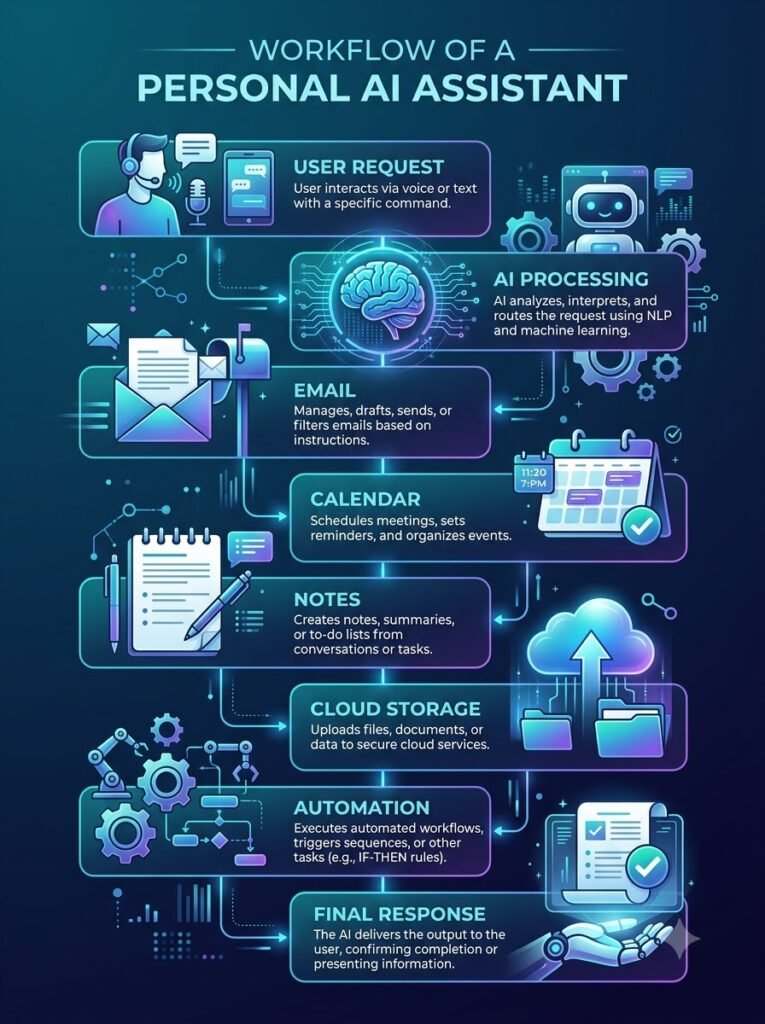
ಒಂದು Personal AI Assistant ಸಾಮಾನ್ಯವಾಗಿ ಈ workflow follow ಮಾಡುತ್ತದೆ.
User Request
↓
AI Understands Intent
↓
Retrieves Information
↓
Processes the Request
↓
Generates a Response
↓
Performs the Action (if connected)
Example:
“Tomorrow morning 9 AM meeting remind ಮಾಡು.”
↓
AI checks calendar
↓
Creates reminder
↓
Confirms completion
No-Code vs Coding Approach
| No-Code AI | Coding Approach |
|---|---|
| Beginner friendly | Requires programming |
| Faster setup | More development time |
| Drag-and-drop workflow | Manual coding |
| Easy integrations | API development required |
| Lower learning curve | Technical knowledge needed |
Beginnersಗೆ No-code AI platforms ಅತ್ಯುತ್ತಮ starting point.
What Can Your Personal AI Assistant Do?
ಒಂದು modern assistant ಹಲವಾರು tasks handle ಮಾಡಬಹುದು.
Productivity
- Manage daily tasks
- Schedule reminders
- Create to-do lists
- Organize notes
Communication
- Draft emails
- Summarize conversations
- Generate replies
- Translate text
Knowledge Management
- Search documents
- Answer company FAQs
- Store notes
- Retrieve information quickly
Content Creation
- Blog ideas
- Social media captions
- Video scripts
- Content summaries
Learning
- Explain concepts
- Answer questions
- Create study notes
- Practice quizzes
Best No-Code AI Platforms
ಕೆಲವು popular platforms coding ಇಲ್ಲದೆ assistant build ಮಾಡಲು ಸಹಾಯ ಮಾಡುತ್ತವೆ.
ChatGPT
Best for:
- General assistant
- Writing
- Brainstorming
- Learning
Explore OpenAI to learn more about ChatGPT, AI models, and productivity features.
Google Gemini
Best for:
- Google Workspace integration
- Research
- Productivity
Learn more about Google Gemini and its AI capabilities for personal productivity.
Microsoft Copilot
Best for:
- Microsoft 365 users
- Office productivity
- Business workflows
Explore Microsoft Copilot for AI-powered assistance across Microsoft 365 apps.
Claude
Best for:
- Long documents
- Detailed analysis
- Research assistance
Zapier AI
Best for:
- Workflow automation
- Connecting apps
- Business tasks
Visit Zapier to build powerful no-code AI automations and connect thousands of apps.
Best AI Meeting Assistants Compared: Notes, Summaries and Action Items
Essential Features to Look For
ಒಳ್ಳೆಯ Personal AI Assistantನಲ್ಲಿ ಈ features ಇದ್ದರೆ ಉತ್ತಮ.
✅ Natural conversations
✅ Voice support (optional)
✅ Memory (where available)
✅ File understanding
✅ Document summarization
✅ Automation support
✅ Multi-device access
✅ Secure authentication
Who Should Build a Personal AI Assistant?
ಈ solution ಬಹುತೇಕ ಎಲ್ಲರಿಗೂ useful.
Ideal users include:
- Students
- Bloggers
- Freelancers
- Small business owners
- Digital marketers
- Content creators
- Office professionals
- Entrepreneurs
Prompt Engineering Best Practices: 25 Techniques That Actually Improve AI Results
Common Use Cases
Daily lifeನಲ್ಲಿ ಬಳಸಬಹುದಾದ ಕೆಲವು examples:
- Morning task planning
- Meeting preparation
- Email drafting
- Research assistance
- Customer support
- Content planning
- Study guidance
- Personal knowledge management
Is It Safe to Use?
Yes, but security matters.
Always:
- Use strong passwords
- Enable two-factor authentication
- Review permissions
- Avoid sharing sensitive information
- Check privacy settings regularly
Responsible usage ನಿಮ್ಮ data protectionಗೆ ಮುಖ್ಯ.
Step 1: Define Your Goal
ಮೊದಲಿಗೆ ನಿಮ್ಮ Personal AI Assistant ಏನು ಮಾಡಬೇಕು ಎಂದು decide ಮಾಡಿ.
Examples:
- Email assistant
- Study assistant
- Business assistant
- Content writing assistant
- Customer support assistant
- Personal productivity assistant
Clear goal ಇದ್ದರೆ setup process ತುಂಬಾ easy ಆಗುತ್ತದೆ.
Step 2: Choose the Right AI Platform
ನಿಮ್ಮ requirementsಗೆ ಅನುಗುಣವಾಗಿ AI platform select ಮಾಡಿ.
| Platform | Best For |
|---|---|
| ChatGPT | General productivity |
| Google Gemini | Google Workspace users |
| Microsoft Copilot | Microsoft 365 integration |
| Claude | Long documents & research |
| Zapier AI | Workflow automation |
Beginner ಆಗಿದ್ದರೆ ChatGPT ಅಥವಾ Gemini ಉತ್ತಮ starting point.
Step 3: Connect Your Daily Apps
ಒಳ್ಳೆಯ Personal AI Assistant ನಿಮ್ಮ frequently used apps ಜೊತೆ connect ಆಗಿರಬೇಕು.
Examples:
- Gmail
- Google Calendar
- Google Drive
- Notion
- Slack
- Microsoft Outlook
- Trello
- Google Docs
Apps integrate ಆದಾಗ repetitive work automation ಸಾಧ್ಯವಾಗುತ್ತದೆ.
Step 4: Give Your Assistant Clear Instructions
Assistantಗೆ clear instructions ಕೊಟ್ಟರೆ responses consistent ಆಗಿರುತ್ತವೆ.
Example:
“You are my productivity assistant.
Help me:
- Organize daily tasks
- Summarize emails
- Schedule reminders
- Suggest priorities
- Answer work-related questions”
Clear instructions = Better AI responses.
Step 5: Upload Your Knowledge
ನಿಮ್ಮ assistantಗೆ useful information provide ಮಾಡಿ.
Examples:
- Company documents
- SOPs
- Notes
- PDFs
- FAQs
- Product manuals
- Meeting notes
- Personal knowledge base
ಹೆಚ್ಚು relevant information ಇದ್ದರೆ assistant ಹೆಚ್ಚು accurate answers ನೀಡುತ್ತದೆ.
Build Your First AI Knowledge Base Using Modern AI Tools
Step 6: Create Simple Automations
No-code automation tools repetitive work reduce ಮಾಡುತ್ತವೆ.
Examples:
New Email
↓
AI summarizes email
↓
Important emails tagged
↓
Summary stored in Notes
Another example:
Meeting Ends
↓
Transcript generated
↓
AI summary created
↓
Action items added to To-Do List
ಈ ರೀತಿಯ workflows productivity significantly improve ಮಾಡುತ್ತವೆ.
Step 7: Test Your Personal AI Assistant
Setup ಆದ ನಂತರ real-world scenariosನಲ್ಲಿ test ಮಾಡಿ.
Example questions:
- Today’s schedule ಏನು?
- Yesterday meeting summary ಕೊಡು.
- Draft a professional email.
- My pending tasks ಯಾವುವು?
- Find last week’s project notes.
Testing ಮೂಲಕ improvements identify ಮಾಡಬಹುದು.
Best Automation Ideas
ನಿಮ್ಮ Personal AI Assistantಗಾಗಿ useful automation ideas.
Email Assistant
Automatically:
- Summarize emails
- Draft replies
- Categorize messages
- Highlight priorities
Calendar Assistant
- Schedule meetings
- Send reminders
- Detect conflicts
- Suggest free time
Document Assistant
- Summarize PDFs
- Find information
- Explain documents
- Generate reports
Content Assistant
- Blog outlines
- Social media captions
- Video ideas
- Newsletter drafts
Study Assistant
- Explain difficult concepts
- Create quizzes
- Generate summaries
- Prepare revision notes
Best Integrations
Popular integrations include:
- Google Workspace
- Microsoft 365
- Notion
- Slack
- Discord
- Dropbox
- Google Drive
- Trello
- ClickUp
- Airtable
ಹೆಚ್ಚು integrations ಇದ್ದಷ್ಟು assistant powerful ಆಗುತ್ತದೆ.
Tips for Better Responses
Assistantನ quality improve ಮಾಡಲು:
✅ Give complete context.
✅ Ask specific questions.
✅ Mention desired output format.
✅ Upload relevant files.
✅ Break large tasks into smaller requests.
✅ Refine instructions regularly.
Prompt quality directly response quality ಮೇಲೆ impact ಮಾಡುತ್ತದೆ.
Common Mistakes
Beginners ಸಾಮಾನ್ಯವಾಗಿ ಈ mistakes ಮಾಡುತ್ತಾರೆ.
❌ Too many instructions at once.
❌ No clear purpose.
❌ Poor prompts.
❌ No testing.
❌ Ignoring privacy settings.
❌ Connecting unnecessary apps.
❌ Expecting perfect answers immediately.
Privacy and Security Tips
ನಿಮ್ಮ data ಸುರಕ್ಷಿತವಾಗಿರಲು ಈ practices follow ಮಾಡಿ.
✅ Enable two-factor authentication.
✅ Review connected apps regularly.
✅ Avoid uploading confidential information unless necessary.
✅ Use trusted AI platforms.
✅ Remove unused integrations.
✅ Update passwords periodically.
Security first approach always better.
Benefits of a Personal AI Assistant
Properly configured assistant ನಿಮಗೆ ಈ advantages ನೀಡಬಹುದು.
- Saves time
- Reduces repetitive work
- Improves productivity
- Organizes information
- Helps with research
- Automates daily tasks
- Supports learning
- Improves work efficiency
Real-Life Example
Imagine you are a content creator.
Morning routine:
Email arrives
↓
Assistant summarizes important emails
↓
Calendar shows today’s meetings
↓
Content ideas generated
↓
Draft blog outline prepared
↓
Reminder for social media posting
↓
End-of-day productivity summary
ಈ entire workflow manual work ಅನ್ನು considerably reduce ಮಾಡಬಹುದು.
Is No-Code AI Enough?
ಬಹುತೇಕ usersಗೆ answer:
Yes.
Students, freelancers, bloggers, marketers ಹಾಗೂ small business owners coding ಇಲ್ಲದೇ powerful Personal AI Assistant build ಮಾಡಬಹುದು.
Advanced customization ಬೇಕಾದರೆ later APIs ಅಥವಾ coding learn ಮಾಡಬಹುದು.
Advanced Customization Ideas
Basic setup ಆದ ನಂತರ ನಿಮ್ಮ Personal AI Assistant ಅನ್ನು ಇನ್ನಷ್ಟು powerful ಮಾಡಬಹುದು.
Advanced features include:
- Custom personality
- Multi-language support
- Voice interaction
- Smart reminders
- Document search
- Task prioritization
- AI knowledge retrieval
- Workflow automation
ನಿಮ್ಮ daily routineಗೆ match ಆಗುವಂತೆ assistant ಅನ್ನು customize ಮಾಡಿದರೆ productivity ಇನ್ನಷ್ಟು improve ಆಗುತ್ತದೆ.
Add Memory for Better Responses
Modern AI assistants ಕೆಲವು platformsನಲ್ಲಿ memory features support ಮಾಡುತ್ತವೆ.
Benefits:
- Remembers preferences
- Learns writing style
- Stores recurring instructions
- Personalizes responses
- Saves repetitive prompts
Example:
Instead of repeatedly saying,
“Write in professional tone.”
Assistant already remembers your preferred writing style.
Note: Memory features platform ಪ್ರಕಾರ vary ಆಗಬಹುದು.
Voice-Based Personal AI Assistants
Typing ಮಾತ್ರವಲ್ಲ.
Voice interaction ಕೂಡ ಈಗ ಹೆಚ್ಚು popular ಆಗುತ್ತಿದೆ.
You can use voice commands like:
- Schedule tomorrow’s meeting.
- Summarize today’s emails.
- Create a shopping list.
- Find my project notes.
- Remind me to publish my blog.
Hands-free operation busy professionalsಗೆ ತುಂಬಾ useful.
Build AI Workflows
ಒಂದು Personal AI Assistant multiple tasks automatically perform ಮಾಡಬಹುದು.
Example Workflow:
New Email Received
↓
AI reads email
↓
Creates summary
↓
Detects priority
↓
Adds reminder
↓
Stores important information
↓
Notifies user
ಈ automation repetitive work ಅನ್ನು ಸಾಕಷ್ಟು reduce ಮಾಡುತ್ತದೆ.
AI Agents vs Personal AI Assistants
ಈ ಎರಡು terms ಒಂದೇ ಅಲ್ಲ.
| Personal AI Assistant | AI Agent |
|---|---|
| Helps with daily tasks | Can perform multi-step autonomous tasks |
| Requires user instructions | Can make limited decisions based on goals |
| Best for individuals | Often used in business automation |
| Easier to set up | More advanced workflows |
Futureನಲ್ಲಿ personal assistants ಮತ್ತು AI agents ನಡುವಿನ gap ಇನ್ನಷ್ಟು ಕಡಿಮೆಯಾಗುವ ಸಾಧ್ಯತೆ ಇದೆ.
Future of Personal AI Assistants
ಮುಂದಿನ ಕೆಲವು ವರ್ಷಗಳಲ್ಲಿ AI assistants ಇನ್ನಷ್ಟು intelligent ಆಗಲಿವೆ.
Expected trends include:
- Better voice conversations
- More personalized responses
- Improved reasoning
- On-device AI processing
- Multi-device synchronization
- Better automation
- Context-aware assistance
- Smarter scheduling
Future assistants simple chatbot ಆಗಿರದೆ digital productivity partner ಆಗುವ ಸಾಧ್ಯತೆ ಇದೆ.
Common Challenges
Personal AI assistants use ಮಾಡುವಾಗ ಕೆಲವು challenges ಇರಬಹುದು.
Privacy
Sensitive data share ಮಾಡುವಾಗ careful ಆಗಿರಿ.
Accuracy
AI responses ಯಾವಾಗಲೂ 100% correct ಆಗಿರಬೇಕೆಂದಿಲ್ಲ.
Important information verify ಮಾಡುವುದು ಉತ್ತಮ.
Integration Limits
ಎಲ್ಲ apps ಒಂದೇ platformನಲ್ಲಿ support ಆಗುವುದಿಲ್ಲ.
ಮೊದಲು compatibility check ಮಾಡಿ.
Internet Dependency
ಕೆಲವು AI features internet connection ಇಲ್ಲದೆ work ಮಾಡದೇ ಇರಬಹುದು.
Best Practices
ನಿಮ್ಮ assistant ಹೆಚ್ಚು effective ಆಗಿರಲು ಈ practices follow ಮಾಡಿ.
✅ Clear instructions ನೀಡಿ.
✅ Regularly update your knowledge base.
✅ Organize documents properly.
✅ Use trusted AI platforms.
✅ Review automation workflows.
✅ Remove unnecessary integrations.
✅ Test new workflows before daily use.
✅ Protect sensitive information.
Frequently Asked Questions (FAQs)
1. What is a Personal AI Assistant?
Personal AI Assistant ಅಂದರೆ ನಿಮ್ಮ daily tasks automate ಮಾಡಲು, information organize ಮಾಡಲು ಹಾಗೂ productivity improve ಮಾಡಲು ಸಹಾಯ ಮಾಡುವ AI-powered digital assistant.
2. Can I build a Personal AI Assistant without coding?
ಹೌದು.
ಇಂದು ChatGPT, Google Gemini, Claude, Microsoft Copilot ಹಾಗೂ automation platforms ಬಳಸಿ coding knowledge ಇಲ್ಲದೇ ಕೂಡ personal assistant build ಮಾಡಬಹುದು.
3. Is a Personal AI Assistant free?
ಕೆಲವು platforms free plans provide ಮಾಡುತ್ತವೆ.
Advanced features, automation ಹಾಗೂ larger usage limitsಗಾಗಿ paid plans ಬೇಕಾಗಬಹುದು.
4. Is it safe to use a Personal AI Assistant?
Trusted platforms generally strong security provide ಮಾಡುತ್ತವೆ.
ಆದರೂ sensitive personal information share ಮಾಡುವ ಮೊದಲು privacy settings ಹಾಗೂ permissions review ಮಾಡುವುದು ಉತ್ತಮ.
5. Who should create a Personal AI Assistant?
Students, professionals, bloggers, freelancers, entrepreneurs, marketers ಹಾಗೂ small business owners ಎಲ್ಲರೂ ಇದರ benefit ಪಡೆಯಬಹುದು.
Expert Tips
Maximum productivityಗಾಗಿ ಈ tips follow ಮಾಡಿ.
✅ ಒಂದೇ assistantಗೆ too many responsibilities ಕೊಡಬೇಡಿ.
✅ Different tasksಗೆ dedicated workflows create ಮಾಡಿ.
✅ Frequently used prompts save ಮಾಡಿ.
✅ Weekly knowledge update ಮಾಡಿ.
✅ Calendar ಹಾಗೂ notes regularly sync ಮಾಡಿ.
✅ AI suggestions review ಮಾಡಿ.
✅ Automation results periodically test ಮಾಡಿ.
✅ Human review important tasksಗೆ maintain ಮಾಡಿ.
Final Verdict
Personal AI Assistant technology ಈಗ large companiesಗೆ ಮಾತ್ರ ಸೀಮಿತವಾಗಿಲ್ಲ.
No-code AI tools thanks to modern platforms, beginners ಕೂಡ ತಮ್ಮ own intelligent assistant create ಮಾಡಬಹುದು.
Daily productivity, content creation, learning, research ಹಾಗೂ business automation ಎಲ್ಲಕ್ಕೂ personal AI assistant valuable investment ಆಗಬಹುದು.
Conclusion
Personal AI Assistant build ಮಾಡುವುದು 2026ರಲ್ಲಿ programming expertsಗೆ ಮಾತ್ರ ಇರುವ ಕೆಲಸವಲ್ಲ.
No-code AI platforms, automation tools ಹಾಗೂ modern AI models ಸಹಾಯದಿಂದ ಯಾರಾದರೂ ತಮ್ಮ requirementsಗೆ ಅನುಗುಣವಾಗಿ intelligent assistant create ಮಾಡಬಹುದು.
ಸರಿಯಾದ goals define ಮಾಡಿ, trusted AI platform ಆಯ್ಕೆ ಮಾಡಿ, useful integrations connect ಮಾಡಿ ಹಾಗೂ automation workflows gradually improve ಮಾಡಿದರೆ, ನಿಮ್ಮ assistant time save ಮಾಡುವುದು ಮಾತ್ರವಲ್ಲದೆ daily productivity ಕೂಡ significantly increase ಮಾಡಬಹುದು.
AI technology evolve ಆಗುತ್ತಿರುವಂತೆ Personal AI Assistant ಕೂಡ ಇನ್ನಷ್ಟು intelligent, personalized ಹಾಗೂ capable ಆಗಲಿದೆ. ಈಗಲೇ learning start ಮಾಡಿದರೆ future AI-powered workplaceಗೆ ನೀವು ಉತ್ತಮವಾಗಿ prepare ಆಗಿರುತ್ತೀರಿ.