Build Your First AI Knowledge Base Using Modern AI Tools: Complete Guide
Introduction
ಇಂದು almost ಪ್ರತಿಯೊಂದು company, startup ಹಾಗೂ enterprise ಸಾವಿರಾರು documents, PDFs, emails, manuals ಹಾಗೂ knowledge articles manage ಮಾಡುತ್ತಿದೆ. ಆದರೆ required information ಹುಡುಕಲು employees ಸಾಕಷ್ಟು time spend ಮಾಡುತ್ತಾರೆ.
ಇಲ್ಲಿಯೇ AI Knowledge Base game changer ಆಗುತ್ತದೆ.
Traditional search systems keyword matching ಮಾತ್ರ ಮಾಡುತ್ತವೆ. ಆದರೆ AI Knowledge Base semantic search, Retrieval-Augmented Generation (RAG) ಹಾಗೂ Large Language Models (LLMs) help ಮೂಲಕ user question ಅರ್ಥಮಾಡಿಕೊಂಡು relevant answer ನೀಡುತ್ತದೆ.
ಸರಳವಾಗಿ ಹೇಳಬೇಕಾದರೆ,
AI Knowledge Base = Your company’s documents + AI + Smart Search + Natural Language Answers
ಈ guideನಲ್ಲಿ beginner perspectiveನಿಂದ AI Knowledge Base ಹೇಗೆ build ಮಾಡುವುದು, ಯಾವ tools ಬೇಕು, architecture ಹೇಗಿರುತ್ತದೆ ಹಾಗೂ real-world implementation ಹೇಗೆ ಮಾಡಬಹುದು ಎಂಬುದನ್ನು step-by-stepವಾಗಿ ಕಲಿಯೋಣ.
What is an AI Knowledge Base?
AI Knowledge Base ಅಂದರೆ documents, websites, databases, FAQs, manuals ಹಾಗೂ business information ಅನ್ನು AI understand ಮಾಡುವ formatಗೆ convert ಮಾಡಿ, users natural languageನಲ್ಲಿ ಪ್ರಶ್ನೆ ಕೇಳಿದಾಗ accurate answer ನೀಡುವ intelligent system.
Simple example:
ನಿಮ್ಮ companyನಲ್ಲಿ 8,000 PDF files ಇದ್ದರೆ, manual search ಮಾಡುವ ಬದಲು employee ಕೇಳಬಹುದು,
“Leave policy ಏನು?”
AI Knowledge Base ಕೆಲವೇ secondsನಲ್ಲಿ correct document search ಮಾಡಿ answer generate ಮಾಡುತ್ತದೆ.
Why Traditional Knowledge Bases Are No Longer Enough
Traditional knowledge systemsನಲ್ಲಿ ಕೆಲವು common problems ಇವೆ.
- Keyword search ಮಾತ್ರ
- Exact file name ಬೇಕಾಗುತ್ತದೆ
- Duplicate documents
- Slow information retrieval
- Poor user experience
- Manual document management
AI Knowledge Base ಈ limitations ಅನ್ನು eliminate ಮಾಡುತ್ತದೆ.
Users simply ask questions naturally.
AI handles the rest.
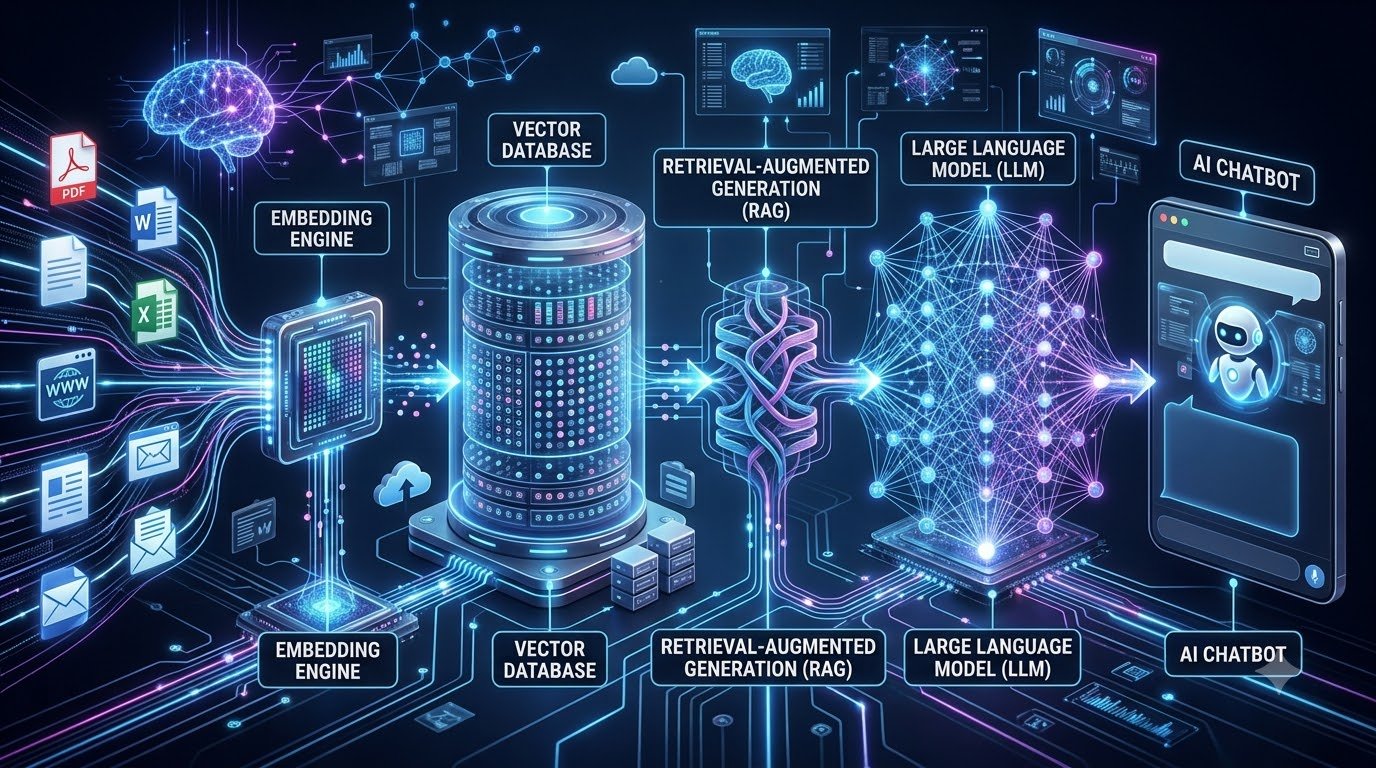
How an AI Knowledge Base Works
Basic workflow:
Documents

↓

Text Extraction

↓

Embeddings

↓

Vector Database

↓

RAG Retrieval

↓

Large Language Model

↓

Natural Language Answer
ಈ complete pipeline userಗೆ fast ಹಾಗೂ accurate answers ಕೊಡಲು help ಮಾಡುತ್ತದೆ.
Core Components of an AI Knowledge Base
1. Documents
Knowledge source ಆಗಿ use ಮಾಡಬಹುದಾದ files:
- DOCX
- PPT
- Excel
- Notion
- Confluence
- Websites
- FAQs
- Emails
- Internal Wikis
2. Text Extraction
Documents ಮೊದಲು readable textಗೆ convert ಆಗುತ್ತವೆ.
Common tools:
- OCR
- PDF Parser
- HTML Parser
- Document Readers
3. Embeddings
ಇದು AI Knowledge Baseನ heart.
Embedding ಅಂದರೆ words ಹಾಗೂ sentences ಅನ್ನು numerical vectorsಗೆ convert ಮಾಡುವುದು.
ಈ vectors meaning understand ಮಾಡಲು AIಗೆ help ಮಾಡುತ್ತವೆ.
Example:
“Car”
“Vehicle”
“Automobile”
ಈ ಮೂರು words keyword different ಆದರೂ meaning similar ಎಂದು AI identify ಮಾಡುತ್ತದೆ.
What is Semantic Search?
Traditional Search:
Search:
LaptopResults:
Only “Laptop” keyword ಇರುವ files.
Semantic Search:
Search:
Best computer for office workAI returns:
- Laptop buying guide
- Office workstation
- Business notebook
- Productivity PCs
Meaning understand ಮಾಡಿ search ಮಾಡುವುದು semantic search.
ಇದೇ AI Knowledge Baseನ biggest advantage.
Next-Generation AI Chips Explained: NPUs, GPUs and AI PCs
What is RAG (Retrieval-Augmented Generation)?
RAG =
Retrieval + AI Generation
Instead of relying only on the AI model’s memory, AI Knowledge Base first retrieves relevant information from your own documents and then generates an answer.
Workflow:
User Question
↓
Search Relevant Documents
↓
Retrieve Best Context
↓
LLM Reads Context
↓
Generate Accurate Answer
ಈ approach hallucination reduce ಮಾಡುತ್ತದೆ ಹಾಗೂ answer accuracy improve ಮಾಡುತ್ತದೆ.
Why RAG is Better than Traditional AI Chatbots
Without RAG:
AI answers from pre-trained knowledge only.
Sometimes outdated information.
Sometimes hallucinations.
With RAG:
- Latest documents
- Company knowledge
- Internal files
- Updated policies
- Real-time information
Result:
More trustworthy answers.
AI Scientists Get a New Discovery Framework: How BLAZE Could Transform Scientific Research
Popular AI Knowledge Base Tools
Several modern tools simplify building an AI Knowledge Base.
Popular options include:
- LangChain
- LlamaIndex
- Haystack
- Pinecone
- Weaviate
- ChromaDB
- Milvus
- OpenAI API
- Azure AI Search
- Google Vertex AI Search
Each tool focuses on different parts of the AI pipeline such as orchestration, vector storage or retrieval.
LangChain Official Website
URL: https://www.langchain.com/
Step-by-Step: How to Build an AI Knowledge Base
ಈಗ practical side ನೋಡೋಣ. Beginner ಆಗಿದ್ದರೂ ಕೂಡ modern AI tools ಬಳಸಿಕೊಂಡು powerful AI Knowledge Base build ಮಾಡಬಹುದು.
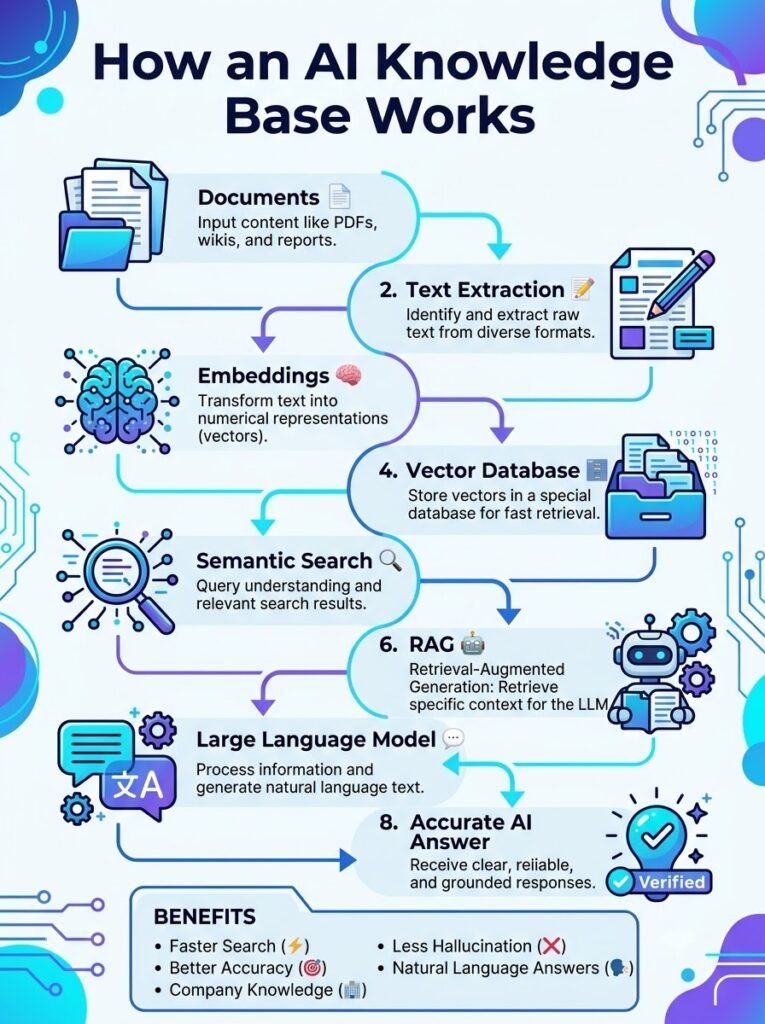
Overall workflow ಹೀಗಿರುತ್ತದೆ:
Collect Documents

↓

Clean Data

↓

Chunk Documents

↓

Generate Embeddings

↓

Store in Vector Database

↓

Retrieve Relevant Content

↓

LLM Generates Answer

↓

Deploy AI Chatbot
ಪ್ರತಿಯೊಂದು step ಅನ್ನು ಈಗ detailನಲ್ಲಿ ತಿಳಿಯೋಣ.
Step 1: Collect Your Knowledge Sources
ಮೊದಲಿಗೆ ನಿಮ್ಮ organizationನಲ್ಲಿ ಇರುವ knowledge sources collect ಮಾಡಬೇಕು.
Examples:
- PDF Manuals
- HR Policies
- SOP Documents
- Word Files
- Excel Reports
- Company Wiki
- FAQs
- Website Content
- Product Documentation
- Email Knowledge
- Support Tickets
Tip:
Documents updated ಆಗಿರುವುದನ್ನು ಮಾತ್ರ use ಮಾಡಿದರೆ AI answers ಕೂಡ accurate ಆಗಿರುತ್ತವೆ.
Step 2: Clean the Data
Raw documentsನಲ್ಲಿ unnecessary content ಸಾಕಷ್ಟು ಇರುತ್ತದೆ.
Examples:
- Duplicate pages
- Empty spaces
- Broken formatting
- Old information
- Repeated paragraphs
- Watermarks
- Irrelevant attachments
ಈ data clean ಮಾಡಿದ ನಂತರ AI Knowledge Base much better quality answers ಕೊಡುತ್ತದೆ.
Step 3: Chunk the Documents
ಒಂದು 200-page PDF ಅನ್ನು AI directly process ಮಾಡುವುದಿಲ್ಲ.
ಆದ್ದರಿಂದ document ಅನ್ನು smaller sections ಆಗಿ divide ಮಾಡಲಾಗುತ್ತದೆ.
Example:
Instead of:
200-page ManualConvert into:
Chunk 1

Chunk 2

Chunk 3

Chunk 4
ಈ process ಅನ್ನು Chunking ಎಂದು ಕರೆಯುತ್ತಾರೆ.
Why Chunking is Important?
ಸರಿಯಾದ chunk size ಇದ್ದರೆ:
- Better retrieval
- Higher accuracy
- Faster search
- Less hallucination
- Better context understanding
Very small chunks ಕೂಡ ಬೇಡ.
Very large chunks ಕೂಡ ಬೇಡ.
Balanced chunking gives the best performance.
Step 4: Generate Embeddings
ಈಗ ಪ್ರತಿಯೊಂದು chunk embedding ಆಗಿ convert ಆಗುತ್ತದೆ.
Embedding ಅಂದರೆ textನ mathematical representation.
Example:
Sentence:
Company Leave PolicyAI converts it into a numerical vector.
ಈ vectors meaning ಅನ್ನು represent ಮಾಡುತ್ತವೆ.
ಇದರಿಂದ AI Knowledge Base exact keyword ಇಲ್ಲದಿದ್ದರೂ similar meaning identify ಮಾಡಬಹುದು.
Popular Embedding Models
Common embedding models include:
- OpenAI Embeddings
- BGE Models
- E5 Models
- Sentence Transformers
- Cohere Embeddings
- Jina Embeddings
ಪ್ರತಿಯೊಂದು model ತನ್ನದೇ accuracy ಹಾಗೂ performance ಹೊಂದಿರುತ್ತದೆ.
Prompt Engineering Best Practices: 25 Techniques That Actually Improve AI Results
Step 5: Store Data in a Vector Database
Embeddings generate ಆದ ನಂತರ ಅವು Vector Databaseನಲ್ಲಿ store ಆಗುತ್ತವೆ.
Unlike SQL databases,
Vector databases similarity search ಮಾಡುತ್ತವೆ.
Popular options:
- Pinecone
- ChromaDB
- Milvus
- Weaviate
- Qdrant
- FAISS
ಇವು millions of vectors ಅನ್ನು efficiently search ಮಾಡಬಹುದು.
How Vector Search Works
Suppose user asks:
“How many leave days do employees get?”
Documentನಲ್ಲಿ exact sentence ಇಲ್ಲದಿದ್ದರೂ,
AI finds related information like:
- Annual Leave
- Paid Leave
- Vacation Policy
- Employee Benefits
Meaning match ಆಗುವುದರಿಂದ relevant answer ಸಿಗುತ್ತದೆ.
Step 6: Retrieval Process
ಈ stageನಲ್ಲಿ AI Knowledge Base best matching chunks retrieve ಮಾಡುತ್ತದೆ.
Workflow:
User Question

↓

Embedding Generated

↓

Similarity Search

↓

Top Matching Chunks

↓

Context Ready
ಈ retrieved context ನಂತರ Large Language Modelಗೆ ಹೋಗುತ್ತದೆ.
Step 7: AI Generates the Answer
ಇಲ್ಲಿ Large Language Model (LLM) retrieved context ಅನ್ನು ಓದಿ natural languageನಲ್ಲಿ answer generate ಮಾಡುತ್ತದೆ.
Example:
User:
“Can I work from home?”
Instead of guessing,
AI first checks company documents.
Then replies:
“According to the HR policy, employees can work from home for up to two days per week with manager approval.”
ಇದು hallucination ಕಡಿಮೆ ಮಾಡುತ್ತದೆ.
Popular Large Language Models
Modern AI Knowledge Base projects commonly use:
- GPT-4.1
- GPT-5
- Claude
- Gemini
- Llama
- Mistral
ಪ್ರತಿಯೊಂದು model different pricing, speed ಹಾಗೂ capabilities ಹೊಂದಿದೆ.
AI Knowledge Base Architecture
Complete architecture looks like this:
Documents

↓

Cleaning

↓

Chunking

↓

Embeddings

↓

Vector Database

↓

Retriever

↓

Large Language Model

↓

AI Chatbot

↓

User
ಈ architecture ಈಗ enterprise AI systemsನಲ್ಲಿ widely ಬಳಸಲಾಗುತ್ತಿದೆ.
Choosing the Right Vector Database
ಪ್ರತಿ projectಗೆ ಒಂದೇ database best ಆಗುವುದಿಲ್ಲ.
Consider these factors:
- Dataset size
- Search speed
- Cost
- Scalability
- Cloud support
- Security
- API availability
Small startupsಗೆ ChromaDB ಅಥವಾ FAISS ಸಾಕಾಗಬಹುದು.
Large enterprisesಗೆ Pinecone, Weaviate ಅಥವಾ Milvus ಹೆಚ್ಚು suitable.
Common Mistakes Beginners Make
ಹೊಸದಾಗಿ AI Knowledge Base build ಮಾಡುವವರು ಸಾಮಾನ್ಯವಾಗಿ ಮಾಡುವ mistakes:
❌ Poor-quality documents upload ಮಾಡುವುದು
❌ Duplicate files remove ಮಾಡದೇ ಇರುವುದು
❌ Very large chunks create ಮಾಡುವುದು
❌ Embedding model correctly select ಮಾಡದಿರುವುದು
❌ Retrieval testing skip ಮಾಡುವುದು
❌ Regular updates ಮಾಡದೇ knowledge outdated ಆಗಲು ಬಿಡುವುದು
ಈ mistakes avoid ಮಾಡಿದರೆ project quality significantly improve ಆಗುತ್ತದೆ.
Best Practices
ಒಂದು reliable AI Knowledge Base build ಮಾಡಲು ಈ practices follow ಮಾಡಿ.
✅ Use clean and verified documents.
✅ Keep documents updated regularly.
✅ Test retrieval quality frequently.
✅ Choose the right embedding model.
✅ Optimize chunk size.
✅ Secure sensitive company data.
✅ Monitor user feedback.
✅ Improve the knowledge base continuously.
Real Business Example
ಒಂದು IT companyಯಲ್ಲಿ 15,000 documentation files ಇವೆ ಎಂದು assume ಮಾಡೋಣ.
Earlier:
Employee manually search ಮಾಡುತ್ತಿದ್ದ.
Average search time:
15–20 minutes
After implementing an AI Knowledge Base:
Employee simply asks:
“How do I request VPN access?”
AI instantly retrieves the correct SOP ಮತ್ತು secondsನಲ್ಲಿ answer ಕೊಡುತ್ತದೆ.
Result:
- Faster productivity
- Less support workload
- Better employee experience
- Consistent answers
- Higher operational efficiency
Deploying Your AI Knowledge Base
ನಿಮ್ಮ AI Knowledge Base build ಆದ ನಂತರ next step deployment.
Deployment method ನಿಮ್ಮ organization size, budget ಹಾಗೂ security requirements ಮೇಲೆ depend ಆಗುತ್ತದೆ.
Cloud Deployment
Cloud deployment beginners ಹಾಗೂ startupsಗೆ best option.
Popular cloud platforms:
- Microsoft Azure
- Google Cloud
- AWS
- OpenAI Platform
Benefits:
- Easy setup
- High scalability
- Automatic updates
- Low maintenance
On-Premise Deployment
ಕೆಲವು industries sensitive data handle ಮಾಡುತ್ತವೆ.
Examples:
- Banks
- Government
- Healthcare
- Defence
- Legal Firms
ಇಂತಹ organizations ತಮ್ಮ AI Knowledge Base ಅನ್ನು own serversನಲ್ಲಿ deploy ಮಾಡುತ್ತವೆ.
Benefits:
- Complete data control
- Better compliance
- Higher security
- Private infrastructure
Hybrid Deployment
ಇಂದು ಅನೇಕ companies Hybrid architecture adopt ಮಾಡುತ್ತಿವೆ.
Example:
Sensitive documents → Local Server
General knowledge → Cloud AI
ಈ approach security ಹಾಗೂ scalability ಎರಡನ್ನೂ balance ಮಾಡುತ್ತದೆ.
How Secure is an AI Knowledge Base?
Security ಯಾವುದೇ AI Knowledge Base projectನಲ್ಲಿ most important factor.
ನಿಮ್ಮ knowledge baseನಲ್ಲಿ confidential company data ಇರಬಹುದು.
ಅದಕ್ಕಾಗಿ security measures implement ಮಾಡಲೇಬೇಕು.
Essential practices:
- User Authentication
- Role-Based Access Control (RBAC)
- Data Encryption
- API Security
- Audit Logs
- Multi-Factor Authentication (MFA)
- Secure Backups
Proper security ಇಲ್ಲದಿದ್ದರೆ sensitive information leak ಆಗುವ risk ಇರುತ್ತದೆ.
Common Challenges
ಮೊದಲ ಬಾರಿ AI Knowledge Base build ಮಾಡುವಾಗ ಕೆಲವು challenges ಎದುರಾಗಬಹುದು.
Poor Quality Documents
Garbage in = Garbage out.
Documents outdated ಅಥವಾ incorrect ಇದ್ದರೆ AI ಕೂಡ accurate answer ಕೊಡಲು ಸಾಧ್ಯವಾಗುವುದಿಲ್ಲ.
Duplicate Information
ಒಂದೇ information multiple documentsನಲ್ಲಿ ಇದ್ದರೆ AI confusing answers generate ಮಾಡಬಹುದು.
Regular document cleanup ಅಗತ್ಯ.
Wrong Chunk Size
Chunk ತುಂಬಾ small ಇದ್ದರೆ context miss ಆಗುತ್ತದೆ.
Chunk ತುಂಬಾ large ಇದ್ದರೆ retrieval accuracy reduce ಆಗುತ್ತದೆ.
Balanced chunk size always works better.
Outdated Knowledge
Company policies change ಆಗುತ್ತಿರುತ್ತವೆ.
ಆದ್ದರಿಂದ AI Knowledge Base ಅನ್ನು regularly update ಮಾಡಬೇಕು.
Hallucination
LLMs ಕೆಲವೊಮ್ಮೆ confident ಆಗಿ wrong answers ಕೊಡಬಹುದು.
RAG ಹಾಗೂ verified documents use ಮಾಡಿದರೆ ಈ problem ಸಾಕಷ್ಟು reduce ಆಗುತ್ತದೆ.
Cost of Building an AI Knowledge Base
Project cost depends on:
- Number of documents
- AI model
- Vector database
- API usage
- Cloud infrastructure
- Team size
Small Business
- Open-source tools
- Local deployment
- Lower operational cost
Medium Business
- Managed vector databases
- Cloud AI APIs
- Moderate infrastructure cost
Enterprise
- Dedicated AI infrastructure
- Large vector databases
- Private deployment
- Advanced security
ಒಂದು small prototype ಅನ್ನು ಕಡಿಮೆ investmentನಲ್ಲೇ build ಮಾಡಬಹುದು.
Who Should Build an AI Knowledge Base?
ಈ technology almost every industryಗೆ useful.
Suitable for:
- Startups
- Software Companies
- Hospitals
- Schools & Universities
- Banks
- Government Departments
- Manufacturing Companies
- E-commerce Businesses
- Customer Support Teams
- HR Departments
Knowledge management ಇರುವ ಎಲ್ಲ organizationsಗೆ AI Knowledge Base valuable investment.
Future of AI Knowledge Base
ಮುಂದಿನ ಕೆಲವು ವರ್ಷಗಳಲ್ಲಿ AI Knowledge Base systems ಇನ್ನಷ್ಟು intelligent ಆಗಲಿವೆ.
Expected trends:
- Multimodal Search (Text + Image + Audio + Video)
- Voice-based Knowledge Search
- AI Agents with Autonomous Retrieval
- Real-time Knowledge Updates
- Personalized AI Assistants
- Better Enterprise Search
- Faster Vector Databases
- Smarter RAG Pipelines
ಭವಿಷ್ಯದಲ್ಲಿ employees documents ಹುಡುಕುವ ಬದಲು AI ಜೊತೆ conversation ಮೂಲಕ information ಪಡೆಯುವ ಕಾಲ ಬರುತ್ತಿದೆ.
Edge AI Explained: Why On-Device AI Is the Future of Smart Devices
Frequently Asked Questions (FAQs)
1. AI Knowledge Base ಎಂದರೇನು?
AI Knowledge Base ಅಂದರೆ documents, manuals, websites ಹಾಗೂ company information ಅನ್ನು AI ಅರ್ಥಮಾಡಿಕೊಂಡು natural languageನಲ್ಲಿ answers ನೀಡುವ intelligent system.
2. RAG ಯಾಕೆ ಮುಖ್ಯ?
RAG (Retrieval-Augmented Generation) documentsನಿಂದ relevant information retrieve ಮಾಡಿ ನಂತರ AI answer generate ಮಾಡುತ್ತದೆ.
ಇದರಿಂದ hallucination ಕಡಿಮೆಯಾಗುತ್ತದೆ ಮತ್ತು accuracy ಹೆಚ್ಚುತ್ತದೆ.
3. Vector Database ಯಾಕೆ ಬೇಕು?
Vector database embeddings store ಮಾಡಿ semantic similarity search ಮಾಡಲು ಬಳಸಲಾಗುತ್ತದೆ.
ಇದು traditional keyword searchಗಿಂತ ಹೆಚ್ಚು intelligent.
4. Beginner ಯಾವ tools use ಮಾಡಬಹುದು?
Beginners ಈ toolsನಿಂದ start ಮಾಡಬಹುದು.
- LangChain
- LlamaIndex
- ChromaDB
- FAISS
- OpenAI API
ಇವು learningಗೆ ಉತ್ತಮ ecosystem provide ಮಾಡುತ್ತವೆ.
5. AI Knowledge Base ಮತ್ತು Normal Chatbot ಒಂದೇನಾ?
ಇಲ್ಲ.
Normal chatbot ತನ್ನ training knowledge ಮೇಲೆ answer ಕೊಡುತ್ತದೆ.
AI Knowledge Base ನಿಮ್ಮ own documents search ಮಾಡಿ updated informationನಿಂದ answer generate ಮಾಡುತ್ತದೆ.
6. Small businessಗೂ AI Knowledge Base ಬೇಕೇ?
ಖಂಡಿತ.
Even small companies ಕೂಡ FAQs, SOPs, HR policies ಹಾಗೂ customer support automationಗಾಗಿ AI Knowledge Base ಬಳಸಬಹುದು.
Expert Tips
ಒಳ್ಳೆಯ AI Knowledge Base build ಮಾಡಲು ಈ recommendations follow ಮಾಡಿ.
✅ High-quality documents ಮಾತ್ರ use ಮಾಡಿ.
✅ Duplicate content remove ಮಾಡಿ.
✅ Knowledge regularly update ಮಾಡಿ.
✅ Right chunk size ಆಯ್ಕೆ ಮಾಡಿ.
✅ Trusted embedding models use ಮಾಡಿ.
✅ Security ಹಾಗೂ access permissions enable ಮಾಡಿ.
✅ User feedback ಆಧರಿಸಿ knowledge base continuously improve ಮಾಡಿ.
Conclusion
ಇಂದಿನ AI eraನಲ್ಲಿ information collect ಮಾಡುವುದು ಮಾತ್ರ ಸಾಕಾಗುವುದಿಲ್ಲ. ಅದನ್ನು usersಗೆ fast, accurate ಹಾಗೂ meaningful ರೀತಿಯಲ್ಲಿ deliver ಮಾಡುವುದು equally important.
ಅಲ್ಲಿಯೇ AI Knowledge Base ತನ್ನ real value ತೋರಿಸುತ್ತದೆ.
RAG, embeddings, vector databases ಹಾಗೂ Large Language Models combine ಆಗುವುದರಿಂದ organizations ತಮ್ಮ documents ಅನ್ನು intelligent assistant ಆಗಿ transform ಮಾಡಬಹುದು. ಇದರಿಂದ employee productivity improve ಆಗುತ್ತದೆ, customer support faster ಆಗುತ್ತದೆ ಹಾಗೂ knowledge sharing ತುಂಬಾ efficient ಆಗುತ್ತದೆ.
ನೀವು beginner ಆಗಿರಲಿ, developer ಆಗಿರಲಿ ಅಥವಾ business owner ಆಗಿರಲಿ, ಈಗಿನಿಂದ AI Knowledge Base technology ಕಲಿಯುವುದು future AI projectsಗೆ strong foundation ಆಗಲಿದೆ.
Final Article Summary
ಈ complete guideನಲ್ಲಿ ನಾವು AI Knowledge Base ಅನ್ನು end-to-endವಾಗಿ ತಿಳಿದುಕೊಂಡಿದ್ದೇವೆ.
✔ AI Knowledge Base Basics
✔ Traditional vs AI Knowledge Base
✔ Semantic Search
✔ Embeddings Explained
✔ Retrieval-Augmented Generation (RAG)
✔ Vector Databases
✔ Step-by-Step Development Workflow
✔ Document Chunking
✔ Deployment Options
✔ Security Best Practices
✔ Business Applications
✔ Future Trends
✔ FAQs
AI Knowledge Base technology ವೇಗವಾಗಿ enterprise AIಯ backbone ಆಗುತ್ತಿದೆ. ನಿಮ್ಮ organizationನಲ್ಲಿ knowledge search, document management ಹಾಗೂ AI-powered assistance improve ಮಾಡಬೇಕಾದರೆ, ಈ technologyಯನ್ನು ಅಳವಡಿಸಿಕೊಳ್ಳುವುದು smart investment ಆಗಲಿದೆ.