Best AI Video Generators Compared for YouTube Creators and Marketers in 2026
Introduction
Video content ಇಂದಿನ digital worldನಲ್ಲಿ king ಆಗಿದೆ. YouTube, Instagram Reels, Facebook, LinkedIn ಹಾಗೂ business marketing ಎಲ್ಲವೂ video-first strategy ಕಡೆ move ಆಗುತ್ತಿವೆ. ಆದರೆ professional video create ಮಾಡುವುದು time-consuming ಹಾಗೂ expensive process ಆಗಿರಬಹುದು.
ಇಲ್ಲಿಯೇ AI Video Generator tools game changer ಆಗಿವೆ.
ಒಂದು modern Video Generator ಬಳಸಿದರೆ scriptದಿಂದ complete video, AI avatar presentation, subtitles, voice-over, animations ಮತ್ತು social media ready content ಅನ್ನು ಕೆಲವೇ ನಿಮಿಷಗಳಲ್ಲಿ generate ಮಾಡಬಹುದು.
ಈ guideನಲ್ಲಿ 2026ರ best Video Generator platforms ಅನ್ನು features, pricing, ease of use, video quality ಹಾಗೂ commercial usage ಆಧಾರದ ಮೇಲೆ compare ಮಾಡೋಣ.
What is an AI Video Generator?
AI Video Generator ಎಂದರೆ Artificial Intelligence ಬಳಸಿ automatically videos create ಮಾಡುವ software.
Traditional editingನಲ್ಲಿ hours ಅಥವಾ days ತೆಗೆದುಕೊಳ್ಳುವ ಕೆಲಸವನ್ನು AI ಕೆಲವು minutesಗಳಲ್ಲಿ complete ಮಾಡಬಹುದು.
Most Video Generator platforms support:
- Text-to-Video
- AI Avatars
- AI Voice-over
- Automatic Subtitles
- Video Translation
- Background Music
- Stock Media Integration
- Auto Scene Generation
Runway AI — https://runwayml.com/
Why AI Video Generators Are Becoming Popular
Businesses ಮತ್ತು creators ಈಗ AI tools ಕಡೆ shift ಆಗುತ್ತಿರುವ ಪ್ರಮುಖ ಕಾರಣಗಳು:
- Faster video production
- Lower production cost
- Professional quality videos
- Easy content localization
- Social media optimization
- No advanced editing skills required
- Consistent brand content
- Higher productivity
A good Video Generator can help creators publish more content without increasing production costs.
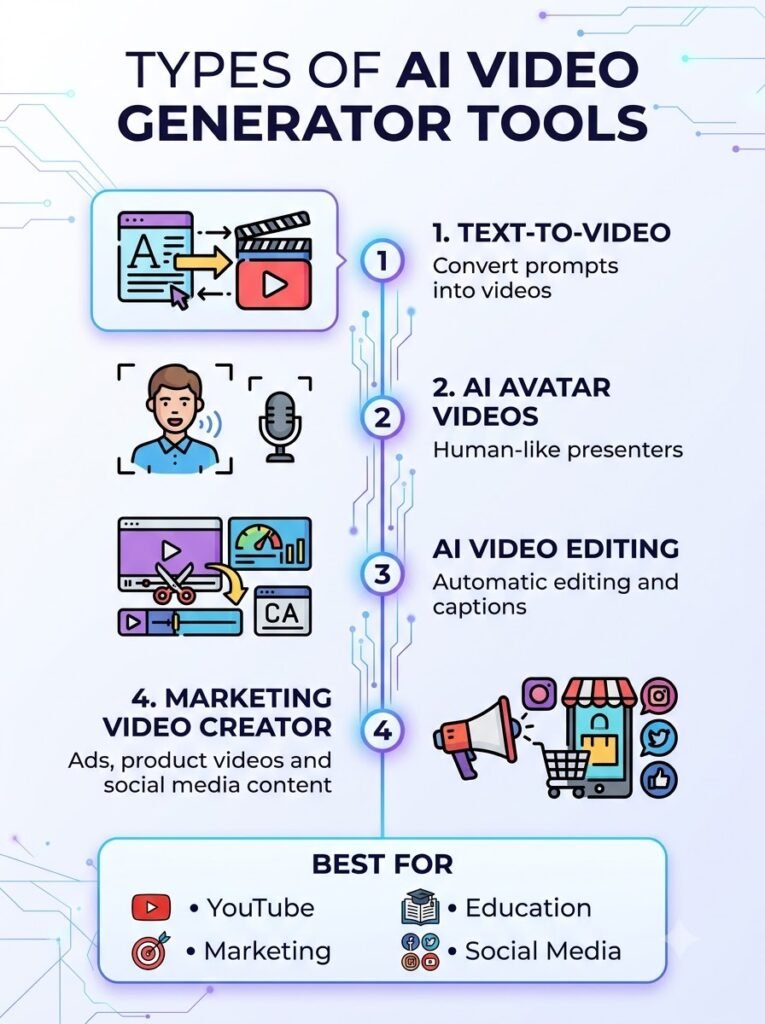
Types of AI Video Generator Tools
ಪ್ರತಿ AI Video Generator ಒಂದೇ ರೀತಿಯಲ್ಲಿ ಕೆಲಸ ಮಾಡುವುದಿಲ್ಲ.
ಮುಖ್ಯ categories ಇವು:
Text-to-Video
Article ಅಥವಾ prompt ನೀಡಿ complete AI video generate ಮಾಡುವುದು.
Examples:
- Pika
- Runway
- Luma AI
Pika — https://pika.art/
AI Avatar Video
Human presenter ಇಲ್ಲದೇ AI avatar video create ಮಾಡಬಹುದು.
Examples:
- Synthesia
- HeyGen
- Elai
Synthesia — https://www.synthesia.io
AI Video Editing
Existing video edit, enhance ಹಾಗೂ automate ಮಾಡುವುದು.
Examples:
- Descript
- Wisecut
- VEED
Marketing Video Generator
Ads, product demos ಹಾಗೂ promotional videos create ಮಾಡಲು.
Examples:
- InVideo AI
- Canva AI
- FlexClip
InVideo AI — https://invideo.io/
Key Features to Look for in an AI Video Generator
Before choosing an AI Video Generator, check these important features.
1. Video Quality
Look for:
- HD Output
- Full HD
- 4K Export
- Smooth animations
2. AI Avatars
Some platforms provide realistic AI presenters.
Useful for:
- Training videos
- Business presentations
- Educational content
- Product demonstrations
What Are AI Digital Humans? Technology, Business Uses and Future Explained
3. AI Voice Support
Modern tools include:
- Natural AI voices
- Multiple languages
- Voice cloning
- Emotion control
ElevenLabs — https://elevenlabs.io/
Best AI Voice Generators for YouTube, Podcasts and Business in 2026
4. Templates
Ready-made templates save significant editing time.
Ideal for:
- YouTube
- Instagram Reels
- Shorts
- TikTok
- Facebook Ads
5. Editing Tools
Choose platforms offering:
- Auto subtitles
- Background removal
- AI transitions
- Auto B-roll
- Scene detection
Who Should Use AI Video Generator Tools?
An AI Video Generator is useful for almost everyone creating digital content.
YouTubers
- Educational videos
- Explainer videos
- Faceless channels
Digital Marketers
- Facebook Ads
- Instagram Ads
- Product promotions
Businesses
- Corporate training
- Product demos
- Customer onboarding
Teachers
- Online lessons
- Educational presentations
Freelancers
- Client videos
- Social media content
- Marketing campaigns
Prompt Engineering Best Practices: 25 Techniques That Actually Improve AI Results
How to Choose the Right AI Video Generator
Ask yourself these questions:
- What type of videos do I create?
- Do I need AI avatars?
- Is multilingual support important?
- What’s my monthly budget?
- Do I need commercial licensing?
- Is YouTube my primary platform?
- Do I need team collaboration?
Answering these questions makes selecting the right AI Video Generator much easier.
What We’ll Compare in This Guide
In the next section, we’ll compare leading AI Video Generator platforms based on:
- Features
- Ease of use
- Video quality
- AI avatars
- Voice quality
- Pricing
- Commercial license
- Best use case
- Pros & Cons
ಈಗ 2026ರ best Video Generator platforms ಅನ್ನು detailed comparison ಮಾಡೋಣ.
1. InVideo AI
Best For
- YouTube Videos
- Marketing Videos
- Social Media Content
- Beginners
Key Features
- AI Script Generator
- Text-to-Video
- AI Voice-over
- Auto B-roll
- Stock Media Library
- Brand Kit
- Multiple Export Formats
Pros
- Beginner-friendly interface
- Fast video generation
- Huge template collection
- Excellent for YouTube creators
Cons
- Limited customization on lower plans
- Premium assets require paid subscription
Pricing
- Free Plan Available
- Paid Plans Available
Rating
⭐⭐⭐⭐⭐ (4.8/5)
2. Synthesia
Best For
- AI Avatar Videos
- Corporate Training
- Business Presentations
- HR & Learning
Key Features
- Realistic AI Avatars
- Multiple Languages
- AI Voice Cloning
- Screen Recording
- Team Collaboration
Pros
- High-quality avatars
- Excellent multilingual support
- Professional presentation videos
Cons
- Limited cinematic creativity
- Higher pricing for advanced plans
Pricing
Premium Subscription
Rating
⭐⭐⭐⭐⭐ (4.9/5)
3. HeyGen
Best For
- Marketing Videos
- Sales Videos
- Business Communication
- AI Presenters
Key Features
- AI Avatars
- Face Swap
- Instant Translation
- Voice Cloning
- Talking Photos
Pros
- Very realistic avatars
- Easy to use
- Fast rendering
- Excellent localization
Cons
- Premium features cost extra
- Limited free usage
Rating
⭐⭐⭐⭐⭐ (4.8/5)
4. Runway
Best For
- Cinematic Videos
- Creative Projects
- Filmmakers
- AI Visual Effects
Key Features
- Text-to-Video
- Image-to-Video
- Motion Brush
- AI Editing
- Object Removal
- Video Expansion
Pros
- Hollywood-level creativity
- Professional editing tools
- Excellent motion quality
Cons
- Learning curve
- Credit-based generation
Rating
⭐⭐⭐⭐⭐ (4.9/5)
5. Pika
Best For
- Short Videos
- Social Media
- Creative Animations
Key Features
- Text-to-Video
- Image Animation
- Style Effects
- Fast Rendering
Pros
- Very easy to use
- Fun creative effects
- Good free tier
Cons
- Short video duration
- Limited editing controls
Rating
⭐⭐⭐⭐☆ (4.6/5)
6. Luma AI Dream Machine
Best For
- Realistic AI Videos
- Product Visuals
- Creative Storytelling
Key Features
- Text-to-Video
- Image-to-Video
- Natural Camera Motion
- High Realism
Pros
- Excellent realism
- Natural movement
- Fast generation
Cons
- Limited editing features
- Credit limits
Rating
⭐⭐⭐⭐⭐ (4.8/5)
7. Descript
Best For
- Podcast Videos
- Tutorials
- Screen Recording
- YouTube Editing
Key Features
- Edit Video by Editing Text
- AI Voice
- Auto Captions
- Screen Recorder
- Studio Sound
Pros
- Perfect for creators
- Excellent subtitle generation
- Simple editing workflow
Cons
- Not designed for cinematic AI generation
Rating
⭐⭐⭐⭐⭐ (4.8/5)
8. Canva AI Video
Best For
- Small Businesses
- Marketing Teams
- Social Media Creators
Key Features
- Magic Media
- Drag-and-Drop Editing
- Brand Templates
- Stock Assets
Pros
- Beginner friendly
- Huge design ecosystem
- Fast editing
Cons
- Limited advanced AI generation
Rating
⭐⭐⭐⭐☆ (4.7/5)
AI Video Generator Comparison Table
| Tool | Best For | AI Avatar | Text-to-Video | Editing | Ease of Use |
|---|---|---|---|---|---|
| InVideo AI | YouTube | No | ✅ | ✅ | ⭐⭐⭐⭐⭐ |
| Synthesia | Business | ✅ | Limited | Basic | ⭐⭐⭐⭐⭐ |
| HeyGen | Marketing | ✅ | Limited | Basic | ⭐⭐⭐⭐⭐ |
| Runway | Filmmaking | No | ✅ | Advanced | ⭐⭐⭐⭐ |
| Pika | Short Videos | No | ✅ | Basic | ⭐⭐⭐⭐⭐ |
| Luma AI | Creative Videos | No | ✅ | Medium | ⭐⭐⭐⭐ |
| Descript | Podcast Editing | No | No | Advanced | ⭐⭐⭐⭐⭐ |
| Canva AI | Marketing | Limited | Basic | Medium | ⭐⭐⭐⭐⭐ |
Modern AI video tools now specialize in different use cases rather than trying to be a one-size-fits-all solution. Choosing the right platform depends on whether your priority is cinematic generation, AI avatars, editing, or marketing content.
Which AI Video Generator Is Best?
Best Overall
🏆 Runway
Excellent for creators needing professional cinematic AI videos.
Best for Beginners
🏆 InVideo AI
Simple interface with powerful automation.
Best AI Avatar Platform
🏆 Synthesia
Ideal for corporate presentations and training.
Best Marketing Videos
🏆 HeyGen
Perfect for sales, marketing and multilingual content.
Best Short Social Media Videos
🏆 Pika
Fast generation with creative visual effects.
Best Professional Editing
🏆 Descript
Excellent for YouTube creators and podcasters.
Best Budget-Friendly Option
🏆 Canva AI
Affordable and beginner-friendly.
How to Choose the Right AI Video Generator
Choose based on your primary goal.
If YouTube is your priority
Choose:
- InVideo AI
- Descript
- Runway
If Marketing is your priority
Choose:
- HeyGen
- Canva AI
- Synthesia
If Business Training is your priority
Choose:
- Synthesia
If Cinematic Videos are your priority
Choose:
- Runway
- Luma AI
- Pika
If Budget is limited
Choose tools with free plans first and upgrade only when your workflow grows.
Commercial License Considerations
Before using any Video Generator commercially, always check:
- Commercial usage rights
- Ownership of generated videos
- AI avatar licensing
- Music licensing
- Stock footage permissions
- Brand usage policies
Licensing terms vary significantly between platforms, so creators and businesses should review them before publishing monetized or client work.
Common Mistakes When Choosing an AI Video Generator
Many beginners make these mistakes:
- Choosing only based on price
- Ignoring commercial licensing
- Not checking export quality
- Selecting complex tools for simple tasks
- Ignoring AI voice quality
- Not testing the free version first
- Choosing one tool for every workflow
Affiliate Buying Guide
Best Video Generator ಆಯ್ಕೆ ಮಾಡುವಾಗ features ಮಾತ್ರ ನೋಡುವುದು ಸಾಕಾಗುವುದಿಲ್ಲ. ನಿಮ್ಮ workflow, budget ಹಾಗೂ content goalsಗೆ match ಆಗುವ platform ಆಯ್ಕೆ ಮಾಡುವುದು ಮುಖ್ಯ.
ಕೆಳಗಿನ checklist follow ಮಾಡಿದರೆ right Video Generator ಆಯ್ಕೆ ಮಾಡುವುದು ಸುಲಭ.
✅ Content Type
ಮೊದಲು ನಿಮ್ಮ primary content ಯಾವುದು ಎಂದು identify ಮಾಡಿ.
- YouTube Videos
- Shorts & Reels
- Marketing Ads
- Product Videos
- Online Courses
- Business Presentations
✅ Ease of Use
ನೀವು beginner ಆಗಿದ್ದರೆ simple interface ಇರುವ Video Generator tools ಆಯ್ಕೆ ಮಾಡಿ.
Advanced editorsಗೆ powerful customization ಇರುವ tools ಹೆಚ್ಚು suitable.
✅ AI Video Quality
Check for:
- HD Export
- Full HD
- 4K Support
- Realistic Motion
- Natural Lighting
- Smooth Camera Movement
Modern AI video models have improved significantly in realism and production quality, but different platforms still specialize in different workflows.
✅ AI Avatar Quality
Business videos create ಮಾಡುವವರು ನೋಡಬೇಕಾದ features:
- Human-like expressions
- Lip Sync Accuracy
- Multiple Languages
- Voice Synchronization
✅ AI Voice Support
Good platform should provide:
- Natural AI voices
- Voice cloning
- Multiple accents
- Emotion control
- Noise-free narration
✅ Commercial License
YouTube monetization ಅಥವಾ client projects ಮಾಡುವವರು always verify:
- Commercial Rights
- Copyright Policy
- Stock Media License
- Music License
- AI Avatar Usage Rights
✅ Pricing
Compare:
- Free Plan
- Monthly Subscription
- Annual Discount
- Credit System
- Enterprise Plans
✅ Customer Support
Professional creators should prefer platforms offering:
- Live Chat
- Knowledge Base
- Tutorials
- Community Forum
- Email Support
Which AI Video Generator Should You Buy?
For Beginners
✅ Canva AI
✅ InVideo AI
Simple interface with minimal learning curve.
For YouTubers
✅ InVideo AI
✅ Descript
Excellent for tutorials, explainers and faceless YouTube channels.
For Businesses
✅ Synthesia
Corporate training, HR onboarding and multilingual presentations.
For Digital Marketing Agencies
✅ HeyGen
AI avatars, localized marketing videos and client campaigns.
For Filmmakers
✅ Runway
✅ Luma AI
Professional-quality cinematic AI video generation with advanced creative controls.
For Budget Users
Choose platforms offering generous free plans before upgrading to premium subscriptions.
Future of AI Video Generator
AI video technology is evolving rapidly.
Future Video Generator platforms are expected to include:
- Longer AI-generated videos
- More realistic human avatars
- Real-time video generation
- Better character consistency
- Native multilingual dubbing
- Interactive video creation
- Improved editing automation
- Faster cloud rendering
Industry trends show that AI video creation is moving from experimental tools to mainstream production workflows for creators and businesses.
Best Tips Before Using an AI Video Generator
Follow these expert tips:
- Write a clear script before generating videos.
- Keep prompts detailed and specific.
- Use high-quality reference images when supported.
- Review AI output before publishing.
- Add your own branding and logo.
- Verify copyright permissions for assets.
- Export in the highest quality available.
- Test multiple tools before purchasing.
Frequently Asked Questions (FAQs)
1. What is an AI Video Generator?
An Video Generator is software that uses artificial intelligence to create videos from text, images or scripts with minimal manual editing.
2. Which AI Video Generator is best for YouTube?
For most YouTube creators, InVideo AI, Runway and Descript are among the strongest choices depending on whether your focus is automation, cinematic visuals or editing.
3. Which AI Video Generator is best for businesses?
Synthesia and HeyGen are excellent for training, sales, multilingual communication and corporate presentations.
4. Can beginners use AI Video Generator tools?
ಹೌದು. Canva AI, InVideo AI ಮತ್ತು Pika போன்ற platforms beginnersಗೂ easy interface ನೀಡುತ್ತವೆ.
5. Are AI-generated videos copyright free?
Platform policies differ. Commercial projects ಮಾಡುವ ಮೊದಲು licensing terms, stock media rights ಹಾಗೂ AI-generated content policies ಅನ್ನು verify ಮಾಡುವುದು ಉತ್ತಮ.
6. Do AI Video Generator tools support Indian languages?
ಹಲವು modern platforms Kannada ಸೇರಿದಂತೆ Indian languagesಗೆ subtitles, dubbing ಅಥವಾ AI voice support ನೀಡುತ್ತಿವೆ. Features platformಗೆ ಅನುಗುಣವಾಗಿ ಬದಲಾಗಬಹುದು.
Final Summary
ಈ complete guideನಲ್ಲಿ ನಾವು Video Generator ಬಗ್ಗೆ ಸಂಪೂರ್ಣ ಮಾಹಿತಿ ತಿಳಿದುಕೊಂಡಿದ್ದೇವೆ.
ನಾವು cover ಮಾಡಿದ topics:
- AI Video Generator ಎಂದರೇನು
- Different types of AI video tools
- Important features
- Top platforms comparison
- Pricing overview
- Pros & Cons
- Commercial licensing
- Buying guide
- Future trends
- FAQs
ಸರಿಯಾದ AI Video Generator ಆಯ್ಕೆ ಮಾಡಿದರೆ content creation speed, video quality ಹಾಗೂ overall productivity ಎರಡೂ improve ಆಗುತ್ತವೆ.
Conclusion
Video content demand ದಿನದಿಂದ ದಿನಕ್ಕೆ ಹೆಚ್ಚಾಗುತ್ತಿರುವ ಈ ಸಮಯದಲ್ಲಿ Video Generator tools creators, marketers ಹಾಗೂ businessesಗೆ powerful productivity partner ಆಗಿವೆ.
ನೀವು YouTube channel grow ಮಾಡುತ್ತಿದ್ದರೂ, client marketing videos create ಮಾಡುತ್ತಿದ್ದರೂ ಅಥವಾ business presentations automate ಮಾಡುತ್ತಿದ್ದರೂ, ನಿಮ್ಮ requirementಗೆ match ಆಗುವ Video Generator ಆಯ್ಕೆ ಮಾಡಿದರೆ time, cost ಹಾಗೂ effort ಅನ್ನು ಗಮನಾರ್ಹವಾಗಿ reduce ಮಾಡಬಹುದು.
ಆದರೆ ಯಾವುದೇ AI tool ಸಂಪೂರ್ಣ replacement ಅಲ್ಲ. Best resultsಗಾಗಿ AI-generated videos ಅನ್ನು human creativity, storytelling ಹಾಗೂ final editing ಜೊತೆಗೆ combine ಮಾಡುವುದು ಉತ್ತಮ approach ಆಗಿರುತ್ತದೆ. AI technology ವೇಗವಾಗಿ evolve ಆಗುತ್ತಿರುವುದರಿಂದ ಹೊಸ features ಮತ್ತು platforms ಅನ್ನು periodically evaluate ಮಾಡಿ ನಿಮ್ಮ workflow ಅನ್ನು update ಮಾಡುತ್ತಿರಬೇಕು.